Apple’s WWDC 2026 had a pretty clear priority list: clean up the software, talk about keeping kids safe, and finally deliver the new Siri.
And my first impression of that Siri? It’s about what I expected. No massive surprises. No dramatic letdowns, either. Apple seems to have picked a fairly conservative set of capabilities, demonstrated them extensively, and leaned into the one advantage other AI assistants don’t have: knowing what’s on your iPhone.
That makes for a less spectacular pitch than an AI agent buying concert tickets on your behalf. It might also make for something more useful day to day. Especially if you already live inside Apple’s ecosystem.
Key Takeaways
- Apple’s software updates emphasize performance, consistency, and overdue controls rather than another major visual overhaul.
- The new Siri prioritizes personal device context and relatively conservative actions over ambitious autonomous tasks.
- Third-party app integration remains the biggest unresolved test of Siri’s everyday usefulness.
- The most powerful on-device Siri model has hardware restrictions, but other supported iPhones still receive improvements.
Table of Contents
- iOS 27 and macOS Golden Gate: Fixing the Small Stuff
- Child Safety: Better Controls, Plus a Familiar Business Incentive
- The New Siri: Conversational, Connected, and Pretty Conservative
- Third-Party Apps Are the Big Question
- The On-Device Siri Hardware Limit Is Disappointing
- Apple Intelligence Beyond Siri
- Golden Gate Is a Pretty Appropriate Name
- Sponsor: Ridge’s Father’s Day Offer
iOS 27 and macOS Golden Gate: Fixing the Small Stuff
Before getting to AI, Apple moved pretty quickly through its operating system updates. Normally, that might feel disappointing. This time, I actually liked the emphasis.
Recent releases have brought big visual changes, particularly Liquid Glass, but some of the basics have felt a little sloppy. Battery life complaints, strange performance behavior, bugs, readability issues. A shiny interface doesn’t cancel those things out.
Across iOS 27, iPadOS 27, watchOS, tvOS, and the newly named macOS Golden Gate, the overall look stays roughly familiar. The pitch is that more of the things underneath it will work better.
- Performance: Faster app launches and smoother system animations.
- Search: More complete and thorough Spotlight indexing.
- Transfers: Apple advertises AirDrop transfers that are up to 80% faster.
- Visual consistency: Tweaked app icons, matching corner radiuses, and color returning to sidebar icons.
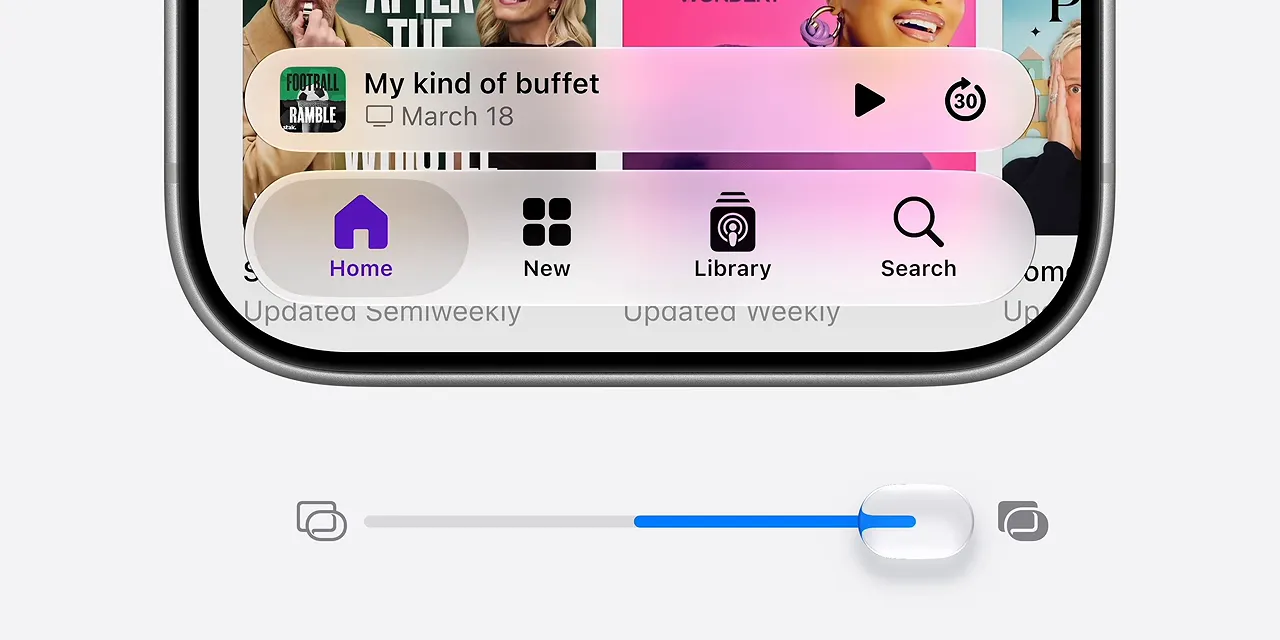
- Liquid Glass controls: A slider to adjust how transparent or tinted the interface appears.
Yes, that slider can apparently make Liquid Glass even clearer. I’m not sure who was asking for that particular direction, but having control is good.
The AirDrop number immediately caught my attention. Faster transfers sound great. Now please also make it work more consistently. That’s the kind of attention to detail that matters more than a slide full of features.
Two overdue additions I’m happy to take
Vision Pro will let you use your own panoramic photos as environments, rather than being limited to Apple’s supplied locations. Finally, your immersive backdrop can actually be somewhere you photographed.
And AirPods are getting custom EQ. That’s my personal favorite of the smaller announcements. Other earbuds have offered it for years, but being late doesn’t make it any less welcome.
Some of this feels like a grab bag of useful additions surrounding a much bigger AI announcement. Fine. If that’s how we get custom EQ and a more polished operating system, I’ll take it. The real test will be whether these improvements hold up in the betas, including the details that never made the keynote.
Child Safety: Better Controls, Plus a Familiar Business Incentive
The middle section focused on Trust and Safety, with a central argument: a child’s best device experience is on their own device, managed by a parent.
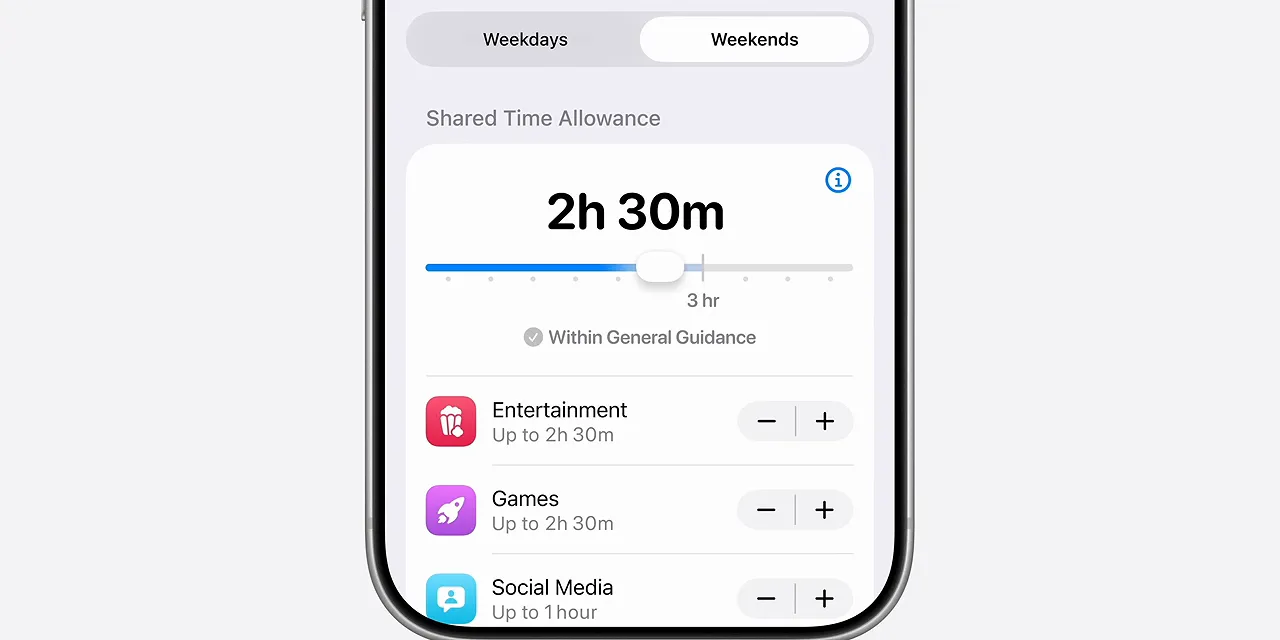
There are real benefits here. Dedicated child accounts give parents control over which apps kids can download, which websites they can visit, and who they can communicate with. More granular Screen Time tools also make it easier to understand how a day was spent and schedule different limits for different kinds of apps.
That distinction matters. A movie on the weekend and three hours of Instagram during school aren’t the same activity, even if both count as screen time. Better scheduling gives parents more room to treat them differently.
So the straightforward read is that these are useful safety features addressing legitimate concerns about content, apps, and communication.
The cynical read is: get your kid an iPhone.
Apple already has a strong position with young people in the US. Getting someone into the ecosystem early makes it more likely they’ll stay there as an adult. Excellent parental controls are good for families, but they’re also good for building the next generation of iPhone customers. Both things can be true.
The New Siri: Conversational, Connected, and Pretty Conservative
The new Siri starts with a different interaction. On iPhone, you can swipe down from the Dynamic Island or hold the power button while speaking. There’s a refreshed animation and a more expressive voice, followed by a conversational interface.
It can answer general questions using Apple’s broader knowledge capabilities, and it includes clickable sources when available. I tried opening those sources, and that part is nice. Being able to inspect where an answer came from is much better than just being handed an answer.
A new Siri app keeps conversation history synced across your iPhone, iPad, and Mac. It doesn’t preserve every tiny request. Instead, it saves the more substantial conversations it thinks you might return to.
There are already little quirks I want to investigate. For example, it wasn’t displaying the words I was saying as I spoke, only after I finished. That’s not a huge capability issue, but it affects how the interaction feels.
These are first impressions, not a full reliability verdict. And reliability is going to be the important part.
Apple’s advantage isn’t another chatbot
People already have ChatGPT, Gemini, and Claude. Apple doesn’t need to prove that conversational AI exists.
Its usual strategy when entering a category is to make the version that works best with the iPhone. That’s exactly the strategy here. Siri’s strongest differentiator is access to the personal context on your device.
The new Siri can look through messages, photos, and calendar information to answer questions. It can also act inside apps, including sending messages, creating calendar entries, and setting reminders.
Those are basic tasks. But basic tasks done correctly, with the right context, can be genuinely useful. In the setup Apple is presenting, competing assistants don’t have that same integrated access to your messages and Apple Calendar.
The emphasis is on using the personal information already on your device, rather than requiring you to copy it into a separate chatbot.
Adding an event is different from buying the tickets
At Google I/O, Gemini’s more ambitious agent demonstrations included the idea of turning a concert poster into a ticket purchase. That raises a whole set of questions for me. Will it choose the right date? The right seats? Will it spend too much? Will it invent something along the way?
Apple’s approach stops earlier. Put the event on the calendar. Do the lower-risk thing.
That’s less exciting, but I understand the choice. Apple played this pretty safely, and the number of live demonstrations felt deliberate. After the previous round of promises, skepticism is justified. Demonstrating working software is a much better response than adding another ambitious concept.
Siri can use your screen and camera, too
Personal context isn’t limited to stored information. Siri can also work with what’s on the screen, and Apple is putting an updated version of Visual Intelligence directly into a new mode in the Camera app.
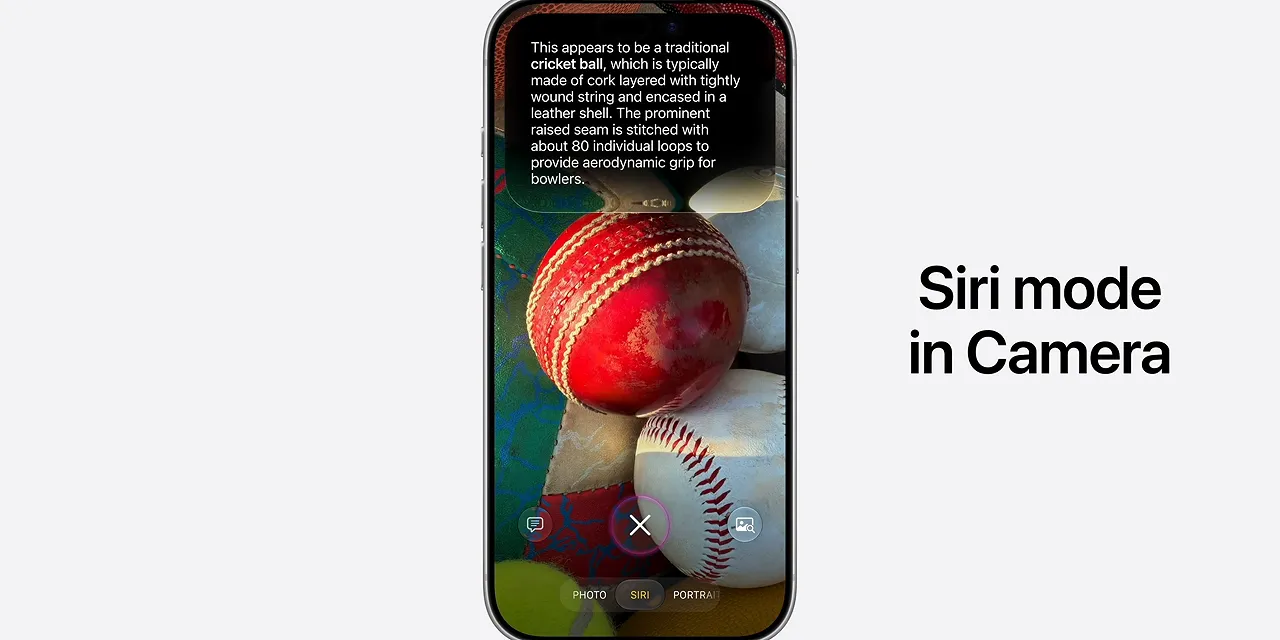
That should expose visual identification to a lot more people. Open the camera, point it at something, and ask about it. It’s also very easy to imagine why Apple would want to develop this interaction if it eventually made smart glasses. That’s a possible application, not a product announcement.
Third-Party Apps Are the Big Question
Of course Siri should understand an iMessage conversation and work with Apple Calendar. But what happens if my conversation is in WhatsApp? What if I use Google Calendar? What if my notes live somewhere other than Apple Notes?
That’s the biggest thing I still need to test.
My current understanding is that third-party support depends on developers enabling App Intents, along with the system understanding what kind of app it is. You can then explicitly ask Siri to use that app. What isn’t clear is whether it can become the default destination in the way I’d want.
Take a podcast recommendation. If Greg recommended a show in iMessage, you could ask Siri to find it and play it. By default, that points toward Apple Podcasts. But if you specify Spotify or Pocket Casts, Siri should be able to recognize a supported podcast player and perform the action there instead.
That sounds promising. It isn’t the same as proving that every third-party workflow will work.
- Can Siri create recurring, location-based tasks in TickTick instead of Apple Reminders?
- Can it retrieve information from WhatsApp group chats?
- How consistently does specifying an alternative app override the Apple-first path?
Those are still open questions. The difference between “supports third-party apps” and “works with the apps I actually use” can be pretty big.
The On-Device Siri Hardware Limit Is Disappointing
The most disappointing slide was the compatibility list for the most powerful on-device Siri model.
On iPhone, that list is limited to the iPhone Air and iPhone 17 Pro, tied to their 12GB of RAM. That’s a rough look when the iPhone 16 was marketed around Apple Intelligence and is already missing the top tier before this new experience arrives.
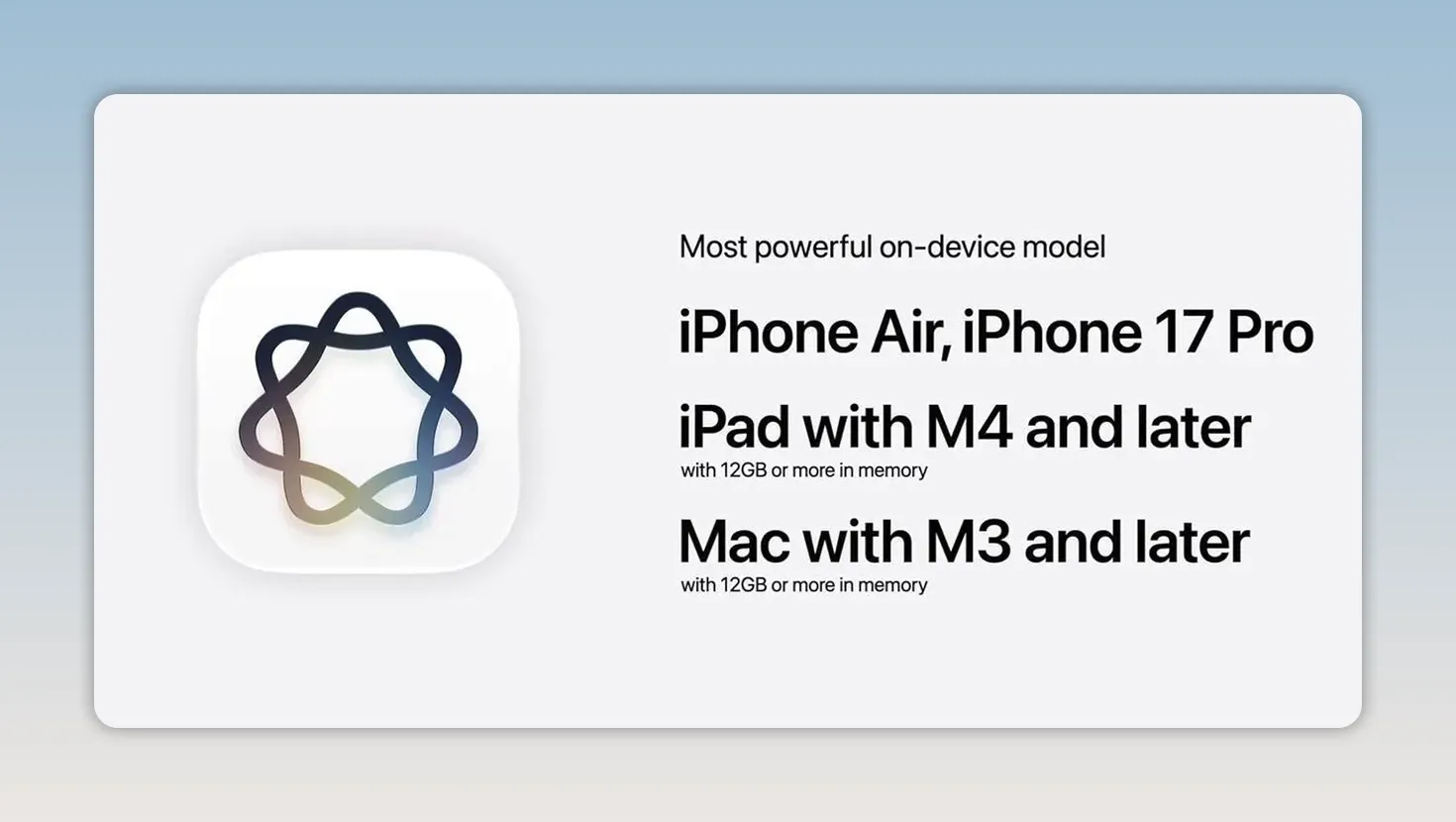
There is an important qualification, though. I’m told the differences between that most advanced model and the versions coming to other supported iPhones, such as the iPhone 16, are the new Siri voice and updated dictation features.
So don’t read this as “older supported iPhones get none of the new Siri.” The distinction is narrower than that, even if the hardware cutoff is still frustrating.
Vision Pro gets a clever Siri interaction
On Vision Pro, Siri becomes a floating orb in your space. To activate it, you look at it and start speaking. Eye tracking lets the system recognize the interaction.
That’s clever. You can ask about open windows or objects in the room around you. It reminds me of the real-world search interactions demonstrated on the Galaxy XR headset: identify something in your surroundings and ask about it without turning the whole process into a phone task.
Apple Intelligence Beyond Siri
Some of the more interesting AI additions aren’t really about talking to an assistant at all. They’re about removing the work involved in managing tabs, building automations, and sorting through notifications.
Safari organization and natural-language tools
Safari can automatically group open tabs by topic and keep them organized. If you’re someone whose tab bar has become a row of microscopic icons, that could be helpful.
You can also describe a Safari extension in natural language and have it built for you. That’s particularly interesting for very specific browser behaviors that might be too niche for an existing extension.
Even more useful to me is describing a Siri shortcut and having the system build it. You can then open the full editor and modify the result.
Describe it first, edit it afterward is a good accessibility improvement for automation. It lowers the barrier without removing the detailed controls. Google recently showed a similar approach for Home automations, and it makes sense here, too.
Apple Home gets less noisy
Instead of receiving a long stack of related Home alerts, you can get one consolidated notification that updates as things happen. Finally.
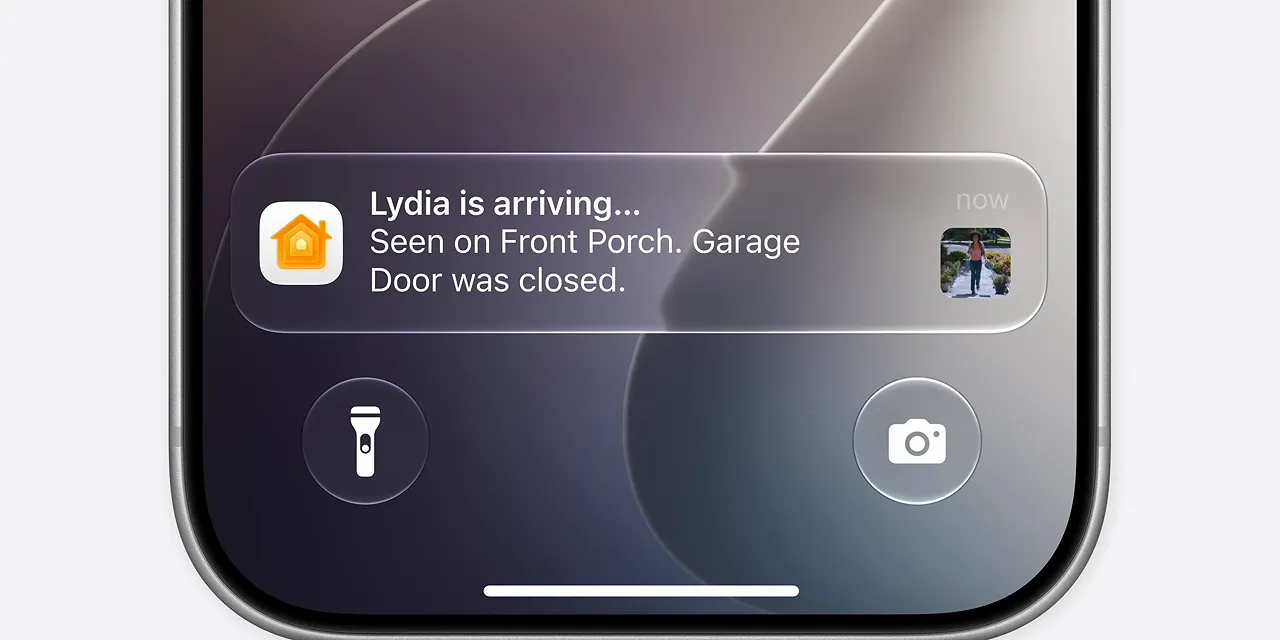
This is the sort of improvement that sounds small until you’ve dealt with 15 notifications describing one arrival. Apple is also adding the ability to search camera footage for events such as a package delivery, making it easier to find the useful clip.
Photos can extend images and change perspective
The new photo tools go beyond cleanup. You can extend an image’s outer edges by up to 25%, generating additional content around the original frame. The demonstrations I’ve seen looked good in multiple directions.
My immediate question is whether you can extend the finished result again. And again. How far does that go? I don’t know yet.
Then there’s spatial reframing, which uses inferred depth to change the perspective of an image and generate what should appear in the newly exposed background.
Technically, that’s impressive. It’s also about as close as Apple has come to stretching the definition of a photograph. You’re no longer just changing color or removing a distraction. You’re constructing a perspective the camera didn’t capture.
I’m not convinced this becomes something people use constantly. It might still be an impressive party trick. But if it works consistently, it is a pretty wild one.
Spatial reframing is also one of the features with limited daily usage because it relies on more powerful cloud models. More usage requires a higher iCloud subscription tier. That’s a distinction worth remembering alongside all the discussion of on-device AI.
Passwords can fix weak credentials for you
One of the most Apple-like features is in Passwords. Beyond identifying weak or compromised passwords, it can go to the relevant website, log in, navigate the account settings, replace the password with a stronger one, and save the new credential.
That’s a genuinely convenient use of an agent. It’s a tedious security task with an obvious desired result.
It also makes the Passwords app a little more central to your life, because it’s the app keeping track of those newly generated credentials. Helpful feature, stronger ecosystem attachment. Again, both things can be true.
Golden Gate Is a Pretty Appropriate Name
That might be the theme of the whole event. The walled garden is getting nicer, and Apple is giving people more reasons to stay inside it.
If you use iMessage, Apple Calendar, Safari, Passwords, and the rest of Apple’s services, a context-aware Siri could make that collection feel much more connected. If you mix platforms and third-party apps, the answer is less certain. That’s where I want to push the software hardest.
There was one especially strange omission: HomePod. No mention during the keynote. For a product that is essentially Siri attached to a nice speaker, that’s notable. It doesn’t answer what happens next for HomePod users. It just leaves the question sitting there.
And there was one interesting developer-tool detail near the end: tools for making apps resize dynamically across different aspect ratios. That certainly looks useful for a future foldable device. It’s a hint I noticed, not confirmation that Apple announced one.
Overall, WWDC 2026 was about right. The maintenance work is welcome. The new Siri is measured rather than mind-blowing. And the most important question isn’t whether Apple can produce a convincing demo. It’s whether these tools reliably work with the information, devices, and apps people already use.
Sponsor: Ridge’s Father’s Day Offer
Ridge is sponsoring this coverage with a Father’s Day sale offering up to 40% off through June 21. A few highlights are the 10,000mAh five-in-one Power Bank with MagSafe charging, an Apple Watch charging pad, USB-C and Lightning cables, and a kickstand; the Find My-compatible Tracker Card with an IP67 rating, wireless charging, and up to five months of battery life; and wallets ranging from oil-waxed Heritage leather to topographical designs inspired by Yosemite, Yellowstone, and the Great Smoky Mountains.
Ridge also offers a 99-day free return policy if something isn’t the right fit.
|


