I pulled out every iPhone generation from 1 to 17 and took the same picture with each one, back to back. Then I tried similar comparisons with other phones and different shooting conditions.
The surprising part wasn't how much smartphone cameras have improved. It was how often the newest phone didn't produce the photo I liked best.
That sounds backward. Bigger sensors, better hardware, more powerful processing, and somehow an older phone's picture looks more natural? But there's a reason for it. Making a camera better at handling terrible conditions isn't always the same as making every photo look better.
Key Takeaways
- Modern smartphone cameras show their biggest advantages in difficult conditions, not ordinary daylight.
- Aggressive HDR and exposure adjustments can reveal more detail while making photos look less natural.
- Better camera tuning means applying heavy processing only when the scene actually needs it.
Daylight Photos Got Good Enough
For years, improving smartphone cameras was pretty straightforward because they were bad.
The original iPhone had a tiny 2-megapixel camera that felt more like a webcam than a serious photography tool. No autofocus. No video recording. No selfie camera. Taking a decent picture was a bonus, not the whole point of the device.
As quick, high-quality photos and videos became more important, cameras became a legitimate reason to upgrade. A new phone could take noticeably better pictures than the one before it. Phones got bigger, camera hardware got bigger, and the improvements were obvious.
But there's a limit to how much phone you can carry in your pocket. Camera bumps can keep growing, but there isn't unlimited room for larger sensors and optics. Physics still applies.
So the dramatic improvements started getting less dramatic. Take the same daylight scene with an iPhone 11 and an iPhone 17, and the results look surprisingly similar.
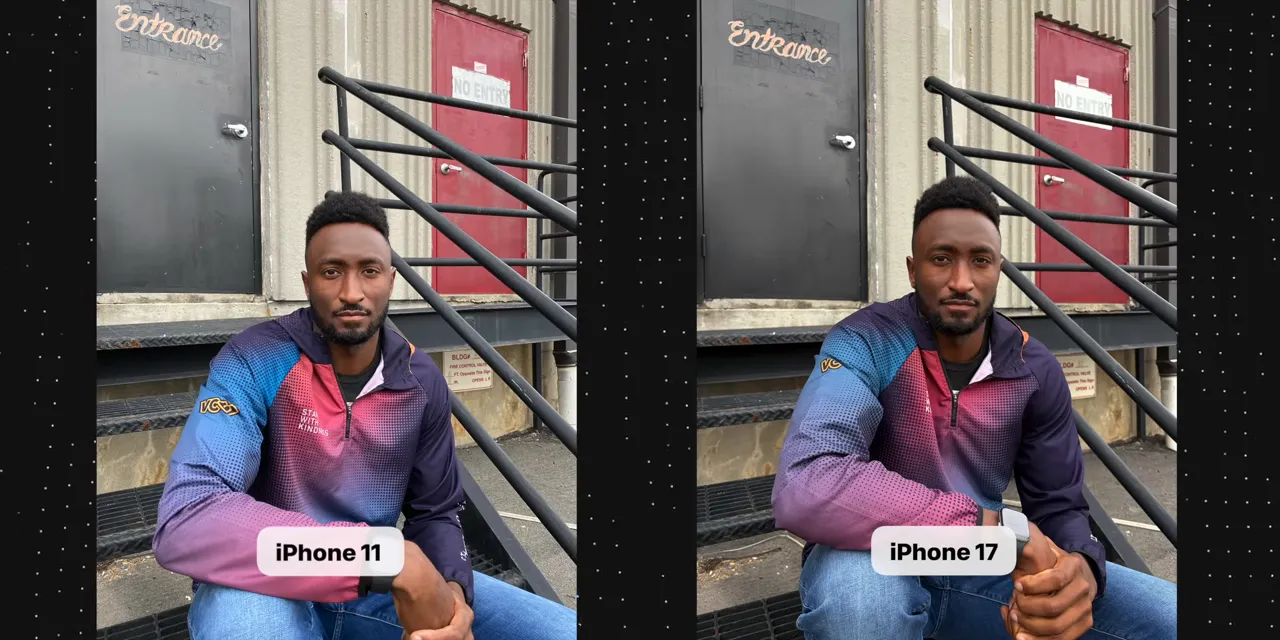
At a glance, you could almost mistake them for pictures from the same phone with slightly different contrast and saturation settings.
There are differences if you look closely. The iPhone 17's larger sensor helps produce a little more background blur, while more of the scene stays in focus in the iPhone 11 image. Zoom in, and other small differences become easier to spot.
But for most people, both pictures are fine. Basically any phone from the past five years can take a perfectly usable photo in broad daylight. In ideal conditions, taking a good picture isn't much of a differentiator anymore.
The Real Improvements Are in Difficult Conditions
Once ordinary daylight photos are good enough, the next challenge is everything around the edges:
- Low light: Getting a usable image when there isn't much light to work with.
- Fast-moving subjects: Capturing something that won't stay still.
- Deep zoom: Making distant subjects look good.
- Extreme backlighting: Preserving a subject and a much brighter background in the same picture.
These are the situations where the gap between a good and a bad smartphone camera can still be huge.
For example, I took a portrait with a Pixel 10 while sitting in front of a bright window. It looks like a fairly normal photo. You can see my face, the black hoodie I'm wearing, and the blue sky outside.

But that scene is almost entirely backlit. Getting all of those things into one usable picture is actually pretty wild.
The Pixel is doing a ton of computational photography: multi-frame HDR, tone mapping, exposure adjustments, and face detection. Multi-frame HDR combines information from multiple captures to retain bright and dark detail. Tone mapping helps fit that wide range of brightness into the final image. Face detection gives the camera another clue about what needs to remain visible.
For perspective, the Nexus 4's version of the same scene leaves me almost entirely in silhouette.

That's the problem modern smartphone cameras have become so good at solving. The difference isn't subtle.
It reminds me of the self-correcting basketball hoop built by Stuff Made Here. You throw the ball, the hoop moves, and somehow the shot goes in. A modern smartphone camera is trying to do the photography equivalent: whatever you point it at, it finds a way to give you a usable picture.
That's an incredible achievement. It's also where things start getting weird.
When Saving Every Photo Starts Hurting Normal Photos
My theory is that, in the pursuit of a camera that never misses, some phones have started making ordinary daylight pictures slightly worse.
You've probably seen the over-processed look. It's not always easy to describe, and some brands are more guilty of it than others. But the pattern seems pretty consistent: the more willing a camera is to use every trick available to rescue a difficult image, the more likely it is to apply those same tricks to an image that doesn't need rescuing.
Suddenly, a normal scene gets aggressive HDR, lifted shadows, and extra adjustments to the face. The camera reveals more, but the picture feels less natural.
More visible detail isn't automatically a better-looking photograph. Sometimes a shadow is supposed to look like a shadow. Sometimes a face shouldn't be as bright as the camera has decided to make it.
The Galaxy Comparison Shows the Trade-Off
I photographed the same scene across the Samsung Galaxy S lineup, from the original Galaxy S through the S26. And the progression makes this balancing act especially clear.
First, there's an obvious improvement around the Galaxy S8 and S9. In the S8 photo, the bright window behind me loses a lot of detail. With the introduction of multi-frame HDR on the S9, the blue sky becomes visible while the rest of the image is preserved.
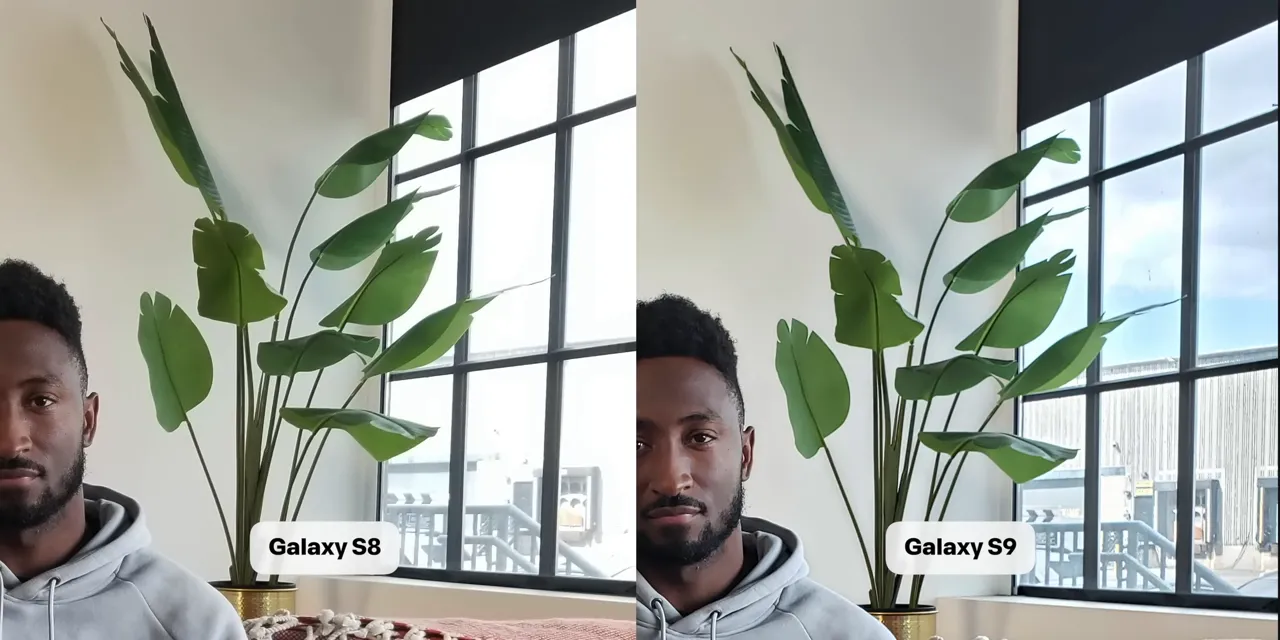
That's a useful improvement. The camera solves a real limitation, and the result is clearly more capable.
Then the sequence continues through the S10, S20, and later generations. Samsung jumped from S10 to S20 to align the naming with the year, so that isn't a missing decade of phones.
By the time I get to the S26 photo, though, I don't like the result as much anymore.
Yes, there's more detail outside the window, including the building and sky. Yes, there's more detail in my face. But there are also halos around the window and the nearby plant. My face looks brighter than it actually was. The picture has this unnatural glow and flatness.
Go back to the Galaxy S23, and I prefer it.

The S23 retains less shadow detail and applies less obvious HDR. But it also has less haloing and less of that artificially bright appearance. To me, it looks more natural.
And that wasn't just my reaction. Plenty of people responding to the full Galaxy camera comparison preferred an older result, too.
That doesn't prove the older camera is better in every situation. It shows that technical capability and aesthetic preference don't always move in the same direction.
The Best Processing Knows When to Back Off
I don't think the answer is to get rid of computational photography. The Pixel and Nexus comparison makes it pretty obvious why we want it.
The challenge is tuning.
Camera makers already know how to combine frames, adjust exposure, identify faces, and recover detail. They also know those techniques can look strange when pushed too far. The difficult part is deciding how much a particular scene needs.
- When the lighting is terrible: Turn up the processing and save the picture.
- When the scene already looks good: Back off and preserve what made it look good.
The goal shouldn't be maximum intervention in every image. It should be the right amount of intervention for that image.
You can see this processing happen on your own phone. Frame a picture, take it, and open the result. Often there's a short pause before the image snaps into its finished appearance.
Some phones take longer than others, but that change is the post-processing at work. In difficult conditions, the difference between the camera preview and the finished photo can be especially dramatic.
That transformation can be impressive. It can also be the moment when a picture you liked becomes a picture you like less.
What If You Prefer Less Processing?
If you prefer a more restrained look, alternative camera apps are worth trying. Halide and MotionCam offer alternative approaches to capture and processing that can help you explore results outside the default camera app.
Depending on the phone and app, reducing processing can be straightforward or a little more difficult. Completely removing it isn't always simple, so don't assume every device will give you the same level of control.
The broader generation comparisons are useful, too. The iPhone daylight comparison, iPhone low-light comparison, and Google phone comparison show how much the result depends on the conditions, not just the age of the camera.
That's really the point. Smartphone cameras have become dramatically better at handling scenes that used to be nearly impossible. But if I prefer the iPhone 11's more natural color in one scene, or the Galaxy S23's rendering over the S26's in another, there's still tuning left to do.
The newest camera doesn't necessarily make the nicest photo. Sometimes the next improvement isn't doing more. It's knowing when to do less.


