The question almost everyone has asked me about the Fitbit Air is really the same question: Is this as good as a Whoop, but cheaper?
I get it. A lot of my Ultimate Frisbee teammates wear Whoops. The appeal is obvious: a lightweight, screenless sensor that stays out of the way while collecting data around the clock. The less appealing part is paying a subscription every year just to keep it useful.
Then along comes a $99 Fitbit with essentially the same idea, except it actually works without a subscription. That gets people interested pretty quickly.
So I spent almost two weeks wearing the Fitbit Air, a Whoop 5.0, and an Apple Watch Series 11 through practices, games, workouts, recovery, and sleep. Yes, I became the guy wearing three fitness trackers at once. Someone had to do it.
The answer is more interesting than “Whoop, but cheaper.” Fitbit wins some important categories outright. Whoop still does things Fitbit doesn’t. And there is a pretty clear difference between collecting health data and getting something useful out of it.
Disclosure: Google provided the Fitbit Air for review. Pricing, features, and software limitations described here reflect my testing period.
Quick Summary
- Fitbit Air provides basic tracking without a subscription, while Whoop requires an ongoing membership.
- Fitbit offers cleaner workout summaries, while Whoop provides deeper recovery analysis and personalization.
- Heart-rate readings were broadly comparable, but calorie estimates varied substantially across the three devices.
- Fitbit suits basic tracking needs; committed Whoop users still have reasons to keep its advanced tools.
Table of Contents
- Price: Fitbit Wins Before You Even Start Training
- Design: A Smaller Tracker vs. a Bigger Accessory Ecosystem
- The App Experience: Fitbit Is Cleaner, Whoop Goes Deeper
- The Numbers: Similar Heart Rates, Very Different Calorie Estimates
- Strain vs. Cardio Load: Different Scores, Similar Purpose
- Battery Life, Charging, and the Little Things
- So, Is Fitbit Air Actually a Whoop Killer?
Price: Fitbit Wins Before You Even Start Training
Whoop’s hardware is included with its membership, but that membership is the product. At the pricing I tested, it starts at $200 a year and goes up to $350 a year. Stop paying, and the tracker stops being useful. There is no basic, subscription-free mode to fall back on.
I really hope competition changes that.
The Fitbit Air costs $99, and the core tracking works without an ongoing payment. That includes heart rate, steps, estimated calories burned, sleep tracking, and basic fitness tracking.
If you want the full experience, including the AI fitness coach and a large workout library, Google Health Premium costs $100 a year. Launch offers included promotions such as three free months, but the important difference isn’t the trial. It’s what happens afterward.
- Whoop: Pay at least $200 every year to keep using it.
- Fitbit Air without Premium: Pay $99 for the tracker and keep the basic tracking functionality.
- Fitbit Air with Premium: Pay for the hardware, then $100 a year for the additional features.
That is a straightforward price win for Fitbit, especially if all you want is a discreet tracker for the basics.
There is another consideration, though: this is still a Google product. Google’s broader business revolves heavily around data and advertising, so I’m not treating the low entry price as the only part of the equation. That isn’t proof of any specific use of your fitness information, but it is a reason to understand what you’re sharing and review the relevant privacy policy. Health data deserves some thought before you hand it over.
Design: A Smaller Tracker vs. a Bigger Accessory Ecosystem
Both devices are small, water-resistant plastic sensor modules with optical heart-rate sensors underneath. Neither has a screen. The whole point is to collect information without becoming another display demanding your attention.
I actually prefer the Fitbit’s form factor. Its longer, narrower oval is a little smaller and lighter than the Whoop, and the thinner band is less noticeable on the wrist.
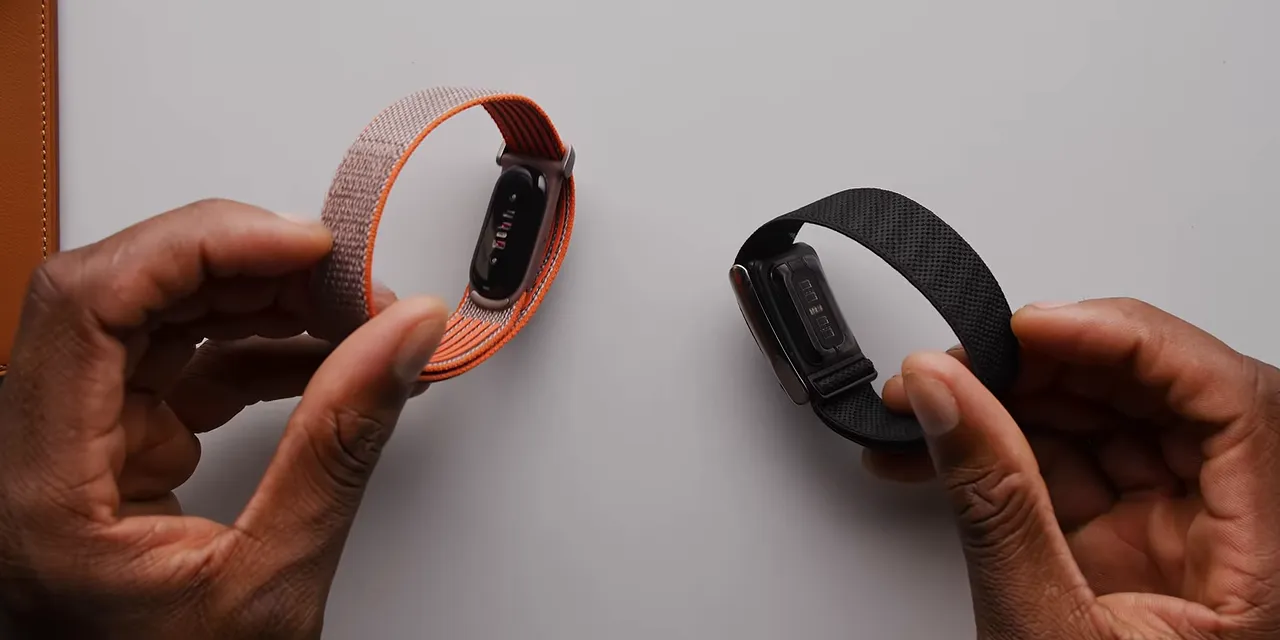
The Fitbit’s Velcro adjustment is also easier to work with than Whoop’s clasp. Whoop feels a little more secure, but changing the fit takes more effort. With the Fitbit, you can also push the tracker out of its holder and move it into another band with very little fuss.
Whoop’s advantage is everything around the tracker. It has had years to build an accessory ecosystem: wristbands, bicep straps, chest straps, and clothing with places to tuck the sensor. There is literally Whoop underwear.
Fitbit Air had wristbands and nothing else during my testing. That’s fine for me, but it matters if wearing something on your wrist doesn’t work for your sport or routine. I wouldn’t be surprised to see more third-party options eventually, but I’m judging what exists, not what might appear.
Which Fitbit Air band would I use?
There are three main band styles, and they serve slightly different purposes:
- Performance Loop: A knitted fabric band that is comfortable for everyday use and sleep.
- Active band: The rubber option, which makes more sense for particularly sweaty workouts.
- Elevated Modern band: The dressier choice for keeping the tracker understated with less athletic clothing.
I spent most of my time wearing the Steph Curry Special Edition, a version of the Performance Loop. The fabric reminds me of the Apple Watch Trail Loop. It was comfortable, stayed secure, and never caused a problem during workouts or sleep.
But I somehow stained it within the first two weeks. No idea when. No idea how. That’s a bummer for the band I most wanted to wear all day.
It also gets damp when you sweat a lot, which is why I’d lean toward the Active band for heavy training. For dressing things up, the Elevated Modern band makes the most sense. A screenless tracker should be easy to wear alongside an actual watch without making both wrists look like a sports lab.
The App Experience: Fitbit Is Cleaner, Whoop Goes Deeper
My baseline for all of this is years of using an Apple Watch. I play Ultimate at a high level on club and professional teams, which means practices, games, strength workouts, cardio training, and recovery. I track pretty much everything.
But I’m not locked into the Apple Watch. If another device gives me better data or a more useful, personalized experience, I’m open to switching. This comparison was as much for my own curiosity as anyone else’s.
Fitbit’s AI coach is central to the experience
The Fitbit Air connects to Google Health, the app previously called Fitbit. Why keep Fitbit on the hardware but remove it from the app name? Your guess is as good as mine.
The app itself is pretty good. With Premium, setup includes talking to an AI coach about what you want to accomplish. It uses those goals to build a starting plan, then keeps bringing new information into the daily recommendations.
That can include the previous night’s sleep and the day’s weather, such as whether it will be especially hot or cold during a workout. The blue AI Coach button is always easy to find, and you can ask questions or update your plan as you go.
I tried a few tricky questions to see where it would fall apart. Generally, it held up well. It provided sources when discussing outside information, and when pushed toward extreme weight-loss or dramatic lifestyle changes, it brought the conversation back to sustainability.
Good. A plan you can actually maintain is much more useful than an impressive-sounding plan you abandon immediately.
I already have a human trainer who programs my workouts throughout the year. He knows my goals, team schedules, lifting availability, how I’m feeling, and whether we need to work around an injury. Not everyone has access to that. The idea behind the AI coach is to make some of that personalized, responsive planning more accessible. That’s the ambition, not a claim that it has replaced my trainer.
Whoop has more ways to interpret your data
Fitbit’s interface is cleaner and prettier. Whoop’s is denser, but it’s denser for a reason.
During a workout, for example, Whoop can show a live heart-rate graph alongside the other metrics. Fitbit’s live display is more stripped down.
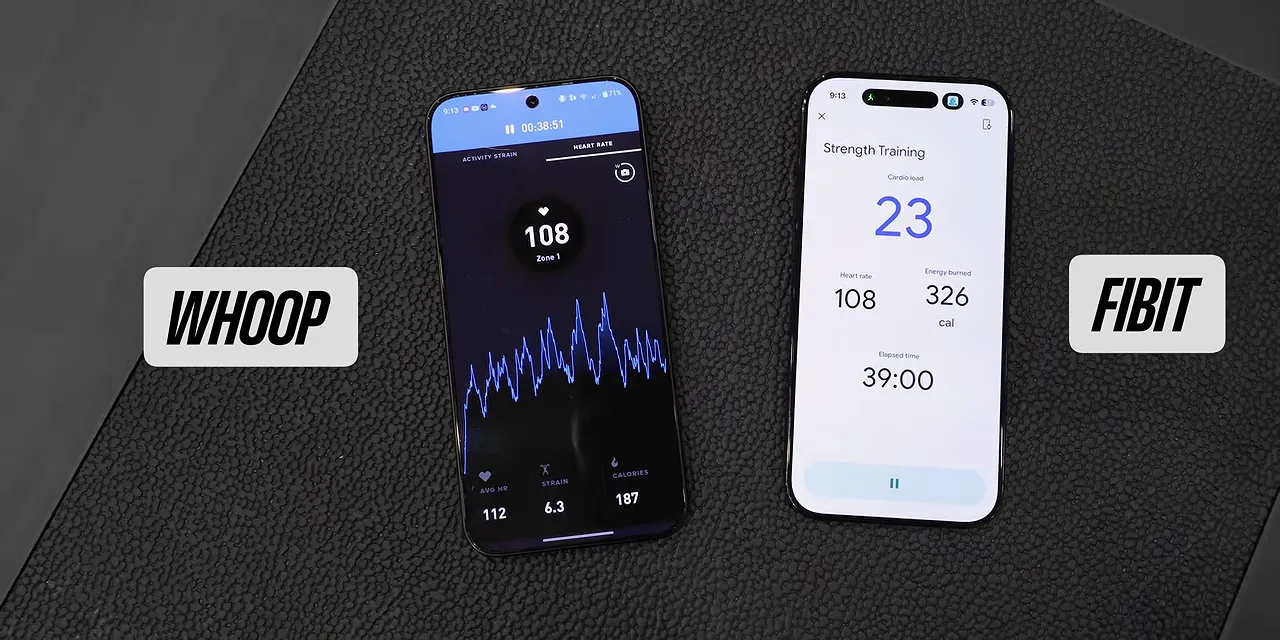
Whoop also offers a broader set of tools for exploring what the numbers mean:
- A daily stress monitor.
- A personalized recovery score.
- A built-in journal for finding patterns between habits and changes in your metrics.
- An advanced labs feature for uploading blood-test results and exploring biomarkers over time.
- An AI assistant for questions about workouts and health metrics.
The AI assistant is less prominent than Fitbit’s coach, but it’s there. Overall, Whoop gives you more ways to dig into the information coming off the sensor.
For the experiences I’m comparing here, Apple Watch feels like the simplest starting point, Fitbit sits in the middle, and Whoop is the more advanced option. That isn’t a ranking of every capability these platforms have. It’s how their default approaches to daily fitness tracking feel: the more you know what you’re looking for, the more you can get out of Whoop.
The Numbers: Similar Heart Rates, Very Different Calorie Estimates
Of course, none of the presentation matters if the underlying measurements aren’t useful.
There’s an important wrinkle before comparing results: these trackers need time to learn your baseline.
- Fitbit Air: Roughly seven days of regular wear to establish its initial personalized baseline.
- Whoop: Four days for personalized recovery, seven days for Health Monitor, 21 days for Healthspan, and about 30 days for full calibration.
- Apple Watch: For the basic rings-and-workout experience I’m using as a reference, you can set it up and get going without the same staged onboarding.
My test lasted less than Whoop’s full calibration window, so that matters when interpreting the personalized features. I still wore all three through my normal routine to compare their readings.
For me, consistency is a huge part of usefulness. If a tracker reads a little high every time, I can learn what its numbers mean for me. If it swings unpredictably between high and low, it’s much harder to use for training decisions.
Steady-state indoor cycling
For a Zone 2 indoor bike workout, all three tracked heart rate throughout, but their summaries weren’t identical:
- Apple Watch: 367 calories and an average heart rate of 136 BPM.
- Whoop: 310 calories, an average of 132 BPM, a peak of 145 BPM, and 8.9 strain.
- Fitbit Air: 324 calories, an average of 122 BPM, a peak of 143 BPM, and 34 cardio load.
Even in this relatively steady session, similar peak readings didn’t mean identical averages. Fitbit and Whoop’s calorie estimates were closer to each other than to the Apple Watch’s.
HIIT and tempo runs
The tempo-run workout produced a much bigger calorie gap:
- Apple Watch: 461 calories and an average heart rate of 125 BPM.
- Whoop: 317 calories, an average of 118 BPM, and a peak of 171 BPM.
- Fitbit Air: 445 calories, an average of 125 BPM, and a peak of 171 BPM.
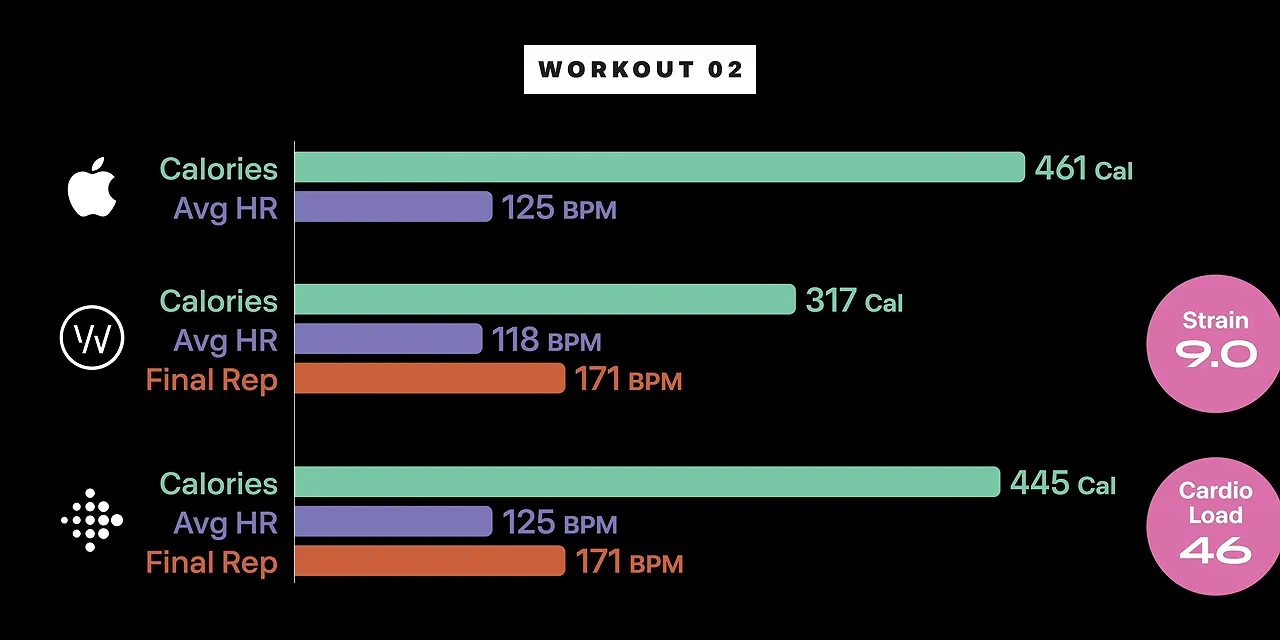
That’s roughly a 45% difference between Whoop and Apple Watch’s calorie estimates, despite much smaller differences in heart rate. Calories are clearly not a number you can move casually between these platforms and expect to mean the same thing.
A four-hour Ultimate practice
I left Fitbit’s automatic tracking to detect a four-hour practice. During its calibration period, it split that practice into two workouts, possibly because a rest break brought my heart rate down. I combined the two entries for the comparison.
The Apple Watch reported 2,959 calories and an average heart rate of 139 BPM. Fitbit reported 1,794 calories and an average of 141 BPM. Again: very similar average heart rates, wildly different calorie totals.
The Apple Watch also recorded 6.1 miles because it has GPS. Neither of these screenless trackers has onboard GPS. Distance isn’t essential for most of my workouts, but it could be important for yours.
Across my testing, the Apple Watch consistently gave the highest calorie estimates, which struck me as overcounting. But this wasn’t a lab test with an independent reference for actual energy expenditure, so the comparison alone can’t establish which estimate is correct.
My broader takeaway was that Fitbit’s heart-rate readings were generally in the same neighborhood as Whoop’s. Fitbit usually estimated somewhat more calories, though individual workouts could produce much larger gaps. The biggest everyday difference was how each platform interpreted and presented the data.
Strain vs. Cardio Load: Different Scores, Similar Purpose
If you use Whoop, you’re probably used to checking strain and recovery percentage. Fitbit doesn’t reproduce that exact framework.
Whoop strain runs from 0 to 21 and is personalized using your history and health data. It’s the headline number for how much work you’ve done.
Fitbit’s headline effort metric is cardio load. It doesn’t appear to have the same fixed cap, and it reflects how far your heart rate rises above its normal level and how long it stays elevated. Once the system learns your baseline, the coach can set a weekly cardio-load target.
The learning period can look funny. During my first week, Fitbit gave one Frisbee practice a cardio load of 327 when my goal for the entire week was 150. Okay, then. It adjusted later as it learned more about my routine.
Once calibrated, cardio load serves a similar practical purpose to strain: a quick number for checking how much work you’re accumulating. The scales aren’t interchangeable, so a Whoop user switching to Fitbit will need to learn a new reference point.
I also prefer Fitbit’s workout summary pages. The AI summary is right at the top rather than tucked behind another tap, and the heart-rate timeline is especially useful for interval workouts. Of these three, Fitbit has my favorite workout summary presentation. It’s excellent.
Battery Life, Charging, and the Little Things
Whoop lasts longer, but Fitbit charges faster
Fitbit Air is rated for seven days of battery life. In my use, it was closer to five or six. Whoop lasted more like seven or eight days.
Fitbit includes a roughly three-foot charging cable with USB-C on one end and magnetic charging pins on the other. You take the tracker off to charge it. A full charge takes about 90 minutes, while five minutes provides about a day of use. That quick top-up is genuinely convenient before a workout or heading out.
Whoop approaches charging differently. You charge a separate puck over USB-C, then slide it onto the tracker’s rails. It charges the Whoop inductively while you keep wearing both.
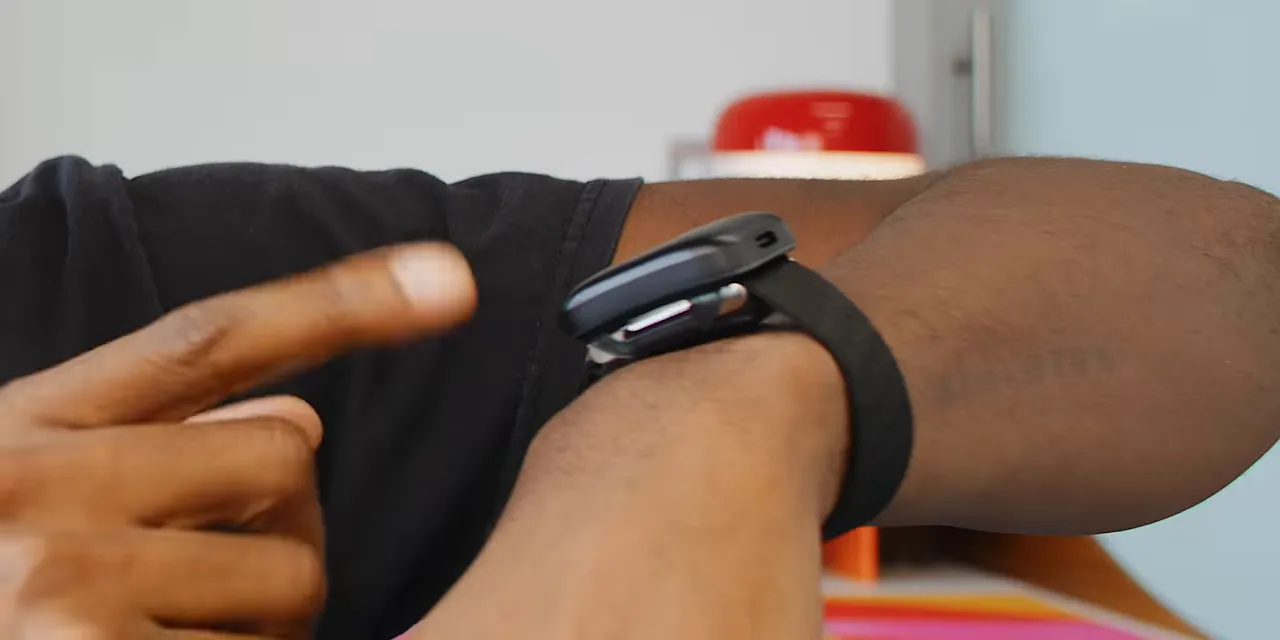
It’s slower, and now there’s a warm little wireless charger on your wrist. But if uninterrupted data is the priority, you don’t have to remove the tracker.
Personally, I’m fine charging these while I shower. I don’t wear them in the shower anyway. Missing that slice of data is a trade I can live with.
Both have silent alarms
Neither tracker shows the time or delivers phone notifications, but both have a haptic motor for a wrist-tapping alarm. You can dismiss either with a double tap.
Whoop’s vibration feels a little rattlier. Fitbit’s feels cleaner. Small difference, but it’s something you notice when it’s waking you up.
Phone compatibility and health-data integrations
Both trackers work with Android phones and iPhones. Whoop also has an iPad app. I don’t think it’s a particularly good iPad app, but it beats not having one, which is where Google Health stood during my testing.
One Google Health detail I appreciate is how it can use data from more specialized devices. For example, it can prioritize sleep information from an Eight Sleep or a run recorded by a Garmin with GPS and more detailed running metrics, rather than relying only on Fitbit’s version of that activity.
You can also check the source of the information you’re seeing. That’s useful when several devices are contributing to the same health record.
There is an important Apple Health limitation: during my testing, Fitbit could read from Apple Health but couldn’t write data back to it. That was supposedly coming in a software update. Supposedly. I wouldn’t make a purchase assuming an unfinished integration is already solved.
So, Is Fitbit Air Actually a Whoop Killer?
For someone paying Whoop prices mainly to track the basics, yes, Fitbit Air makes a very strong case. Heart rate, sleep, steps, calories, and workouts are included with the hardware. You own a useful tracker, not a sensor that becomes useless when you cancel a membership.
For someone deeply invested in Whoop’s recovery tools, journaling, personalization, and dense analysis, it’s more complicated. Fitbit is an alternative, not a complete replacement.
After wearing all three, I think there’s room for each approach:
- Use your smartwatch if you’re getting started. If you already have one, its built-in fitness tracking is the easiest place to begin. Close your rings, get your steps, record your workouts, and build the habit.
- Choose Fitbit Air if you want more focused tracking without a mandatory subscription. It’s comfortable, discreet, relatively inexpensive, and presents workouts really well. Premium adds coaching without reaching Whoop’s annual starting price.
- Stay with Whoop if you actively use its deeper tools. People optimizing training and recovery through all that personalization still have reasons to keep it, even with a subscription model I really dislike.
And Google remains part of the Fitbit decision. A lower price doesn’t remove the need to think about which company you trust with this much personal information.
As for me, I haven’t completely picked a side. I still want notifications on my wrist, but I also want the extra training data. Wearing three trackers made their differences clearer. It did not magically make me stop wanting features from more than one of them.
That’s the truth about the “Whoop killer”: Fitbit Air doesn’t need to beat every Whoop feature to make Whoop’s subscription a much harder sell.


