Google called its pre-I/O Android Show the biggest set of Android updates ever. That is a very high bar.
The announcements cover Android 17, a redesigned Android Auto, and a new generation of laptops called Googlebooks. Not to be confused with Google Books. Because apparently Google’s product names weren’t complicated enough.
There are some genuinely useful ideas here. There are also some features that look less impressive once you stop and think about the details. And the thing doing most of the heavy lifting behind that “biggest ever” claim? Gemini.
My early take is pretty simple: the smaller conveniences look the most compelling. The bigger AI promises still need to prove themselves.
Key Takeaways
- Android 17’s practical additions look more immediately compelling than its biggest AI promises.
- Agentic purchases need clear confirmation steps before they can earn trust.
- AI-generated widgets could make Android’s customization more accessible through natural language.
- Android Auto and Googlebooks offer promising interfaces that still need hands-on testing.
Android 17: Useful Additions, Not a Visual Reinvention
Android updates have become increasingly incremental, so I was curious what Google thought would make this one such a big deal. Android 17 isn’t a sweeping visual redesign. It’s a collection of new features, with a substantial helping of AI on top.
The Gemini interface does get a new look. It’s a little sparklier, with an effect that briefly blurs the edges before sharpening up. But Google labels that interface as a concept that’s subject to change, so I wouldn’t get too attached to the exact appearance yet.
Autofill Gets More Context
The expanded autofill is one of the most straightforwardly useful announcements.
Today, autofill can handle the usual information: your name, address, and phone number. The new version can also pull information from connected Google services, including Gmail, Wallet, and Photos.
Say you’re filling out a travel form and it asks for your passport number. If you have a picture of your passport in Google Photos, autofill can extract the number and put it into the form. You don’t have to switch apps, hunt down the photo, remember the number, and switch back.
That’s not the flashiest demo. But removing that little back-and-forth is exactly the kind of improvement you can appreciate in everyday use.
Built-In Creator Tools
Android is also getting more creator-focused tools, including expanded image-processing compatibility intended to bring results closer to what we see from iPhones.
Another addition lets you cut yourself out and speak over whatever is on your screen. It’s the familiar commentary format that’s become popular on Instagram and TikTok, except the capability is being built directly into Android.
Again, this is a practical convenience. A popular thing people already do becomes easier to do.
Smart Enhance: Brighter Doesn’t Automatically Mean Better
Then there’s Smart Enhance, which Google pitched as a way to bring out impressive detail and clarity in photos and video.
The example did not sell me on that idea.

Yes, the enhanced image is brighter. Yes, there appears to be more visible detail in the shadows, and possibly the highlights. And people often prefer a brighter image when two versions are placed next to each other.
But to my eyes, this processing makes the picture look worse. It lifts so much of the scene that it loses the contrast and shadows that gave it character. You end up with a flatter image, even if more individual details are technically visible.
Recovering detail and making a better photograph are not the same thing. That’s the larger issue I explored in my smartphone camera processing breakdown, and this example gets right to the heart of it.
Pause Point Adds Friction Before You Open an App
Pause Point is a more interesting twist on digital wellbeing.
Traditional app limits work after you’ve spent a certain amount of time somewhere. You hit the limit, the app kicks you out, and then you decide whether to bypass it.
Pause Point puts the interruption at the beginning. When you open a selected app, it briefly asks you to consider whether that’s actually how you want to spend your time.
It can offer a few different prompts:
- A breathing exercise before you continue.
- Suggestions for other apps to open instead.
- Custom photos that remind you there are things to do outside your phone.
- A reminder of how much time you’ve already spent in that app today.
Your phone essentially showing you photos as a reminder to go touch grass is pretty funny. I don’t know whether this will work better than existing screen-time tools, but it’s a different approach. Credit for trying something beyond another timer.
Rambler, Emojis, and Availability
There are expanded emoji options, plus improved speech-to-text called Rambler. I’m not sure why that needed its own name, but the functionality sounds useful.
Rather than simply writing down every sound you make, it removes filler words like “um” and “uh” and organizes the result into a more coherent thought. The goal is cleaner dictation without all the manual cleanup afterward.
Exact release dates for every feature weren’t provided. Google said the announced features would arrive first on Samsung Galaxy and Google Pixel phones later that summer. That’s a familiar rollout pattern, but it still leaves the individual timing to be confirmed.
Gemini Intelligence: A New Name, Bigger Promises
Google is grouping a lot of the AI announcements under the name Gemini Intelligence, describing it as a new intelligence system.
Giving a collection of updates to an existing product a whole new name is becoming a very Google thing to do. Still, the underlying idea is clear: Gemini uses context from your device and connected Google services to help you, and it can take actions on your behalf when asked.
That last part is what “agentic” means here. It doesn’t just give you information. It goes and does something.
And that’s where my enthusiasm starts coming with a lot more questions.
Would You Trust AI to Buy Concert Tickets?
One promotional example starts with someone photographing a concert poster and texting a friend about going. After they agree, Gemini offers a button to book two floor seats.
Press it, and the interface moves from buying the tickets to confirming the purchase. Done.
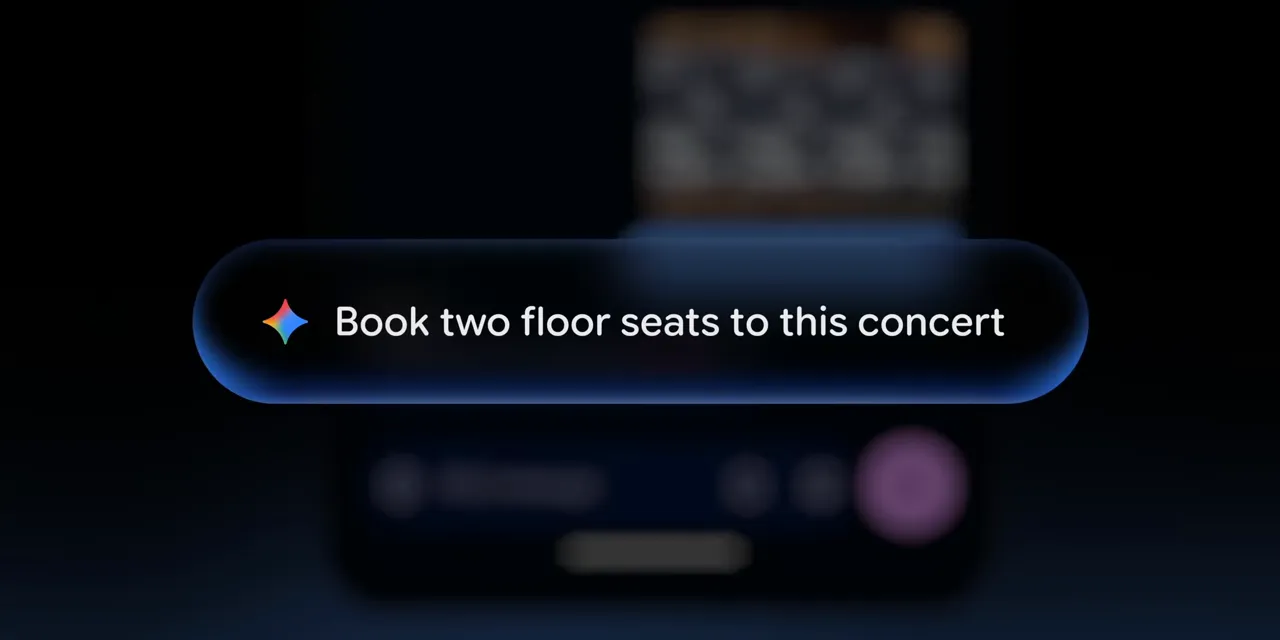
Really? That’s the whole process?
I understand what the ad is trying to communicate. It’s a relatable task with an annoying amount of friction, and AI makes it look effortless. Vacation-planning demos do the same thing: ask for an itinerary, receive a plan, and apparently just follow it.
But I’ve seen generative AI get enough things wrong that I don’t want to blindly hand it a purchase. Buying the right tickets means getting all the important details right:
- The correct concert date.
- The correct venue and location.
- The seats or floor access I actually want.
- A price I’m willing to pay.
I asked about this publicly, and the replies were overwhelmingly skeptical too. That’s not a scientific survey, but it was a pretty clear indication that I wasn’t alone in wanting more control.
Dieter Bohn from Google responded that the actual checkout process should include more steps than the promotion showed. The short version couldn’t fit the full process.
That distinction matters. If I can confirm the date, verify the venue, review the seats, and approve the price, then we’re talking about something much more reasonable. It could let me complete the same task without navigating the Ticketmaster website. Honestly, that’s still a win.
But a simplified checkout and a trustworthy one-click purchase are different promises. Until I can see the complete process, I’m staying skeptical. The promotion presents a level of effortlessness that the actual product apparently won’t have.
Custom Widgets Are a Much Better AI Use Case
The ability to generate custom widgets makes a lot more sense to me.
Imagine you have a trip coming up. You tell Gemini what you want in a widget, and it pulls together relevant information from connected services, such as flight details and weather. You can keep that widget around for the trip, then delete it afterward.

This gets at one of Android’s best strengths: detailed customization. There’s a lot you can do, but knowing what’s possible and figuring out how to configure it are separate challenges.
Google Home is a good comparison. Plenty of people use it for simple actions like switching on a light. More involved automations exist, but if you don’t know how to build them, you might never touch them.
If you can instead describe what you want in plain language, such as turning on the lights and air conditioning when you get home and adjusting a few other settings, AI can make that existing power more accessible.
Custom widgets fit the same pattern. Even for me, finding the right app, locating its customization settings, and building the exact widget would take time. Asking for it and getting a useful result would be a genuine improvement.
That’s where I see a strong role for AI: help me configure the thing I want, rather than asking me to trust an invisible chain of decisions.
Android Auto Gets a More Modern Look
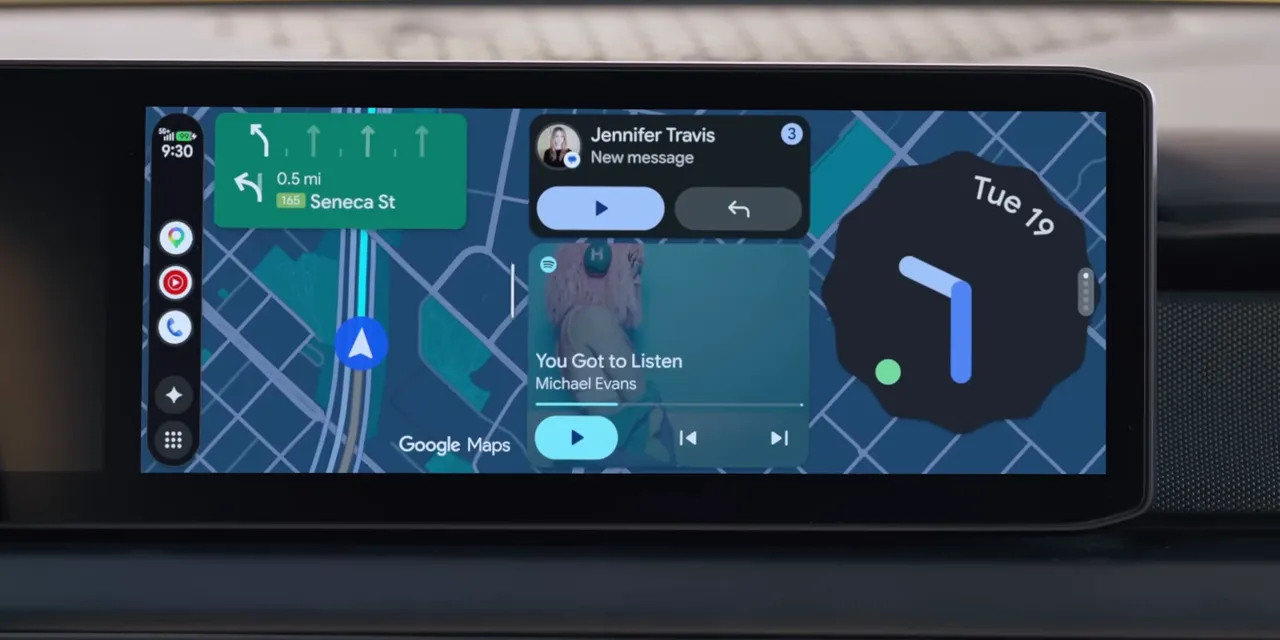
Android Auto’s biggest change is probably the visual overhaul. It looks like a response to the Apple Maps versus Google Maps comparisons that have been circulating for years.
The navigation presentation is more modern, but there’s useful information behind the appearance too. Building silhouettes, overpasses, and specific lane guidance should make it easier to understand where you are and where you need to go.
The app drawer comes in from the left, while customizable widgets live on the right. The Gemini Intelligence features, including custom widgets and Magic Cue, are also intended to be part of the experience. Assuming they work as promised, that could be useful.
YouTube While Parked, Audio While Driving
The feature I found most interesting is Android Auto adapting to the car’s display and playing full-screen YouTube video in HD while parked.
That parked part is important. If you’re sitting at an EV charger for 30 or 40 minutes, using the car’s screen for a video seems perfectly reasonable.
In the demonstration, shifting into drive makes the video disappear and turns the content into background audio. You keep listening, but the picture is no longer there to distract you.
That sounds convenient, though I still want to understand how seamlessly it works. How does the phone know the car has shifted into drive? Does it receive that information directly, or does movement detection come into play? The demonstration doesn’t explain the mechanism.
There was also a subscription question, and the fine print answers it: continuing YouTube audio while driving requires YouTube Premium.
Android-to-Apple Sharing Expands
Google is also expanding AirDrop interoperability to more Android devices, making it easier to share with Apple hardware.
This is another one of those smaller announcements that could be genuinely useful. Being able to send a photo from my OnePlus 15 to my MacBook Pro without the usual cross-platform friction? Yes, please.
Not every meaningful improvement needs to be a whole new intelligence system.
Googlebooks: Chromebooks With a New Name and an AI Cursor
Then there are Googlebooks, which Google introduced as a new laptop category.
A lot of what was demonstrated looks familiar from ChromeOS: a browser, tabs, Android apps, and now the Gemini Intelligence features, including custom widgets. My first impression is that this is a new generation of Chromebooks with enough changes to earn a new name, at least in Google’s eyes.
The Cursor Is the Interesting Part
The standout feature is an AI-enabled cursor. Wiggle it, and it becomes an entry point for Gemini interactions with what’s on your screen.
You can select an image to learn more about it. You can bring multiple images together and use Nano Banana to generate a combined visualization. You can select text to get more information or draft a response.
One example uses a photo of a person alongside images of clothing to visualize an outfit.

I think this is a genuinely smart interface idea. The cursor is something people already understand. Making that familiar tool a convenient way to work with images and text could be more approachable than asking people to learn an entirely separate AI workflow.
Multiple Manufacturers, One Glowing Identifier
A Googlebook isn’t just one laptop made by Google. It’s a category with devices planned from HP, Dell, Lenovo, Acer, and ASUS.
Google emphasized premium craftsmanship and a distinctive glowing bar on the back. The RGB bar looks pretty cool.
Google also described the lighting as functional, but didn’t explain what those functions would be. A battery indicator that turns green when charging finishes could be nice. A notification light could be useful too. Those are possibilities I’d like to see, not confirmed features.
For now, the clear benefit is that it looks cool.
The bigger question is pricing. I hope these don’t end up costing much more than $1,000. Otherwise, we could be looking at an unfortunate throwback to the Chromebook Pixel days. Premium hardware is one thing, but the price still needs to make sense for what the laptop actually does.
The Small Stuff Looks Like the Biggest Win
I’m excited to test all of this. Expanded autofill looks genuinely convenient. The Android Auto redesign looks promising. Generated widgets and the Googlebook cursor both have a clear reason to exist.
The agentic features are where I need more evidence. Show me the full purchase process. Show me where I confirm the details. Show me how much control I keep before something happens on my behalf.
“The biggest Android update ever” is still a lot to claim. For now, the most convincing improvements aren’t the ones promising to do everything for me. They’re the ones that make the things I already do a little easier.


