The Samsung Galaxy S26 Ultra has a genuinely clever new hardware feature. Not another AI checkbox. Not a slightly different camera layout. An actual new thing built into the display that can make your phone much harder for someone next to you to read.
It's called Privacy Display, and it's really useful. It also comes with compromises, including some that stick around when the feature is turned off.
After about a week with this phone, that's the theme I keep coming back to: every feature is a trade-off. The S26 Ultra is a really good phone, but at $1,300, it's worth understanding exactly which trade-offs Samsung has made.
Samsung provided the phone for review.
Quick Summary
- Privacy Display offers selective screen privacy, but compromises detail, brightness, and normal viewing angles.
- Performance is excellent, while battery improvements remain modest without silicon-carbon technology or built-in magnets.
- Strong cameras gain wider apertures and impressive stabilization, though the main camera focuses less closely.
- At $1,300, the Ultra's value depends heavily on how much you need Privacy Display.
Table of Contents
- Privacy Display Is the Big New Feature
- A Thinner, Rounder Design Has Its Own Trade-Offs
- Performance Is Great. That's Almost a Formality.
- Battery Life Improves, but Samsung Is Still Playing It Safe
- The Cameras Are Familiar, and Still Really Good
- Galaxy AI Ranges From Useful to Entirely Optional
- The S26 and S26 Plus Have a Bigger Value Problem
- Verdict: How Much Is Privacy Display Worth to You?
Privacy Display Is the Big New Feature
On paper, the screen looks familiar: a 6.9-inch OLED display, 1440p resolution, and a refresh rate that ranges from 1 to 120Hz. Those are largely the same numbers as last year.
Privacy Display is what changes the experience. Turn it on, and the screen's viewing angles immediately become dramatically narrower. Straight on, you can still use your phone. Off to the side, the content becomes much harder to see.
Yes, you can buy a $20 or $30 privacy screen protector that accomplishes something similar. But Samsung's implementation has two pretty important advantages:
- It works in both directions. It restricts off-axis visibility horizontally and vertically, rather than only along one axis like the privacy protector I compared it with.
- It's selective. Because the feature is built into the display, you can turn it on when you need it, apply it to specific apps, or protect only parts of the screen.
That last part is the most interesting. You could have privacy kick in for your banking app or your messaging app. Or you could leave the rest of the screen alone and hide only incoming notifications from people nearby.
That's much more flexible than permanently putting a filter over your entire display. It solves a real problem without requiring you to keep the privacy effect active all day. We don't get genuinely new smartphone hardware features very often anymore, so this deserves credit.
How Privacy Display Works
The basic explanation is that this display has two types of pixels: wide-angle pixels that are visible from lots of directions, and narrow-angle pixels that appear to use a focusing lens to direct light toward someone directly in front of the screen.
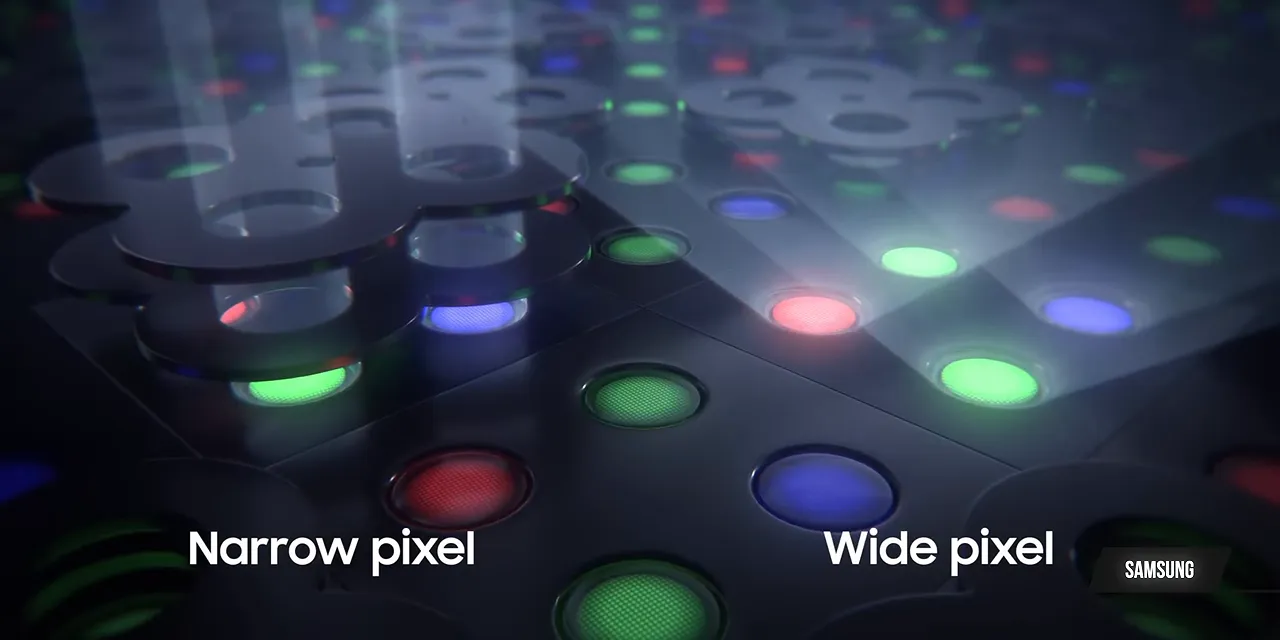
During normal use, both types are active. When you enable Privacy Display, the wide-angle pixels turn off, leaving the narrow-angle pixels to produce the image.
Very clever. But now you've switched off half the pixels.
The Catch: Less Detail and Lower Peak Brightness
With half the pixels no longer contributing to the image, the effective pixel count is cut in half. Small text, fine details, and high-contrast edges can look blockier.
I bought a microscope to get a closer look. Because, apparently, that's where we are now.

Brightness takes a hit, too. Samsung cleverly adjusts the output of the remaining pixels so perceived brightness stays roughly consistent at typical settings. But once the screen is bright enough, that compensation has limits. Toggle privacy on at high brightness, and you can see it get a little dimmer.
Those are the compromises while the feature is active. The more subtle issue is what happens when it isn't.
Some Display Compromises Are Always There
If half the pixels have permanently narrower viewing angles, the full display's viewing angles are slightly worse even during normal use. Turning off the privacy setting doesn't remove the physical characteristics of those pixels.
The screen also appears to have a different coating that isn't quite as effective at reducing reflections as the excellent coating on the S25 Ultra. And it's still an 8-bit panel simulating 10-bit color, rather than a native 10-bit display like a number of competitors offer.
To be clear: this is still a really good display. These are differences that will matter more to some people than others.
Samsung seems pretty comfortable betting that most people aren't pixel peepers. This is a 1440p panel that ships set to 1080p, presumably because the company expects most people to prefer a little extra battery life over maximum sharpness.
People like me immediately go into settings and switch it to 1440p. We're also more likely to notice the differences in fine detail and viewing angles, and complain about the panel's color depth.
Samsung's bet is that a useful, easy-to-demonstrate privacy feature will matter more to buyers than those smaller image-quality compromises. That's a reasonable bet. Just know that if pure display quality is your number one priority, there are better-looking screens available for this kind of money. Some are probably made by Samsung, which is a little funny.
A Thinner, Rounder Design Has Its Own Trade-Offs
The S26 Ultra isn't a dramatic redesign. It's a little thinner, a little lighter, and a little rounder at the corners, bringing it closer to the rest of Samsung's flagship lineup.
Even those small changes have consequences.
The rounder corner means the exposed end of the S Pen now has a slight curve instead of a flat cap. As a result, it needs to go back into its slot in one particular orientation. Last year's flat design didn't require that extra thought.
Not a disaster. Just one of those tiny things you notice because it used to be simpler.
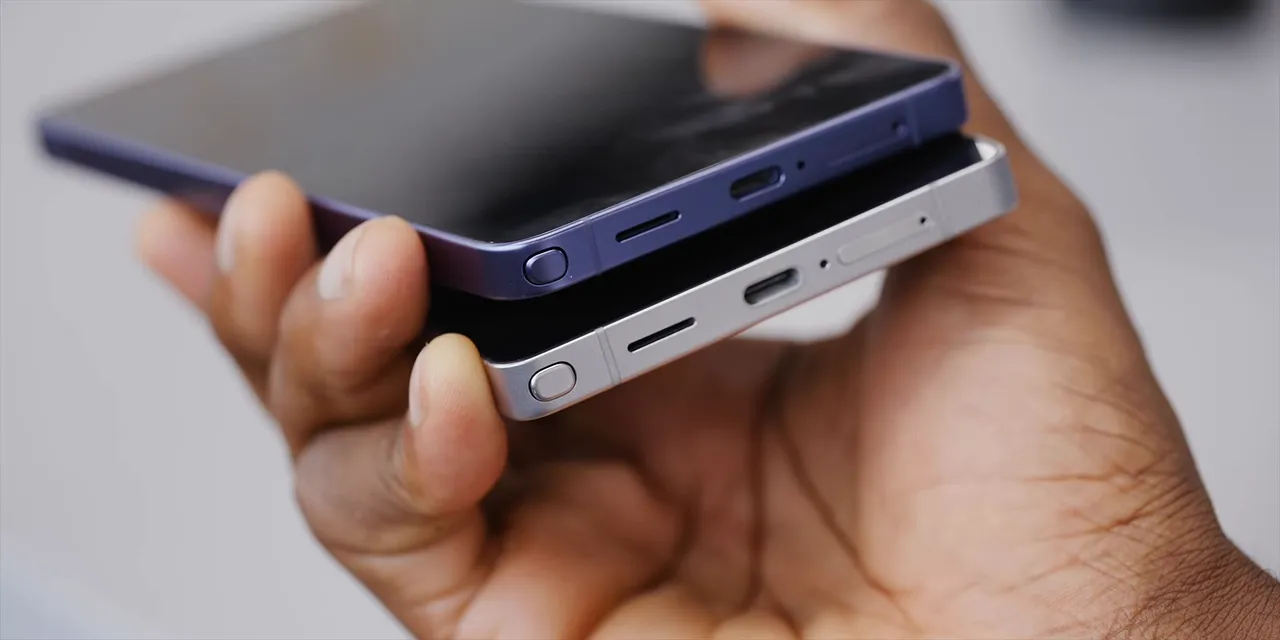
The camera bump is now more of a raised plateau with camera rings stacked on top. Combine that larger protrusion with a thinner body, and this phone rocks aggressively on a table when you're trying to type without a case.
A case will likely make that less annoying, and plenty of people will put one on immediately. But for those of us who use phones without one, it's not nothing.
Samsung also switched the sides from titanium back to aluminum. Honestly, that makes basically no difference to the experience of using the phone. It mostly makes the earlier move to titanium feel less consequential.
Performance Is Great. That's Almost a Formality.
The chip is the Snapdragon 8 Elite Gen 5 for Galaxy. I benchmarked it against the OnePlus 15, which uses the regular Snapdragon 8 Elite Gen 5, and the results were similar, with Samsung's version slightly ahead.
It's the kind of roughly 20 to 30 percent annual CPU improvement we've come to expect. Samsung seems especially interested in the NPU side of the chip, which supports its growing collection of AI features.
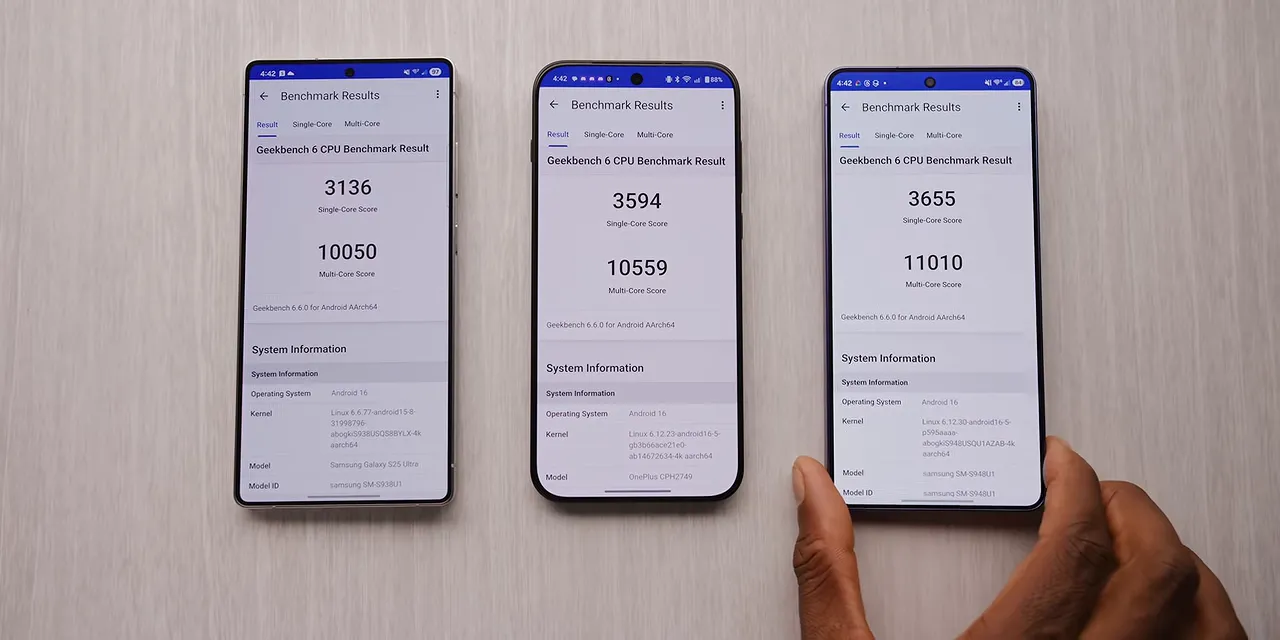
But in day-to-day use, performance is almost a checklist now:
- Are the animations smooth? Yep.
- Can it handle heavy multitasking? Yep.
- Gaming? Also yep.
The redesigned vapor chamber is doing its job despite having less room inside the thinner phone. There isn't some big performance problem hiding behind the design changes. This is a fast flagship, exactly as it should be.
Battery Life Improves, but Samsung Is Still Playing It Safe
The battery is still 5,000mAh. Thanks to a more efficient chip and software, battery life is slightly better than last year's phone.
Standby time still isn't quite as impressive as some competitors, but overall endurance is really good. Wired charging also gets a modest upgrade, reaching a peak of 60 watts.
And yet, there are two omissions that are getting harder to ignore.
Still No Built-In Qi2 Magnets
No built-in magnets? On this phone? At this price?
That feels like it should have been an easy win. Magnetic cases are an option, but I'd much rather have the magnets in the phone itself. If you're unfamiliar with the standard, the Wireless Power Consortium is the organization behind Qi and Qi2.
Samsung can sell magnetic cases and still make the phone more complete out of the box. Those don't need to be mutually exclusive goals.
Still No Silicon-Carbon Battery
Samsung is also sticking with its existing battery approach rather than moving to silicon-carbon. I understand why this company might be conservative about batteries. But the gap between playing it safe and leaving improvements on the table is getting uncomfortable.
Arun at Mrwhosetheboss ran a battery comparison that showed the S26 Ultra improving slightly over its predecessor, while still finishing behind some silicon-carbon battery phones from the previous year.
So, yes, the battery life is good. But it could have been better.
I would happily trade the slightly thinner body for more battery capacity and built-in magnets. That feels like a change a lot of people would appreciate. Instead, Samsung has made a safe improvement when the ceiling could have been much higher. Much more Ultra.
The Cameras Are Familiar, and Still Really Good
Calling these cameras “mostly the same as last year” is accurate, but it also undersells them. This is still a strong camera system.
The main camera gets a wider aperture, the 3x camera is largely unchanged, and the 5x camera also gets a wider aperture. The faster lenses let in more light and produce slightly softer background blur with nearby subjects.
As a photographer, I'll generally take the faster lens when I can get it.
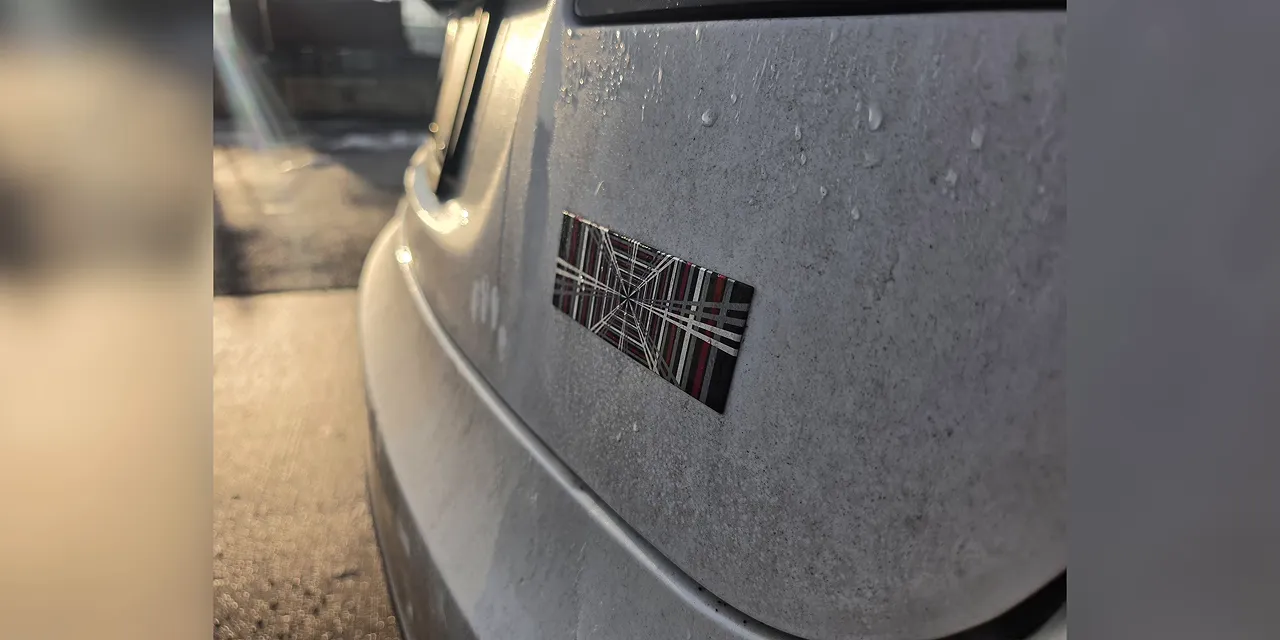
The catch is that the main camera's minimum focusing distance is noticeably worse. I can't say for sure whether that's a direct consequence of the aperture change, but I noticed it. Macro mode is still available, so close-up photography hasn't disappeared. It's just a downgrade in how close the main camera itself can focus.
Video Gets Some More Interesting Upgrades
The bigger camera changes come through software. APV log recording has been added, and it works well.
There's also Horizon Lock, an aggressive stabilization feature. Samsung isn't first to this idea, but this is one of the best implementations I've seen.
It takes advantage of the large 200-megapixel sensor and crops into the image to produce extremely stable footage while still recording at Quad HD resolution and up to 60 frames per second. That's pretty impressive.
Video from the main camera looks good in general, helped by the slightly wider aperture. I used the S26 Ultra for all the talking-head footage in the AutoFocus Polestar 4 episode, which is a more meaningful vote of confidence than just saying the camera is good.
Galaxy AI Ranges From Useful to Entirely Optional
The rest of what's new is mostly software. Samsung would probably like the word “agentic” somewhere in that sentence.
I'm not sure that's the word I'd pick.
There are a lot of AI features packed into this phone now, and their usefulness varies quite a bit:
- Call screening: A welcome, practical addition for dealing with unknown numbers.
- Audio Eraser: Does a good job removing a substantial amount of background noise from video without making the result sound too unnatural.
- Photo Assist: Lets you edit photos into entirely new scenes that never actually happened.
- Now Nudge: I couldn't get it to work once during my testing.
The Galaxy AI settings section gives you plenty to scroll through. You can use as much or as little of it as you want. Go all in on generated scenes, or mostly ignore the whole collection.
I also tried a number of requests with the text-based AI photo editor. To its credit, it refused several of them. So, points for safeguards.
What I'm not convinced of is that any of this is a compelling reason to buy this particular phone. A lot of these features could, and probably should, reach older Samsung devices through software updates. That's an expectation, not a promise that every feature will arrive everywhere.
The useful tools are useful. The rest can stay optional. Neither category feels like the main justification for a $1,300 upgrade.
The S26 and S26 Plus Have a Bigger Value Problem
Separate from the Ultra, the base Galaxy S26 and S26 Plus no longer look like particularly good deals to me. They feel like afterthoughts.
The designs are largely unchanged, which is fine by itself. But the cameras have also stayed broadly similar since the S23 generation. Millimeter-wave support is gone, and many regions outside the US get an Exynos chip.
Dropping the 128GB configuration is a good move. Keeping the 256GB model at its existing price, however, means the cheaper entry point simply disappears. The base S26 now starts at $900.
You can get a lot of phone for $900, and Samsung hasn't made a particularly strong case here. If that strategy is going to change, buying decisions probably need to send the message.
Verdict: How Much Is Privacy Display Worth to You?
The S26 Ultra is easier to defend than the cheaper models. It's a really good phone with excellent performance, strong cameras, good battery life, and one genuinely clever new hardware feature.
But the list of things it doesn't push forward is substantial: no silicon-carbon battery, no built-in magnets, no particularly extreme charging story, and still no Bluetooth in the S Pen.
That makes the Ultra name feel a little ambitious. It's big, fast, and capable, but in a lot of ways it feels more like an S26 Plus Plus. Maybe a Pro Max. You get the idea.
Privacy Display is the exception. It's the distinctive, advanced feature Samsung has chosen to build this generation around. If selective screen privacy solves a problem you regularly have, its compromises may be completely worth it.
If your priorities are the absolute best-looking display, maximum endurance, or the most complete hardware package for the money, the trade-offs become harder to accept.
Samsung has placed its bet on one very cool feature. The question is whether that's the feature you want to pay for. Because at $1,300, the price still feels like the most Ultra thing about this phone.


