Apple’s newest laptop costs $599. With a student discount, it’s $499. And after using it for a week, I think this might be Apple’s most disruptive product in more than a decade.
Not because it introduces some wild new technology. Actually, it’s the opposite. Nothing in the MacBook Neo is fundamentally new. It’s the combination of capable hardware, good build quality, macOS, and a surprisingly low price that should make the Windows laptop and Chromebook industries nervous.
Yes, this is an entry-level laptop. Yes, it runs an iPhone chip. And yes, its main job is browsing, writing, email, and all the other basic things people need a computer to do.
But the MacBook Neo is more capable than that description makes it sound. It’s better than I expected, too.
Disclosure: Apple provided the MacBook Neo for review.
Quick Summary
- The $599 MacBook Neo delivers responsive everyday Mac performance, with a $499 student price.
- The A18 Pro approaches M1 performance, but 8GB of memory limits heavier workloads.
- Aluminum construction and a great keyboard stand out, while display color and connectivity involve compromises.
- Students and writers are ideal buyers; demanding creative work and gaming call for something more capable.
Table of Contents
- Why a $599 MacBook Matters
- A18 Pro Performance: An iPhone Chip, a Real Mac
- The Hardware: Budget Choices, Proper MacBook Feel
- Battery Life: Efficiency Does the Heavy Lifting
- Who Should Buy the MacBook Neo?
- The Verdict: An Easy Laptop to Recommend
- Sponsor: A Retro Look for a Modern MacBook
Why a $599 MacBook Matters
For years, the cheapest new MacBook in Apple’s lineup has been the MacBook Air, usually around $1,000. The M5 version now starts at $1,100. That’s a lot of money for someone who mainly needs a browser and a word processor.
Of course, the real entry point into the Mac ecosystem has often been an older MacBook Air. The M1 Air from 2020 was such a big leap that retailers kept selling it at discounts for years. Between Walmart, Costco, and refurbished options on Amazon, a good-enough MacBook has been available for around $600.
The Neo takes that unofficial entry-level price and turns it into an actual new product.
Here’s the important part: while Apple’s M-series chips have progressed all the way to M5, its iPhone chips have been improving, too. They’ve now reached a point where an A18 Pro can deliver roughly M1-class performance in several important areas.
So Apple doesn’t need to invent a cheap laptop processor. It already has one.
A18 Pro Performance: An iPhone Chip, a Real Mac
The A18 Pro inside the MacBook Neo is the same chip family that powered the iPhone 16 Pro. Calling it a phone chip is technically accurate, but it undersells what that chip can actually do.
My benchmark results put the Neo surprisingly close to the M1 MacBook Air:
- Geekbench multi-core: A little over 8,500, right around M1 territory.
- OpenCL and Metal graphics: Also roughly in the M1 range.
- Single-core performance: The strongest result, closer to M3 levels.
- Cinebench: Broadly around M1-class performance as well.
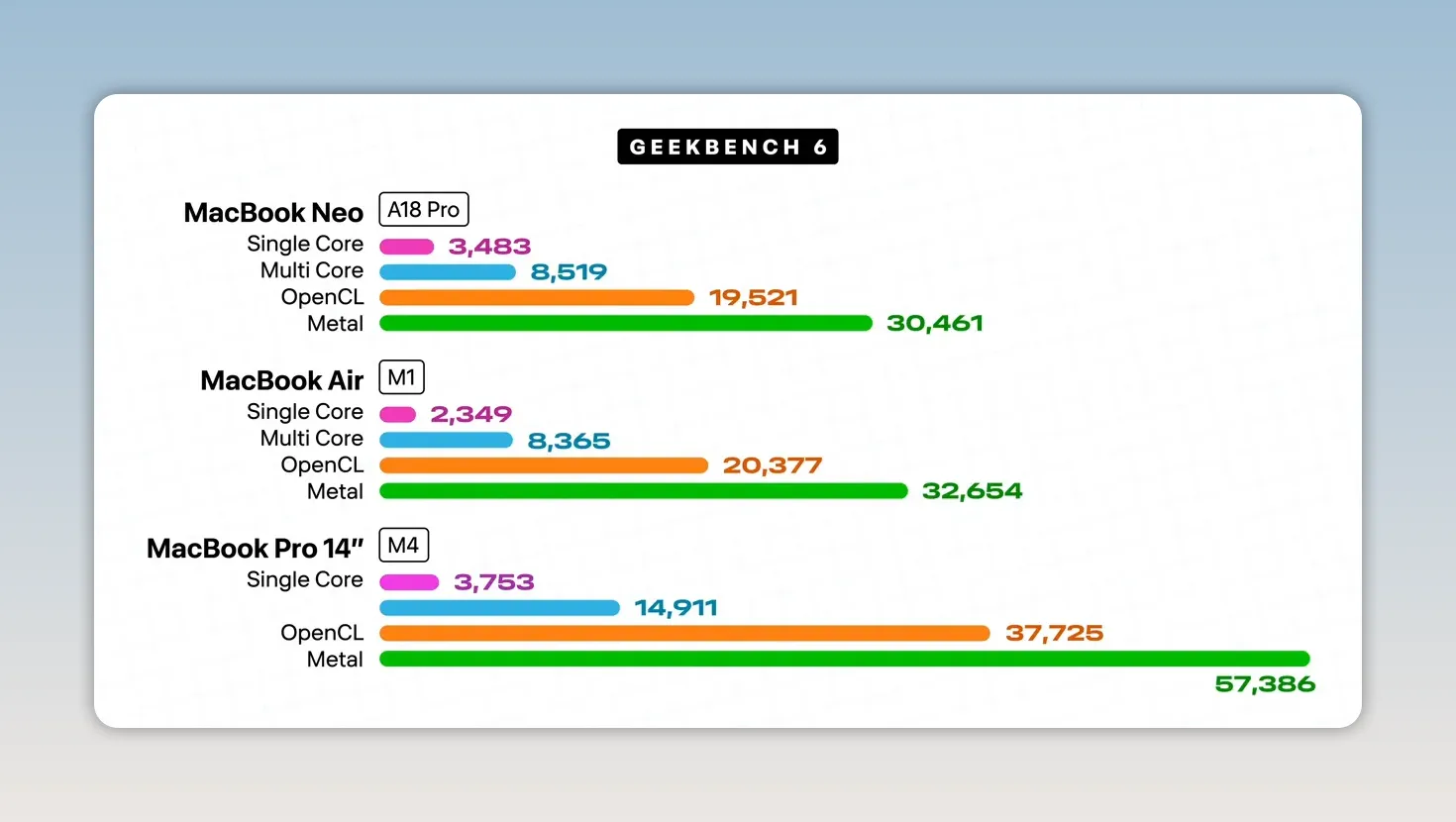
Those different tests measure different parts of the chip. If you want context on the CPU benchmark, Geekbench explains its cross-platform testing approach. The practical takeaway here is simpler: this is a very capable processor, not something that barely keeps macOS running.
And really, that shouldn’t be shocking. An iPhone 16 Pro can edit 4K video. It’s just a little surreal to see that same class of silicon running a Mac.
Everyday Work Feels Like Everyday Mac Work
Strong single-core performance is particularly useful for short bursts of work: opening an app, loading something, responding to an input. That’s a lot of what basic computer use actually involves.
On the Neo, those things feel quick. Especially in Apple’s native apps, it feels like a normal Mac.
Web browsing with a bunch of tabs, spreadsheets, music, email, and word processing are all no problem. You can do those things at the same time, too. This isn’t a machine where you need to close your document before opening your inbox.
There’s no performance mode to turn on. There is a Low Power Mode, but for ordinary work, the default experience is already responsive.
The 8GB Memory Limit Is Real
The part I’m less excited about is the memory. 8GB of RAM is not a lot, and you can fill it up pretty quickly through normal multitasking. Chrome tends to get there faster as you add tabs than Safari does.
Once physical memory fills up, macOS uses swap, moving some data onto the SSD. That’s the same general behavior we saw on the 8GB M1 MacBook Air.
The Neo’s storage reads and writes at around 1,500MB per second. That’s slower than the drives in higher-end Macs, but it’s still fast enough that swap helps keep regular use feeling generally fine.
That doesn’t magically turn 8GB into more RAM. My longer-term concern is what happens as these laptops age and their SSDs fill up. That’s where machines like this can start to feel sluggish.
Right now, though, the everyday performance is comfortably good enough for the average person. That’s the point.
The Hardware: Budget Choices, Proper MacBook Feel
What really gets me about the Neo is how straightforward this must be for Apple to build.
It already manufactures iPhone chips in enormous quantities. That scale brings down the cost of using an existing processor in another product. As another example of that approach, Apple put an A19 Pro in its new Studio Display to handle jobs like the webcam and speakers. That display has 12GB of RAM. Yes, more than this laptop.
For the Neo, Apple has taken an inexpensive, capable chip and built a sensible budget laptop around it.
- Display: A 13-inch LCD at roughly 1440p, with a 60Hz refresh rate and 500 nits of brightness.
- Trackpad: An excellent, physically clicking trackpad.
- Ports: Two USB-C ports, one operating at USB 3 speeds and the other at USB 2 speeds, plus a headphone jack.
- Webcam: A 1080p camera that’s good enough for video calls.
- Speakers: Barely average stereo speakers.
- Construction: An aluminum chassis that feels unusually good at this price.
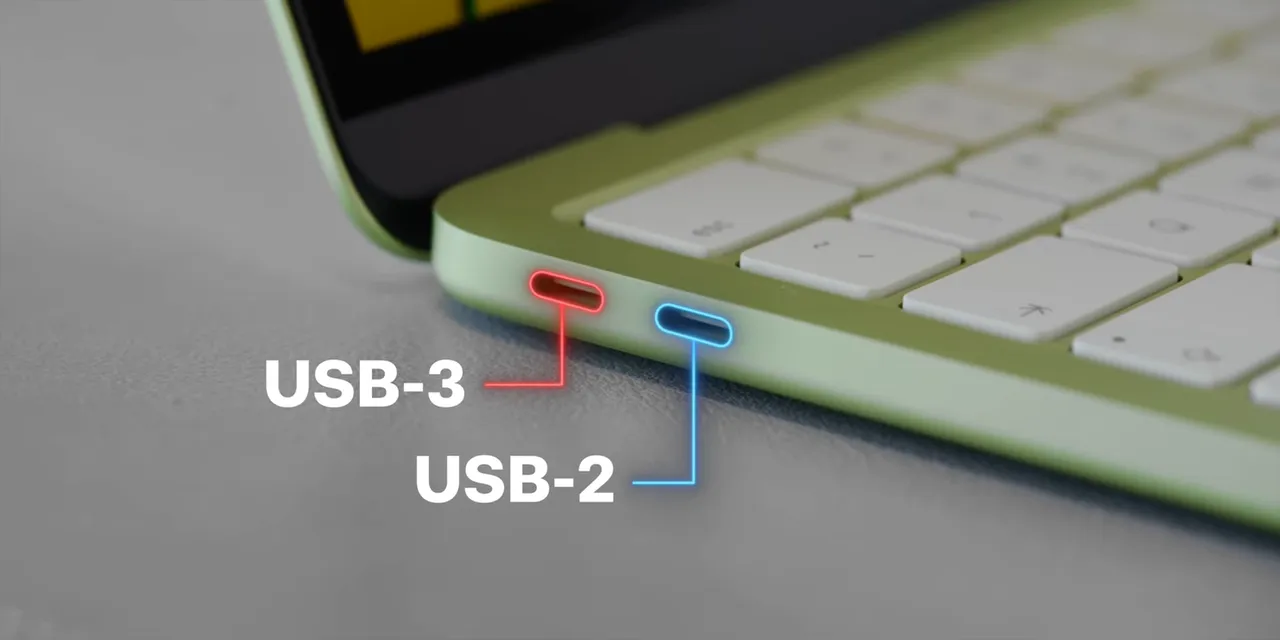
The screen is plenty bright indoors. The webcam gets the job done. The speakers are one of the more obvious places where the budget shows.
But the chassis is the Apple touch. There’s none of the keyboard-deck flex you can get from a cheap plastic laptop. The hinge is balanced well enough to open the lid with one finger. To me, this is the best-feeling, best-built laptop in its price class.
A Great Keyboard, Minus One Important Feature
The keyboard uses essentially the same switches as a much more expensive MacBook Pro. That’s a pretty great thing to preserve in a laptop built for typing.
What you don’t get is a keyboard backlight. That’s one of the omissions I notice most.
The base version also has a lock button rather than Touch ID. Spend the extra $100 for the 512GB model, and you get Touch ID in that corner of the keyboard as well as the storage upgrade.

The Colors Are Actually Fun
My review unit is Citrus, which is basically the color of lemon-lime Gatorade. So, yes, the name checks out.
Apple has carried that color through more of the machine than you might expect. The off-white keys have a slight tint to match the aluminum. The little feet underneath match, too.
Even the default wallpaper and software accent colors coordinate with the hardware. The blue laptop gets blue accents. The pink version, which Apple calls Blush, gets pink accents.
None of that changes performance. It just makes this inexpensive laptop feel considered rather than stripped down and forgotten.
Battery Life: Efficiency Does the Heavy Lifting
On paper, battery life is a little below the MacBook Air. In use, that’s about right.
The interesting part is that the Neo gets close while using a much smaller physical battery. Apple chose a smaller, cheaper battery, and the A18 Pro’s efficiency makes that decision work.
For light tasks, the chip mostly sips power. You can get through almost a whole day of writing, browsing, email, streaming video, and similar work.
As with a phone, sustained heavier tasks wake up the performance cores and drain the battery faster. High screen brightness adds to that. But for its intended workload, battery life is really good.
There’s a 20W charger in the box. In my test, going from empty to full with that charger took more than an hour. Plugging into a higher-power charger can speed things up a bit.
Would battery life have been even better if Apple had filled more of the chassis with a MacBook Air-sized battery? Probably an interesting alternate universe. This one is already good enough to make the smaller battery feel like a reasonable compromise.
Who Should Buy the MacBook Neo?
My initial reaction was that anyone deeply interested in tech probably wasn’t the target customer. After a week, I think that was too simple.
The Neo can do more than its price suggests. The useful question isn’t whether it can open a demanding app. It’s whether it can comfortably handle the kind of work you actually do in that app.
K-12 Students: A+
This laptop was practically made for students. At the $499 education price, it’s an extremely compelling option for schoolwork.
If the budget is around $500 and the choice is yours, I’d have a hard time choosing a Chromebook over the Neo. Of course, for younger students, the school system may be making that choice instead.
College Students: A
There’s a little more nuance here because your major and required software matter.
If your coursework needs a particular application, that requirement comes first. But if you already know you want a Mac and your work is mostly documents, research, spreadsheets, and general productivity, this should do it.
Writers: A+
I did all the writing for this review on the MacBook Neo. It was easy.
Word processing, email, research, and a very good keyboard are basically the whole assignment. The missing backlight is unfortunate, but otherwise this is an excellent fit.
Photographers: B Minus
Performance-wise, the Neo can handle photo editing. Pixelmator works. Lightroom works. Photoshop is a little tougher, but it should be okay for lighter work.
The bigger limitation is the display.
As photography gets more serious, color matters more. This panel is bright enough, but it doesn’t cover the full P3 color space. For more demanding color work, I’d want a better external display connected through USB-C.
With that display in place, the Neo becomes a more credible photo-editing setup. Just remember that you’re already using one of its two ports.
Coders: B
I’m not a coder, so that’s the caveat on this grade. But the performance makes the Neo a surprisingly good option for basic coding on a Mac.
Memory is the obvious boundary. Heavy local large language models and other memory-hungry workloads are not what this machine is built for.
If you’re starting out and those aren’t part of your plans, the Neo makes a lot more sense.
Video Editors: C+
Here’s where “the iPhone can edit 4K” needs some context. The processor isn’t the entire computer. Storage speed and display quality matter, too, and an iPhone Pro has a very good high-refresh-rate OLED display.
Still, I was impressed by what the Neo could do in Final Cut Pro. Basic 4K edits were genuinely usable: add footage, cut it up, apply LUTs, move through the timeline, and export.
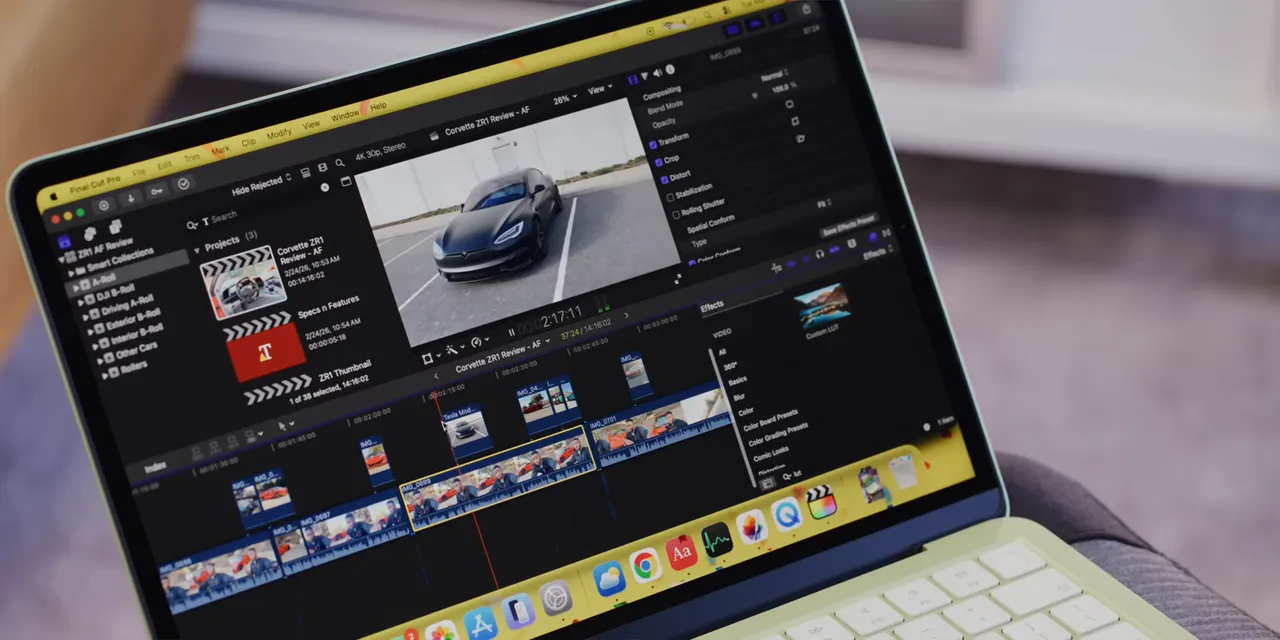
The trouble started when I pushed beyond that, particularly with plugins. That’s when the machine began to slow down and hit a wall. I’d expect Premiere to run into similar constraints, though that’s an expectation rather than a result from my testing here.
If your work is simple CapCut projects or mobile-style edits, great. If editing is becoming a more serious part of your day, an M4 or M5 MacBook Air offers stronger multi-core performance and a better display.
Podcasters: B+
I wouldn’t use this for our more involved podcast production setup. But for a basic podcast with one or two microphones, it feels like a solid option.
The two USB-C ports are the main practical limitation. Depending on what you need connected, you’ll probably end up in dongle land.
And please use headphones for editing. These speakers are not the tool for that job.
Gamers: D+
A small 60Hz screen, limited RAM, and macOS don’t add up to a gaming laptop.
But casual gaming exists. If your idea of gaming is a relaxed session of virtual power washing on an airplane, there’s room for that here.
If you’re shopping around competitive games like Counter-Strike, you were probably never seriously considering this machine anyway.
Grandma and Other Basic-Use Buyers: A
For someone who mainly needs email, websites, video calls, and a straightforward everyday computer, the Neo is an easy recommendation.
It’s the kind of purchase where the realistic alternative might be a Chromebook, not a MacBook Pro. That’s exactly where this product becomes interesting.
The Verdict: An Easy Laptop to Recommend
I do think a future Neo will get more memory. My prediction is that Apple could put an A19 Pro in the next version and move to 12GB of RAM, potentially as early as next year.
I’d also like an ambient light sensor, True Tone, and a backlit keyboard. Those are the biggest missing quality-of-life features for me. To be clear, that’s a prediction and a wish list, not announced hardware.
But the laptop that exists now is already really good.
For years, the MacBook Air has been the easy Mac recommendation. The Neo delivers the vast majority of that everyday experience for hundreds of dollars less, as long as your needs fit within its memory, display, and connectivity limits.
It’s not a cheap laptop pretending to be a professional workstation. It’s a genuinely good basic laptop that can do some surprisingly advanced things.
That combination, at $599 or $499 for students, is a big deal. Well played, Apple.
Sponsor: A Retro Look for a Modern MacBook
If you’ve ever wondered what a modern MacBook might look like with some 1980s Apple personality, sponsor dbrand has a collection of retro MacBook skins built around the classic multicolor logo.
The collection includes color-matched options for finishes such as Space Black, Starlight, Midnight, and Silver, plus versions for the MacBook Neo in Citrus, Blush, and Indigo.
I’ve used dbrand’s Area 51 skin on my personal MacBook Pro for years. The appeal is simple: scratch protection, durability, and a different look without the bulk of a case.
|


