I say no to about 99% of the emails I get. Some are normal product review requests. Some contain things you would never believe anyone thought to send to a tech reviewer.
Which means I miss out on a lot of the weird stuff. So, for a month, I changed the rule: say yes to every product review request.
The last time I did this, we ended up with a casket in the studio. We still have it. This time, we got a triple-screen laptop, a robot that does front flips, a mouse with a fan inside it, and more bathroom technology than I expected to encounter professionally.
These are hands-on impressions, not a month of exhaustive testing for every product. Some things I tried, some I only inspected, and some are very much outside my expertise. But that is part of the experiment: what happens when the usual inbox filter disappears?
Table of Contents
- An $800 Smart Toilet: Apparently, This Counts as Tech
- Xbook: Three Screens, One Very Strange Laptop
- Garmin CIRQA: A Sensible Product in an Unusual Lineup
- Casana Smart Toilet Seat: Health Tracking With a Monthly Bill
- BUSY Bar: An Overpriced Button That I Actually Like
- Beni Robot: The Biggest Surprise of the Month
- Pulsar x Noctua: Put a Fan in a Mouse. Sure.
- KardiaMobile 6L Max: Personal EKG Hardware, With an Important Caveat
- Honor Robot Phone: A Gimbal Camera That Folds Into Your Phone
- The $1,200 “AI-Powered” Chair: Too Much Adjustability Is Possible
- Skullcandy Crusher 1080 ANC: All of the Bass
- A Tiny Grant Sinclair Gaming PC: More Emulator Than Gaming Rig
- Sony True RGB TV: The Everyday Details Matter Too
- What Saying Yes Actually Taught Me
- Sponsor: Best Buy
An $800 Smart Toilet: Apparently, This Counts as Tech
The first arrival was a whole toilet. Not a toilet accessory. A toilet.
The pitch was that smart toilets are becoming more popular, and the feature list certainly makes a case for the word “smart”:
- A built-in bidet with warm water washing and a warm air dryer.
- Automatic flushing and an automatically opening and closing lid.
- A foot sensor, heated seat, deodorizer, and night light.
- A remote control.
Also, it is white. Important specification.
I did not install it. Getting the plumbing and electrical connections sorted out is where I happily hand things over to actual toilet reviewers. But I did pair the remote over Bluetooth, which took about 10 seconds. A light blinks on the remote and another blinks inside the bowl. Bluetooth pairing, but make it bathroom.
The remote needs AAA batteries. They were not included with the $800 toilet. That was less impressive.
Normally, this would be an immediate no, because I am not a toilet reviewer. Somehow, it would not even be the last toilet-related product of the month.
Xbook: Three Screens, One Very Strange Laptop
I have wanted portable multi-monitor setups to work for a long time. About a decade ago, a company in Alaska emailed me about the gScreen SpaceBook, a laptop with a second display that slid out beside the first. I never got one, but as a dual-monitor person, I was intrigued.
The Xbook takes that idea to three screens. The question is how you unfold a laptop into three useful displays. The answer here is: creatively.
Initially, it opens like a normal laptop. Inside are an Intel Core Ultra 7, 32GB of RAM, and 1TB of storage. Then you unfold the additional sections, connect them with a magnet, and end up with three touchscreens in an unusual arrangement.

The screens can mirror one another or extend the desktop, and each touchscreen works independently. There is genuinely a lot of screen space here. I am just not sure when I would want it arranged quite like this.
It also has a neat transformation: fold it into a conventional laptop, flip the whole thing over, and open it again to get a dual-touchscreen setup on the other side.
That is an idea. I like ideas.
It reminds me of the original Galaxy Fold: a fascinating technological trick attached to some fairly fundamental compromises. Early folding phones were not particularly good phones, but the folding part suggested a better future. Here, the three displays are interesting enough to make you briefly overlook a poor trackpad and underwhelming performance.
Briefly.
My score: 2/10. Interesting concept, not a particularly good laptop.
Garmin CIRQA: A Sensible Product in an Unusual Lineup
The Garmin CIRQA is a screenless fitness tracker. This is actually right in my lane, and it is something I would normally accept. I spent a couple of days with it, Andrew spent time with it too, and we discussed it on the podcast.
For $200 with no subscription, you get a tracker designed to stay on your wrist, collect data continuously, and not distract you with a display. It is clearly competing with Whoop.
There are a couple of things I really like:
- A customizable side button: You can start a workout without pulling out your phone, which the other screenless trackers I compared it with do not offer.
- A comfortable band: The blue fabric strap is soft, stretchy, and fastens with Velcro.
- No mandatory recurring charge: The upfront price is the price.
The problem is the Fitbit Air. I think that gets the form factor a little more right: smaller, narrower, and less prominent on my wrist. It also provides plenty of data without a required subscription.
If you care most about sensor accuracy rather than how these feel to wear, DC Rainmaker’s Garmin CIRQA testing goes much deeper into the data and comparisons with Fitbit and Whoop.
My score: 6.5/10. A reasonable product, but it feels like a slightly less elegant Fitbit Air. I probably would not choose or recommend this version over that one.
Casana Smart Toilet Seat: Health Tracking With a Monthly Bill
Why get an entire smart toilet when you could get just the seat? And why stop at a bidet when the seat could collect health data?
The Casana smart toilet seat has visible metal contacts and sensors intended to measure things such as heart rate, heart rate variability, breathing rate, and stress. A companion app displays the information in real time. There is also a metric called “duration,” for reasons I probably do not need to explain.
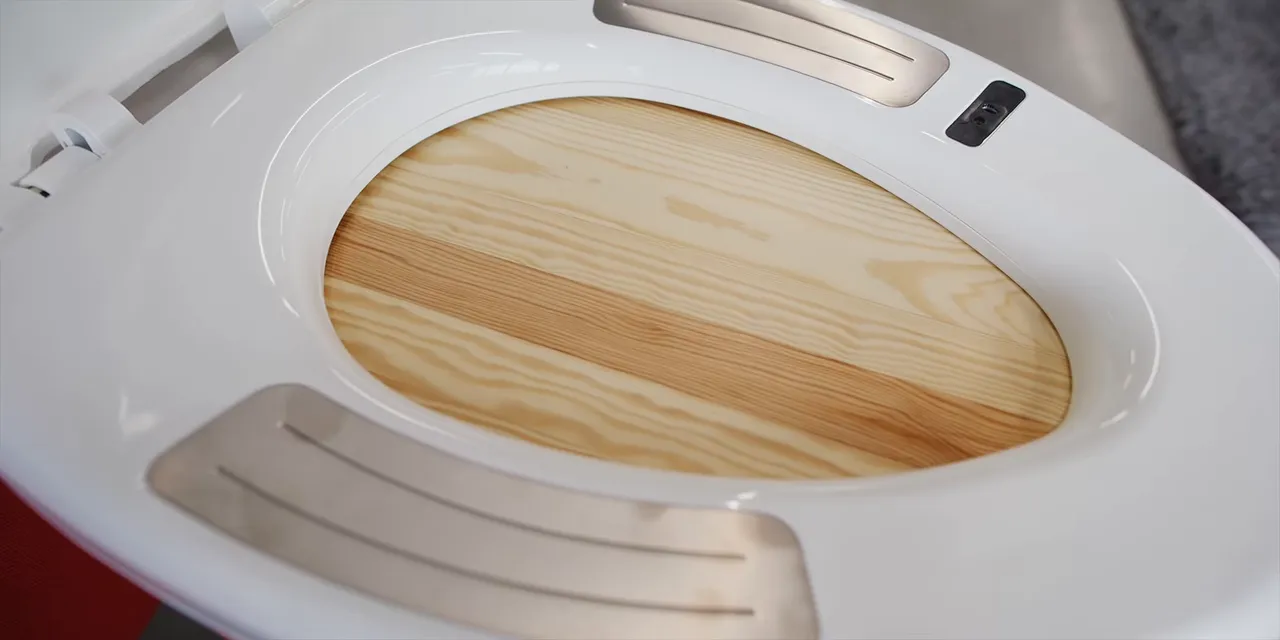
The hardware is about $199, including the first year of service. After that, it is another $10 per month to continue using the data service.
This is the part of subscription health hardware that bothers people: you already own the device, but keeping its central functionality requires another payment.
I did not connect or personally test this seat, so I cannot assess its measurements. My reaction is to the concept, the pricing, and those very obvious metal contact surfaces. I would rather wear the Garmin than make this my health-tracking routine.
My initial score: 4/10. Not a verdict on medical accuracy, which I did not test.
BUSY Bar: An Overpriced Button That I Actually Like
The BUSY Bar does what the name suggests. Press a button, and it tells people you are busy. It can count down how much busy time you have left, and you can pause it.
That sounds almost aggressively unnecessary. It is also surprisingly fun.
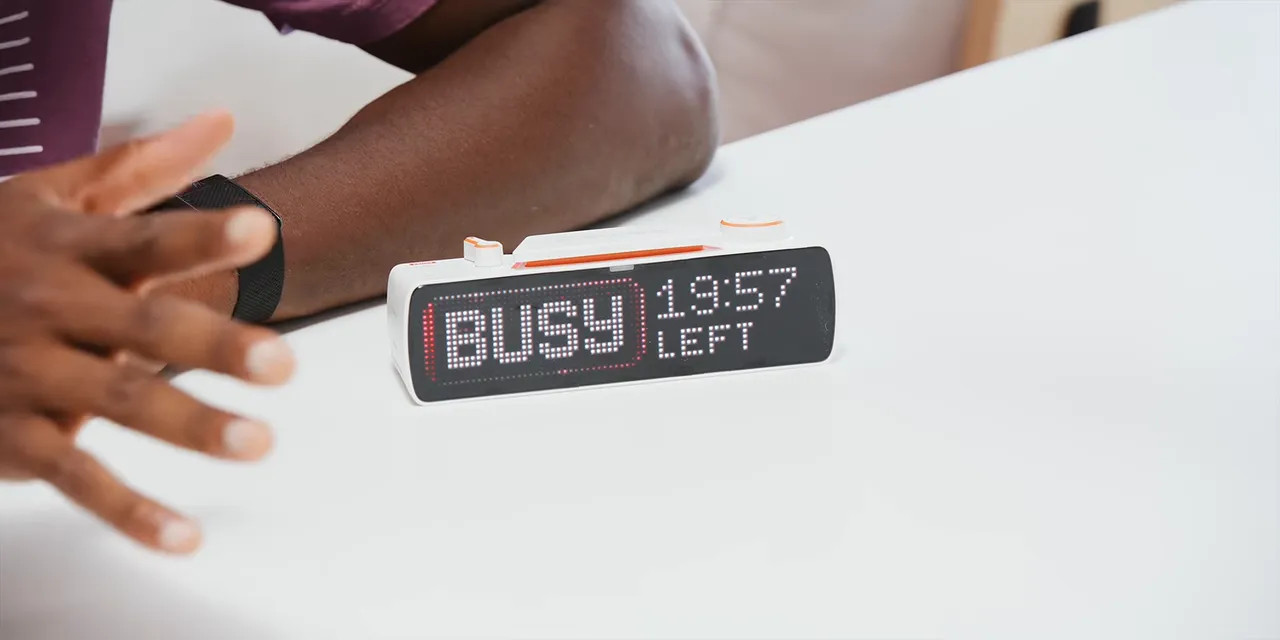
A phone app lets you set a session length and sync it with the display. Beyond the basic status sign, it has Pomodoro-style timer functionality, nice animations, a good-looking screen, and a physical button that is extremely satisfying to press.
It also has smart home connectivity. Google Home, Alexa, or HomePod can communicate with it to make it display messages.
At around $200, it is clearly expensive for the core idea. But it feels like a good gift for somebody who already has everything and might enjoy one more playful thing on their desk. It is annoyingly full-featured for something that starts as a busy button.
My score: 8/10. Things are allowed to be fun.
Beni Robot: The Biggest Surprise of the Month
This is exactly why the experiment is worth doing.
The Mondo Robotics Beni is a small camera robot on wheels that follows you around. Normally, I would have passed. Its promotional material looked so ambitious that my red flags were up. Some clips, particularly the skateboarding footage, looked to me like they might be AI-generated.
Then the robot arrived, and it actually did the things that had made me suspicious.
Beni has a camera at the front, illuminated eyes, little ears, a controller, and a phone app. The unit came with two removable batteries that pop out in a very drone-like way. It was a Kickstarter product at the time of testing, so this was not necessarily finished retail hardware.
I preferred the app to the dedicated controller. It gives you a first-person camera feed, driving controls, and the ability to tilt the camera up or down. Also, a jump button.
Yes, it jumps. It can do a front flip too. Not every attempt was graceful, and one attempt managed to eject its battery, but it landed the trick. I was not prepared for how entertaining that would be.

The actual feature list is pretty substantial:
- 4K recording at 30fps.
- Subject tracking: Tap the box around a person or pet in the app’s camera view, and it follows.
- Object avoidance: It attempts to navigate around obstacles while following a subject.
- Multiple speed modes: Sport mode is rated up to 18 miles per hour.
- Self-balancing recovery: It can often regain its footing after a stumble.
Object avoidance is not perfect. We have footage of it hitting cardboard boxes and table legs. It fell off the table, crashed into things, and generally had a more eventful studio visit than most review products.
But it survived. The mostly plastic construction and balancing mechanism proved surprisingly durable, and it was often able to recover quickly after clipping an obstacle.
My score: 10/10. That is an enthusiasm score, not a declaration of flawless robotics. I love this thing, and I am probably getting another one.
Pulsar x Noctua: Put a Fan in a Mouse. Sure.
Noctua makes excellent PC fans, famously in brown. Pulsar makes mice. Put those together and you get a brown wireless mouse with an actual fan inside it.
My first impressions were good before I even activated the fan. It is very light, glides nicely, and advertises a frankly ridiculous 42,000 DPI.
To switch on the fan, hold the two side buttons and scroll up. Air blows through the open shell onto your palm. If sweaty palms are a problem for you, that is the problem this is trying to solve.
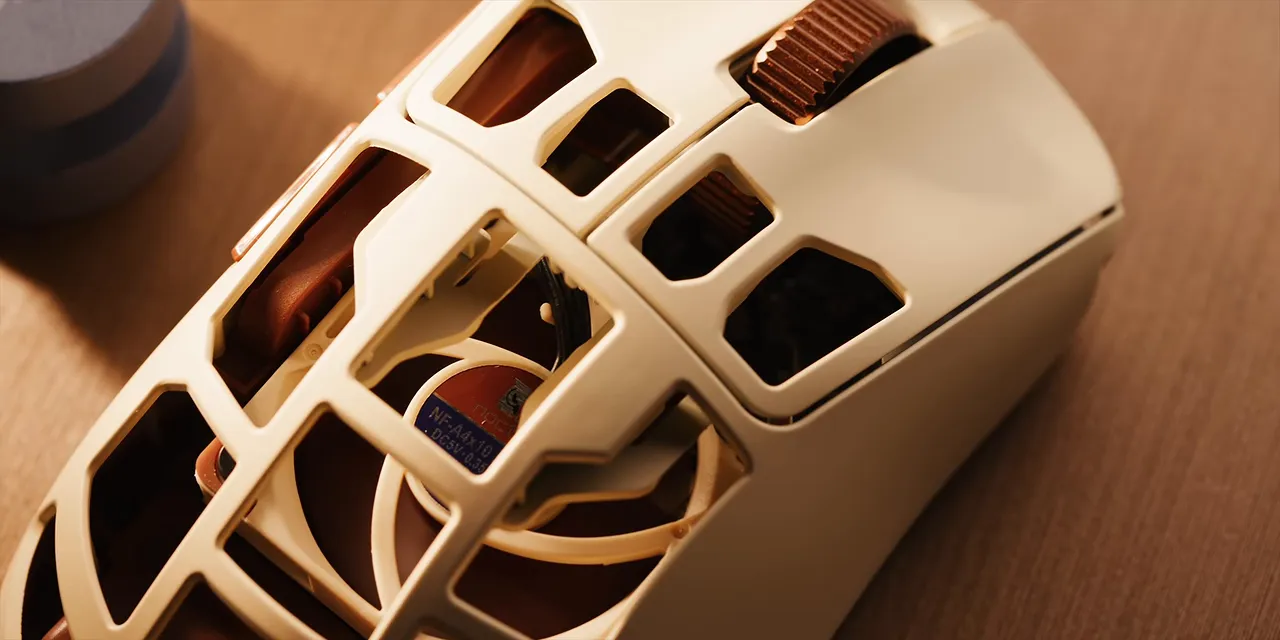
The packaging described three-step control, including off, but experimenting with it revealed more settings than that description suggested. The indicator changed through light blue, dark blue, green, and yellow as I stepped through the fan controls, with yellow at the highest speed.
I have never really needed palm cooling, and I am not a specialist mouse reviewer. But I came away impressed with the feel and amused by the execution.
My score: 8/10. Sure. Put a fan in a mouse.
KardiaMobile 6L Max: Personal EKG Hardware, With an Important Caveat
The KardiaMobile 6L Max is a small personal EKG device priced around $130. EKG and ECG refer to an electrocardiogram, a recording of the heart’s electrical activity. For background on the test itself, MedlinePlus explains what an ECG measures.
I have used ECG features on devices such as the Apple Watch, but I am not a medical doctor. Technically, I have an honorary doctorate from my alma mater. That does not qualify me to evaluate your heart.
This device uses multiple points of contact. You hold the metal electrodes on either side and place the rear contact against your leg. The app walks you through the process.
The package includes a year of KardiaCare, which provides a way to involve doctors in reviewing the information. The idea is not simply to hand you a recording and expect you to interpret it yourself.
My tentative score: 8/10, assuming it delivers the accuracy it claims. That is an impression of the product concept and workflow, not an independent clinical validation.
Honor Robot Phone: A Gimbal Camera That Folds Into Your Phone
Honor emailed asking to bring its Robot Phone to the studio for a demo. The press images already looked fairly ridiculous, so obviously the answer was yes.
Imagine your smartphone camera were also a tiny motorized gimbal. Slide open the glass on the back, unfold the camera mechanism, and there is a 200-megapixel main camera on a remarkably small gimbal.
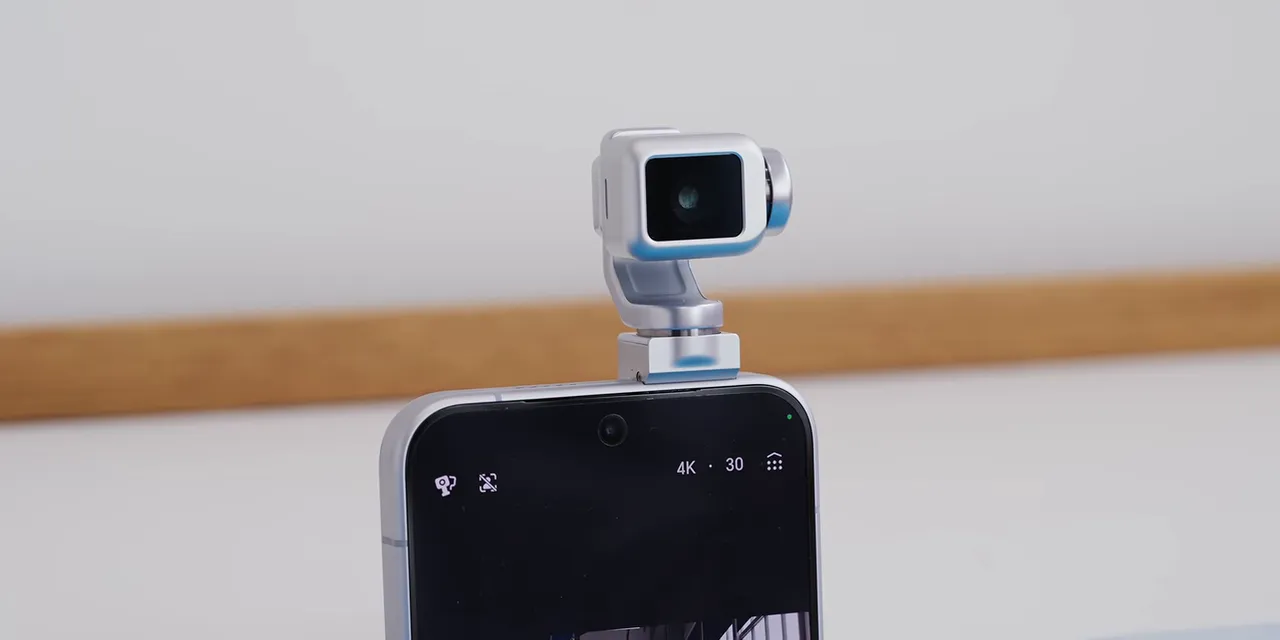
It gives you the benefits you would expect from that mechanism: stabilization modes and the ability to turn and point the camera. Then it folds back against the phone so the whole thing fits in your pocket.
There is also an AI assistant that turns the moving camera into a little character. It nods along to music, wiggles around, and expresses happiness or sadness. You can ask about your outfit, and it will look you up and down before responding.
That part is a bit much.
The camera features are more interesting to me. Honor is working with ARRI on color science, custom color modes, and LUTs. You can record in Log or apply a look directly from a selection of profiles. I did not get image samples off the phone, so camera quality remains an open question.
What impressed me most was that this was real hardware. It feels like one of those concept phones that usually never leaves a presentation, except now it seems headed toward an actual release.
My initial score: 9/10. It is doing too much, but I prefer that to doing nothing interesting.
The $1,200 “AI-Powered” Chair: Too Much Adjustability Is Possible
I have used the same chair for roughly a decade or more. So when a $1,200 AI-powered massaging office chair appeared in the inbox, there was a small part of me wondering whether I had been missing something.
It has a remote. Of course it has a remote.
That remote controls seat cooling at low, medium, and high settings, plus heating. There is also a lumbar massage function with three intensity levels. The massage only works on the lower back, not the seat.
The lumbar support itself moves forward and backward by several inches. You can position it manually, or activate an automatic smart tracking mode that moves it forward to meet your back.
What makes that artificial intelligence? I do not know. The website had an illustration of an AI chip, but that did not make the mechanism any clearer.
The chair also has a footrest and a headrest that adjusts in practically every direction. After moving all these parts around, my main discovery was that it is possible to have too much customizability.
Normally, the phrase “AI-powered chair” would tell me enough to decline. Trying it confirmed that adding motors, modes, and adjustment points does not automatically make a chair better.
My score: 4/10. It remains a functional thing to sit in. That is something.
Skullcandy Crusher 1080 ANC: All of the Bass
I remember Skullcandy as the headphones you bought at a fashion store. Audio quality was not the first thing I associated with the brand.
So a $280 pair of active noise-canceling over-ear headphones made in collaboration with Bose was enough to get my attention. The Crusher 1080 ANC also made a good first impression physically: the build quality felt solid.
Then I tried the bass wheel.
At its minimum setting, the bass already felt like about nine out of ten. At maximum, it became an exaggerated, overwhelming wall of low end that muddied the rest of the music. If there is a bass line, drumbeat, or 808, that is pretty much what takes over.
There is absolutely an audience for this. Some people want to feel bass through their chest and skull, and these deliver a very particular kind of fun. Nothing else I tried sounded quite like them.
But I would not spend $280 on this sound.
My score: 6/10. High fun factor, not my audio preference.
A Tiny Grant Sinclair Gaming PC: More Emulator Than Gaming Rig
This one raised the most questions before it arrived.
The company website appeared to sell two things: a very thin portable gaming computer and a roughly $10,000 enclosed e-bike pod advertised as street legal. An unusual combination. That does not prove anything is wrong, but it did make me wonder what I was getting.
The handheld arrived and worked. Calling it a gaming PC sets expectations a little high, though. It felt more like a compact stack of circuit boards running an emulator, and it got warm in use.
The hardware includes:
- Two unlabeled control areas, functioning roughly as a directional pad and selection buttons.
- A microSD card slot.
- A mini HDMI port.
- USB-C charging.
- Two speakers at the top.
There are built-in games, including Astro Blaze, and you can add more. It is genuinely thin and light. In concept, it is closer to a little Raspberry Pi gaming device than a conventional portable gaming PC.
At about $150, it did not do anything terribly, but clearer control labels and grippier pads on the bottom would help. This is also not a product category I have deep experience testing.
My score: 5/10. We now own a tiny gaming computer. I am still deciding how I feel about that.
Sony True RGB TV: The Everyday Details Matter Too
The Sony television was one of the products I might have accepted even without this experiment, mainly to try its True RGB technology.
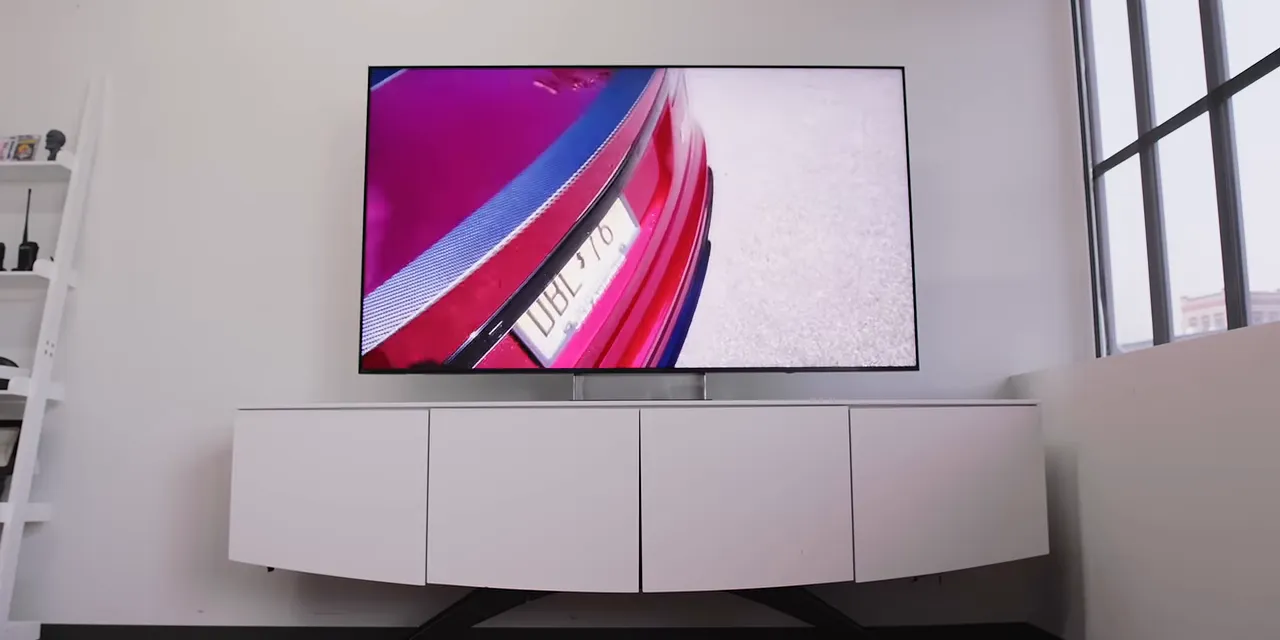
The 65-inch model costs about $3,600. It is a premium 4K television, but not an OLED. Sony’s pitch is that independently controlled red, green, and blue LEDs can deliver vibrant color and high brightness while avoiding OLED’s burn-in concern.
Right out of the box, the reds looked extremely saturated. That was true in Standard mode, and switching to Cinema and other less vibrant presets did not entirely remove that impression.
It still looked very good. But some of the features around the picture made just as much of an impression as the headline display technology.
Anti-glare performance that makes a practical difference
The TV was positioned near a huge window, yet it reflected very little. Deep blacks and high brightness are more useful when room reflections are not fighting the image. The anti-reflective finish was one of the first things I noticed.
Small hardware touches I appreciated
A little optical cover beneath the display disguises the power cable, using an effect similar to lenticular material that obscures what is behind it. It is a clever solution to a very visible annoyance.
The remote also charges over USB-C. No disposable remote batteries required.
Surprisingly effective spatial audio
During setup, you hold the remote out in front of the television. Its microphone helps the TV assess the room while test sounds play.
Upward-firing tweeters and the other built-in speakers produced spatial effects that impressed me. It was not particularly bass-heavy, but the sense of direction was better than I expected from the television itself.
My score: 7.5/10. The benefits are clear. So is the premium price.
What Saying Yes Actually Taught Me
The biggest win was finding things I would otherwise have dismissed. Beni is the obvious example. Its pitch triggered nearly every skeptical instinct I have, and then the actual robot turned out to be delightful.
Other products reinforced why the filter exists. A clever mechanism does not rescue a poor laptop. An AI label does not explain what a chair does. And a product can be genuinely fun without being a sensible purchase for me.
There is also an important boundary here: saying yes to review requests did not mean accepting every speaking invitation, event invitation, or advertising proposal.
RayNeo AR glasses earned the unofficial persistence award by emailing six times from six different accounts, all asking about an ad. Those requests were not part of the product-review experiment.
Another company initially offered to send a product. I accepted, and it then tried to turn the arrangement into an advertising collaboration. I declined the ad but said I was still open to checking out the product.
The company then explained that it would not ship anything without guaranteed coverage.
That is a huge red flag. Agreeing to receive a product for evaluation is not the same as promising to publish something about it. Creators should keep those decisions separate.
So, yes, I am glad I opened the filter for a month. We found some fascinating technology, some very questionable ideas, and a little robot I would have completely missed. I am also glad that saying yes to a product still leaves plenty of room to say no to everything else.
Sponsor: Best Buy
Best Buy sponsored this experiment. I have been answering emails and covering tech for about 17 years, but Best Buy has been doing its thing much longer and was celebrating its 60th anniversary.
One of the best parts of this month was getting hands-on with hardware I would not normally try. That is also a useful part of shopping in a physical tech store: being able to try something before deciding whether it belongs in your life.
|


