The Galaxy Z Fold 8 is a really easy phone to fall in love with. I started using it, immediately liked it, and then spent a week taking pictures, running through battery cycles, installing my apps, and discovering all the little things that don’t show up in a first impression.
The honeymoon is over. And I still really like it.
That’s actually a pretty good way to describe this phone. Getting past the initial excitement doesn’t necessarily mean liking something less. Sometimes it means understanding the flaws better and deciding that the good stuff is still worth it.
And there is a lot of good stuff here. This thin, squared-off, notebook-like foldable is genuinely better than a normal smartphone at several things. It’s also definitely worse at some others. At $1,900, both sides matter.
Samsung provided the phone for review.
Quick Summary
- The thin, lightweight design makes the Fold 8 unusually comfortable for one-handed use and reading.
- The 4:3 inner display works well for multitasking, reading, and surprisingly large widescreen video.
- App compatibility, ordinary cameras, and accessory quirks become more noticeable with daily use.
- At $1,900, its strongest appeal is the experience rather than raw specifications.
Table of Contents
- A Different Shape That Actually Changes the Experience
- The Inner Display Is More Than a Bigger Phone Screen
- Performance and Battery Life Hold Up
- App Compatibility Is the Biggest Wild Card
- The Everyday Hardware Quirks
- The Cameras Are Fine. At $1,900, That Stings.
- One UI 9 Deserves Some Credit
- Three Lessons for a Folding iPhone
- Is the Galaxy Z Fold 8 Worth It?
- Sponsor: Ridge
A Different Shape That Actually Changes the Experience
We’ve seen squat, wider folding phones before. The general idea isn’t new. But the combination of this aspect ratio, the thinness, and the squared-off design makes the Fold 8 feel like a different execution of that idea.
Closed, it has a 5.5-inch, slightly rectangular AMOLED display. It’s bright, sharp, and surrounded by relatively even bezels. Basically, Samsung doing Samsung display things.
The squared edges make it easy to open and close like a small notebook. The power button, which doubles as a fingerprint reader, lands right where my finger naturally rests. And almost the entire outside display is reachable with one hand.
Yes, I have big hands. Still, that’s not something I get to say about most phones anymore.
Reaching every corner isn’t really the point. The benefit is how much normal phone stuff you can do without constantly shifting your grip. The camera app is a particularly good example: the controls you need are arranged along the right side, keeping them within one-handed reach.
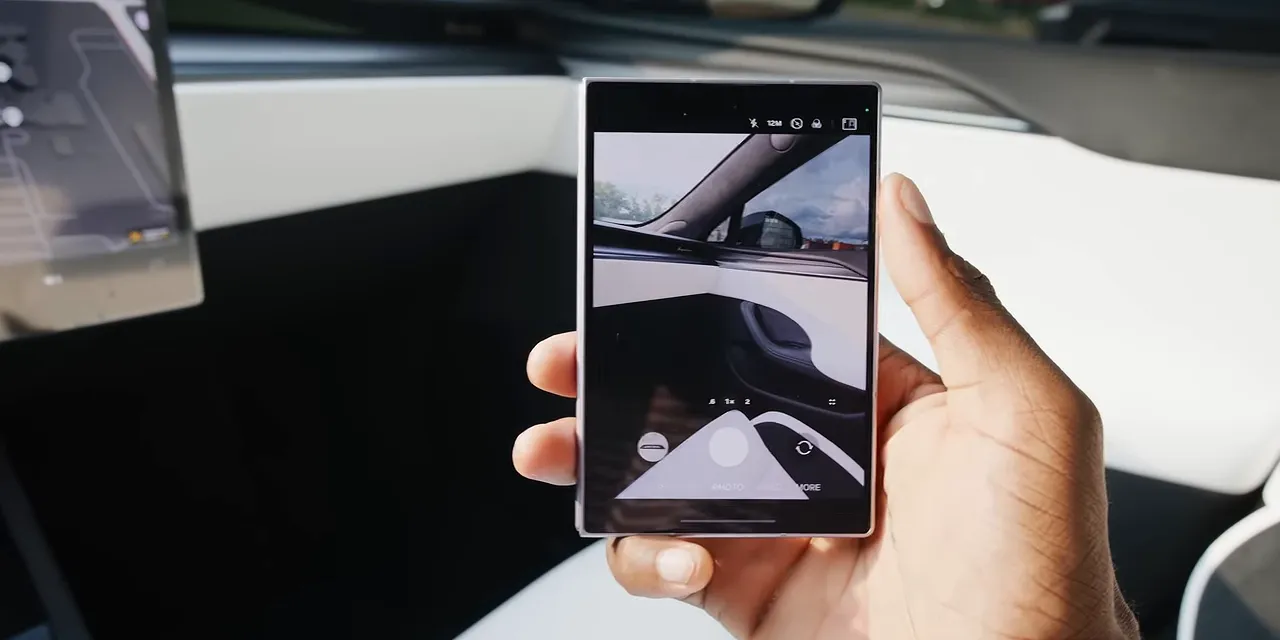
The viewfinder can initially look a little cropped, until you realize that this is simply what a normal photo aspect ratio looks like without a bunch of unused space around it. For taking pictures, this layout is straight-up better than the typical tall-phone interface.
The downside is vertical scrolling. Some content gets awkward black bars, and you get less of that long, uninterrupted feed. Although, if it makes doomscrolling slightly less appealing, maybe that’s an accidental feature.
The Inner Display Is More Than a Bigger Phone Screen
Open the Fold 8 and you get a 4:3 inner display. It keeps that little-notebook feeling, just with a much larger canvas.
The panel itself is another high-refresh-rate AMOLED, now with an anti-reflective coating. Samsung’s Titanium Flex Hinge does a pretty good job of minimizing the crease. I’d give it a B+. It’s an improvement, not a disappearing act.
What really works is the shape. It’s wide enough to make two side-by-side apps legitimately useful, which is how I occasionally get actual productivity out of a folding phone. Having one app open next to another feels natural here rather than like squeezing two tiny phone screens together.
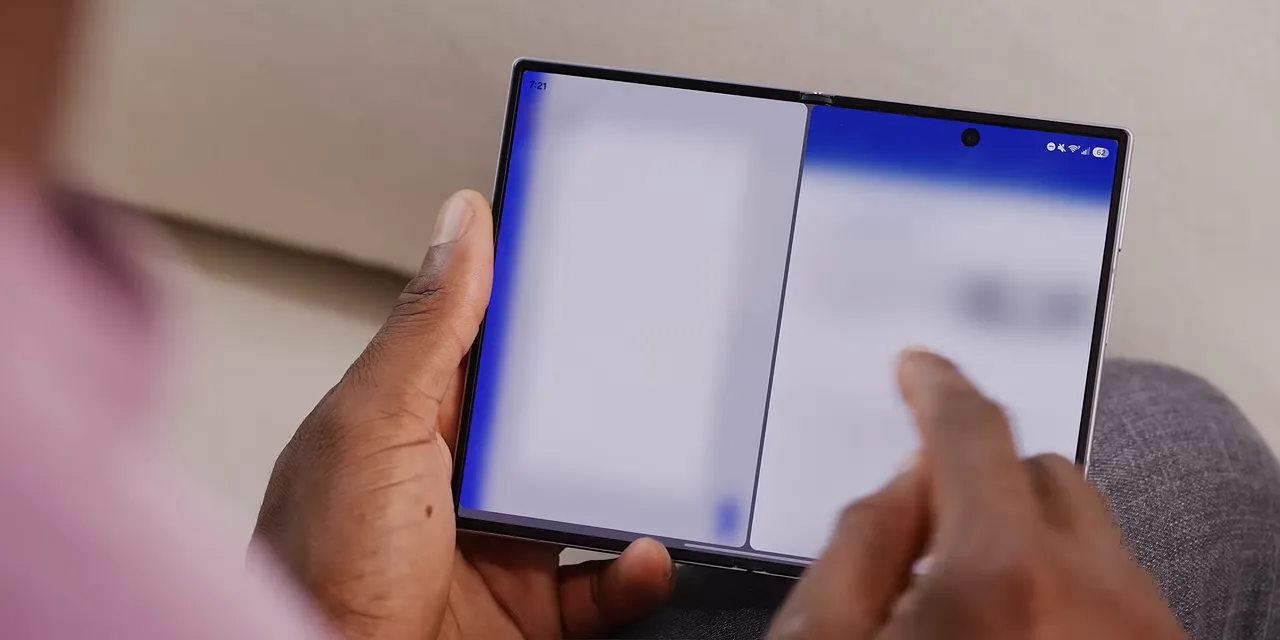
Rotate it, and a single vertical app is also excellent. Reading articles on this thing is genuinely nice. The thin, light hardware makes a difference when you’re holding it for a long time, not just when you’re admiring it on a desk.
Yes, 4:3 Can Be Good for Video
A 4:3 display doesn’t immediately sound like the ideal place for widescreen video. There will be black bars. But here’s the interesting part: the Fold 8 can display widescreen video larger than the Ultra does.
That’s because 4:3 is still wider than a square. Screen shape matters, not just the overall size of the unfolded panel. With the Ultra held vertically, the Fold 8’s wider canvas gives the actual video more room.
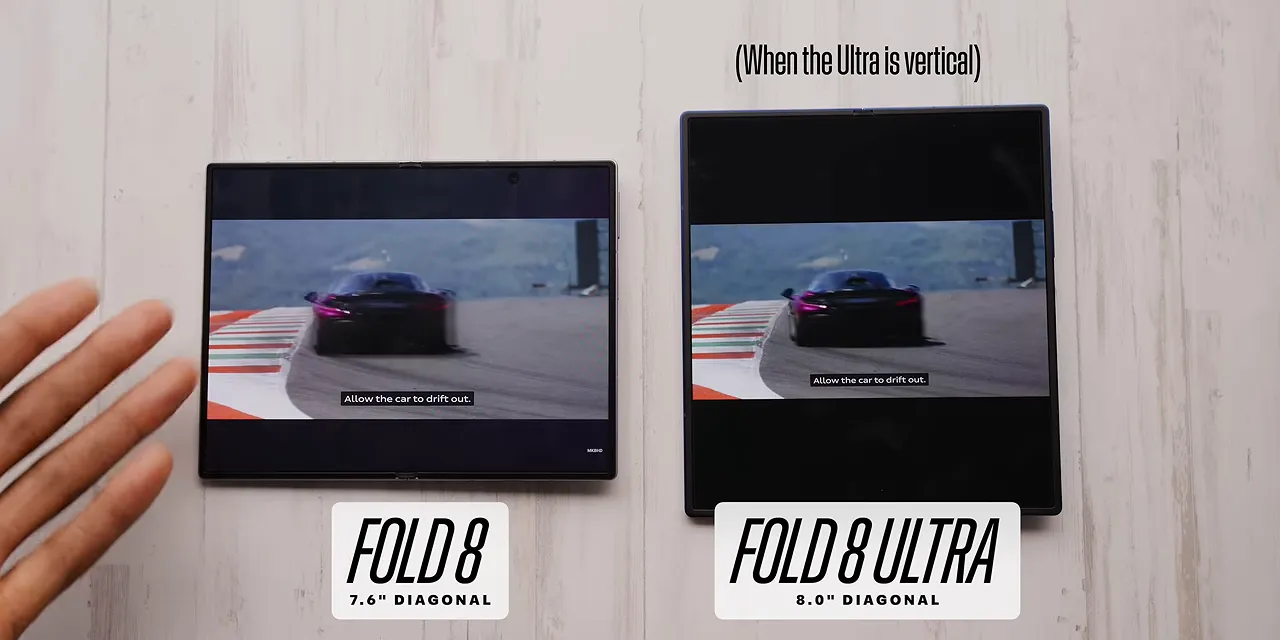
Then there’s native 4:3 content, whether it’s older material or something newer that uses that format intentionally. That looks fantastic. Filling this display makes the whole form factor click.
So the early appeal is easy to understand: great screens, lightweight hardware, satisfying opening and closing, and a shape that makes ordinary tasks feel different. It’s just fun to use.
Performance and Battery Life Hold Up
The spec sheet supports that good first impression, too:
- Processor: Snapdragon 8 Elite for Galaxy.
- Battery: 4,800mAh, with Samsung beginning to incorporate silicon into its batteries.
- Charging: 45W wired charging.
Samsung isn’t pushing silicon battery technology as aggressively as Oppo, Vivo, or Xiaomi. But it’s doing enough to fit a 4,800mAh battery into this thin phone, and that battery has delivered all-day use for me, even with plenty of time on the larger display.
The 45W charging is respectable, and it’s faster than any previous Samsung folding phone. That’s a welcome improvement.
At this point, it’s pretty easy to think Samsung might have nailed it. Then you finish installing your apps and start living your normal life.
App Compatibility Is the Biggest Wild Card
Not every app knows what to do with these aspect ratios.
Sometimes that means something mildly annoying: blank space, black bars, or an app that sits in a narrow column instead of taking advantage of the screen. You notice it, but you can keep going.
Other times, the app is functionally broken.
My example is Crossplay. Don’t judge me. On the outside display, the screen is too short to show the play button. Open the phone, and the inner screen is also the wrong shape. Rotating it doesn’t solve the problem. I cannot get the button to appear.
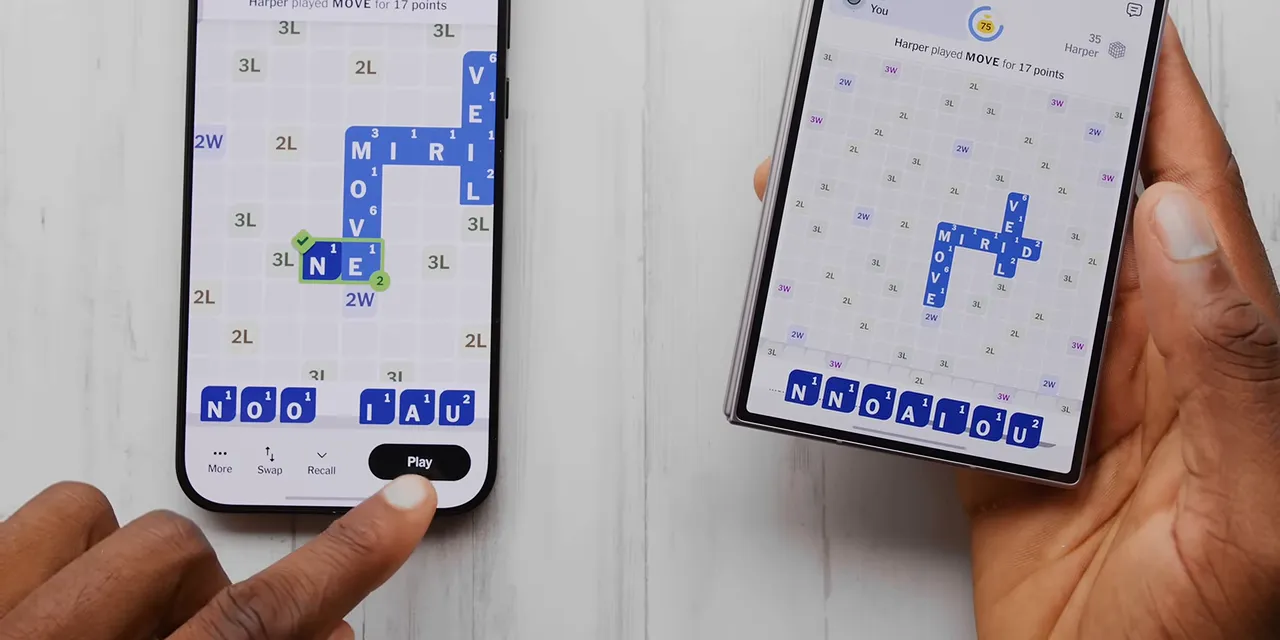
That isn’t an aesthetic issue. It makes the game unplayable on this phone.
Your experience depends on your apps. You might encounter fewer problems than I did, or you might run into more. Either way, this is the part of the foldable experience that great hardware can’t fix by itself.
Developers need to build layouts that respond properly to changing screen dimensions. Google’s adaptive app guidance provides useful context for why supporting a foldable means more than simply stretching an existing phone interface.
The Everyday Hardware Quirks
The app situation is the biggest uncertainty, but there are also a handful of predictable compromises that become more obvious over time.
No Flex Mode
The spring-loaded hinge makes the Fold 8 satisfying to open and snap shut. The trade-off is that it doesn’t offer the same useful halfway-open experience as the Ultra.
You can kind of prop it partially open, but there’s no Flex Mode software experience to take advantage of that position. If using your foldable like a tiny self-supporting laptop is part of the appeal, that’s a missing feature here.
The Speakers End Up on One Side
Closed, the speaker arrangement is fine. There’s a speaker at the top and another at the bottom of the front half, giving you stereo sound.
Open the phone, though, and both speakers are now on the left side. With full-screen video, the audio sounds noticeably lopsided. The picture spreads across the whole device, while the sound comes from one side.
Wireless Charging Requires More Attention
The shorter body doesn’t line up well with every wireless charger. Upright charging stands and in-car chargers often depend on the height of a conventional phone to position the charging coils correctly. A lot of those car chargers simply didn’t work for me.
There are also no built-in magnets. Accessories I previously relied on aren’t usable in the same way without adding a magnetic case.
And if you skip the case, this phone rocks quite a bit on a table. None of these issues individually ruins the experience. Together, they’re the sort of details that turn an exciting new gadget into something you have to adjust your routines around.
The Cameras Are Fine. At $1,900, That Stings.
Probably the most obvious hardware compromise is the camera system.
Making a phone thinner, lighter, and smaller while preserving enough battery capacity leaves less room for cameras. Here, you get:
- A 50-megapixel primary camera.
- A 50-megapixel ultrawide camera.
- No telephoto camera.
These aren’t bad cameras. They’re just not on the level of the flagship cameras you’d ordinarily expect from an expensive slab phone.

Most of my photos were fine. Not especially sharp, not remarkable for their colors, and not impressive in low light. Just fine.
That might sound like nitpicking, but the price changes the expectation. On a $1,900 phone, not having some of the best cameras hits harder. Expensive flagship phones should generally deliver flagship photography, and here you’re clearly paying for something else.
One UI 9 Deserves Some Credit
The new shape takes up so much attention that some of the software improvements are easy to overlook.
This is my first phone running One UI 9 on Android 17, and there are some nice touches. The responsive lock-screen clock adjusts around the wallpaper. The volume and brightness sliders in Quick Settings are thicker. There are a bunch of other subtle interface changes, too.
None of that is game-changing, but it deserves a nod.
I also appreciate being able to turn off home-screen mirroring. The outer display and inner display can have completely separate layouts rather than forcing the same arrangement onto two very different spaces. That’s exactly the kind of flexibility a device like this should offer.
Three Lessons for a Folding iPhone
Using this phone also has me thinking about Apple’s expected folding iPhone. At the time of this review, that announcement is still a possibility ahead of us, not a finished product we can evaluate.
But the Fold 8 makes three things pretty clear.
- App support has to be a priority. Developers ultimately determine whether the unusual screens feel useful or frustrating. Apple’s developer relationships are a strength, and its emphasis on responsive apps and different aspect ratios could help. Ideally, that translates into fewer missing-button situations.
- Thin and light really matters. Better batteries, hinges, displays, and smaller components make returning to this wider shape more compelling. The hand feel isn’t a superficial bonus. It changes how much I look forward to taking the phone out and using it.
- It’s going to be expensive. This Fold already costs $1,900, while the Ultra starts above $2,000. A folding iPhone could push that conversation even further.
I’m already concerned that Apple might skip silicon-carbon batteries, as it did with the iPhone Air. To be clear, that’s a concern about an unannounced device, not a confirmed specification. Call it being pre-mad.
And the idea of a $2,500 folding iPhone? That’s the kind of speculation we’ve been throwing around on the Waveform podcast, not an announced price.
Is the Galaxy Z Fold 8 Worth It?
Objectively, on paper, the value argument isn’t especially convincing.
You’re getting a smaller outside screen, a smaller inside screen, a smaller battery, fewer and less capable cameras, and the same chip available in other flagships. This is positioned as the more casual alternative to the Ultra, but $1,900 is not exactly casual money.
Yet a spec sheet doesn’t explain why I like using it so much.
The reachable outside screen, the comfortable reading experience, the useful unfolded shape, and the thin, light feel add up to something that genuinely feels new. Not just a normal phone with a bigger number attached.
This makes the most sense for someone who has the money to spend and specifically wants that different experience. You have to accept the camera downgrade, check whether your apps behave, and be willing to work around some accessory quirks.
The honeymoon is over. I know the flaws now. And I still want to keep using it. That’s probably the strongest compliment I can give this phone.
Sponsor: Ridge
Ridge is sponsoring this review and promoting a sweepstakes with two winners. Each winner can choose a Hennessey VelociRaptor, a Lamborghini Huracán Sterrato from its 1,499-unit production run, a custom Kevlar-plated Ford Bronco, or $100,000 cash.
Entry is free, with no purchase necessary. Eligible purchases can provide additional entries. A few gear recommendations include the Tracker Card, which works with Apple’s Find My network, plays an audible alert, lasts up to five months on a charge, and charges wirelessly; the 10,000mAh 5-in-1 power bank, with MagSafe compatibility, USB-C and Lightning cables, and an Apple Watch charging pad; and the Atomic Purple wallet, including an updated MagSafe version with a flatter magnetic attachment.
The stated entry deadline is September 8, 2026, at 9:00 a.m. USPT. Eligibility, entry limits, prize details, and restrictions apply. See the official sweepstakes rules, including instructions for entering without a purchase.
|


