“Modular” is one of those words that immediately sets off a few alarms in my head. We have seen plenty of ambitious concepts promise a future where every component is replaceable, only to disappear before becoming something you can actually buy.
Remember Phonebloks? Project Ara? The exciting concept, the Google I/O demonstration, the reassurance that development was still happening, and then nothing.
Sometimes the idea does turn into a real product. Fairphone is a great example. But there is still a difference between a product everyone can root for and a product everyone wants to spend their money on. Early Framework laptops landed in that same category for me: an excellent idea, with hardware that did not quite feel as premium as I wanted.
The Framework 13 Pro is their biggest step toward closing that gap. Framework’s internal goal was essentially to build a MacBook Pro for Linux users, including the ambition of MacBook Pro-level battery life, without giving up control over your own hardware.
That is a big promise. But for the first time, this feels like a genuinely premium laptop that also happens to be modular, rather than a modular laptop you buy despite its compromises.
Quick Summary
- The Framework 13 Pro combines premium construction with unusually accessible repairs and component upgrades.
- Its display, keyboard, and productivity performance impress, but the speakers and webcam fall short.
- Ubuntu feels comfortable for everyday work when the applications you need are available.
- High upfront pricing makes the strongest case for owners who plan to repair and upgrade over time.
Premium Hardware, With Ports You Choose
Apple’s argument for its laptops is built around integration. The CPU, GPU, and memory are tightly integrated, and none of those components can be upgraded after purchase. Repairs to things like ports and batteries are also more involved. What you get in return is an exceptionally polished, all-metal laptop.
Framework is trying to approach that level of polish from the opposite direction.
The Framework 13 Pro comes in DIY and prebuilt versions. Mine is prebuilt, so the main decision after unboxing was which ports to install. I chose three USB-C ports and an SD card reader.
That configuration does not have to be permanent. If I need HDMI or DisplayPort later, I can swap in a different expansion card. Framework also offers options including microSD and Ethernet. Your port selection is something you can change, not something you have to predict correctly when ordering.
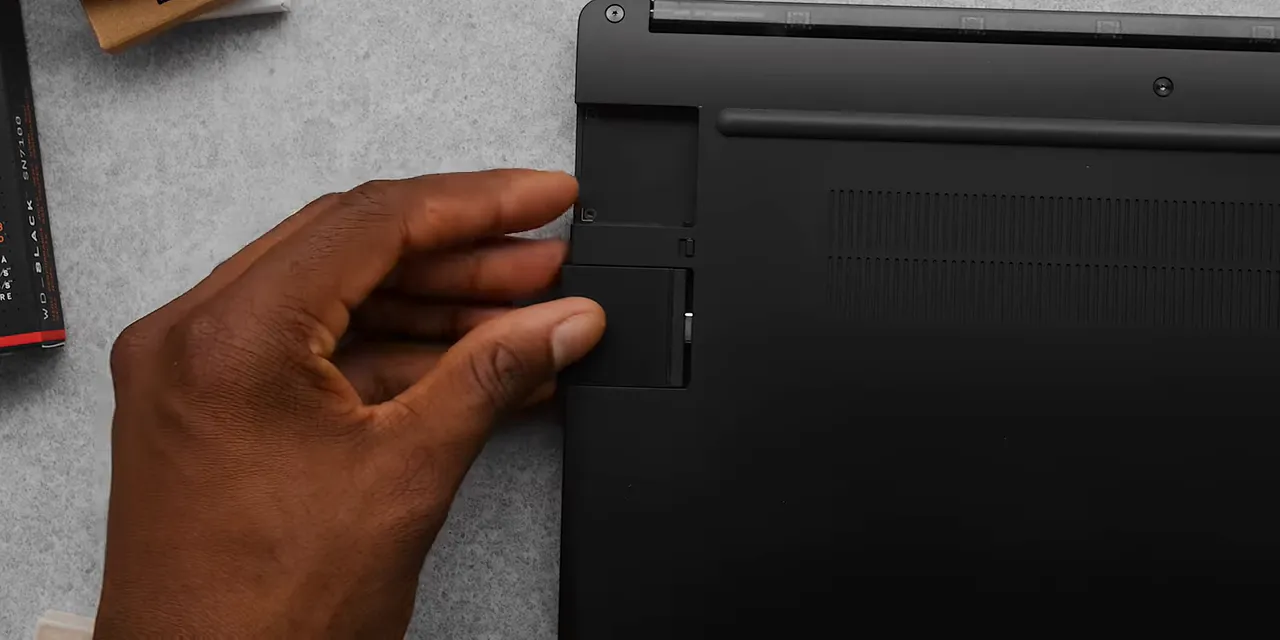
And the laptop itself looks fantastic. Yes, it is matte black, which helps. But the full CNC aluminum chassis also feels good, does a respectable job hiding fingerprints, and has a little more personality than a completely anonymous slab of metal.
There is a Framework logo centered on the lid, a full-size backlit keyboard, a large haptic trackpad, and a fingerprint reader in the corner. The keyboard deck is roughly the same thickness as the one on a 14-inch MacBook Pro.
Customization That Doubles as Repairability
Framework calls the keyboard deck the Input Cover. With the screwdriver included in the box, you can replace the whole assembly in about five to ten minutes. That could mean replacing a damaged part, or just switching to a version with colorful accent keys.
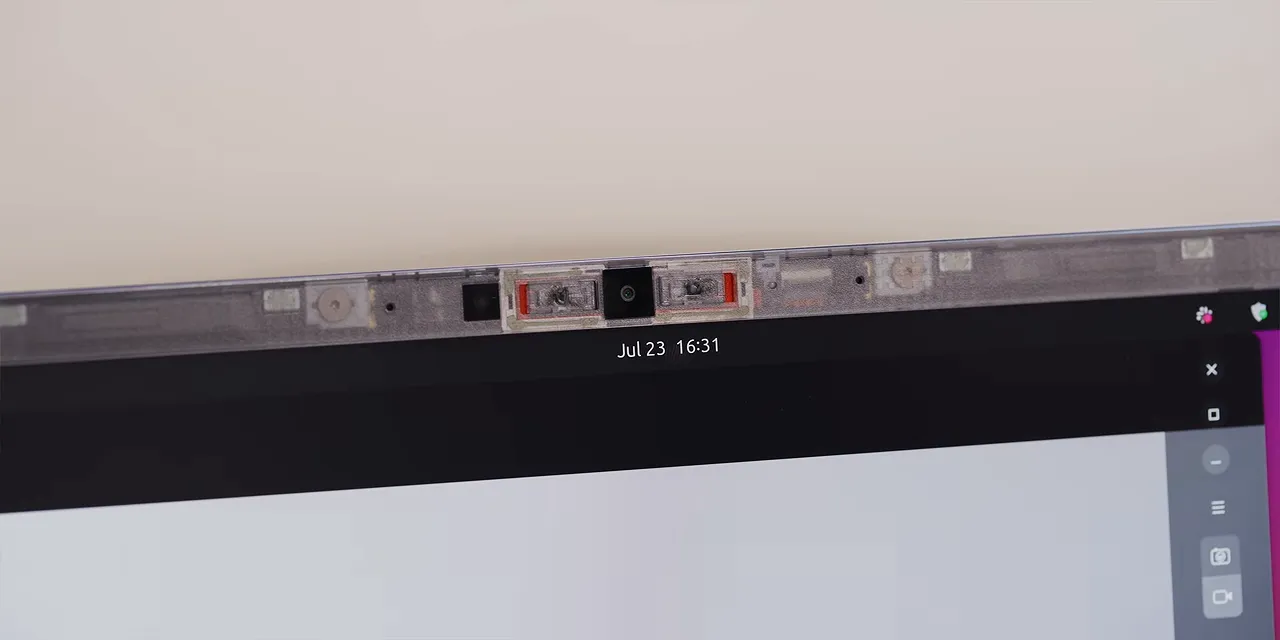
The display bezel is replaceable, too, without tools. The transparent-colored version lets you see some of the magnets and webcam assembly underneath. It is a cool little bit of character, and you can swap it for another color or a plain black bezel if that is more your thing.
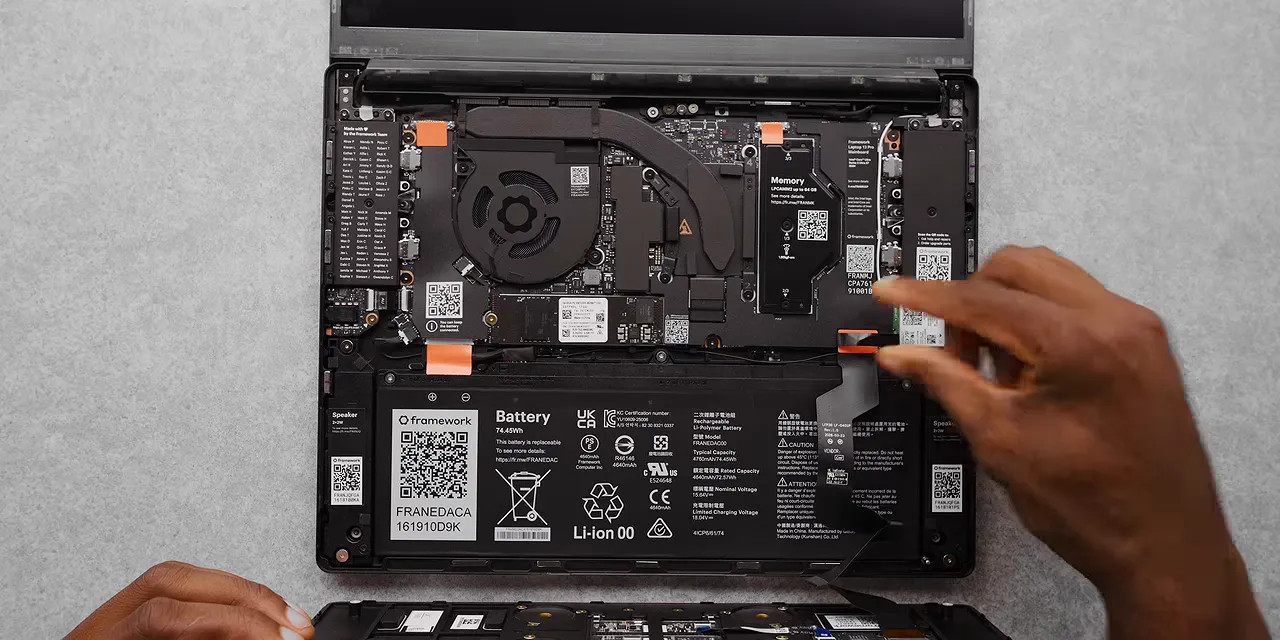
Importantly, this is backed by documentation. Framework’s repair guides include instructions, difficulty ratings, and tool requirements. Very often, the tool requirement is simply the screwdriver that already came with the laptop.
That is the part I love: repairability, replaceability, and upgradability do not make this feel dramatically compromised.
Does it match a MacBook Pro’s construction exactly? No. My subjective estimate would be about 85% of the way there. It is not a unibody design, and twisting the chassis can make the top piece separate slightly from the bottom. That does not feel great. It also passes the one-finger opening test, but the display wobbles more afterward than on some other laptops I have used.
Still, this is Framework’s best build yet. It finally feels like the premium modular laptop people have been asking for.
The Display: Built for Productivity, Built to Be Replaced
The useful way to evaluate this laptop is along two separate axes:
- How good is each component compared with a MacBook Pro?
- How easy is that component to repair or replace?
Once you do that, a pattern starts to emerge.
The custom display is easily the best Framework has offered. It has a 2880 × 1920 resolution and a 3:2 aspect ratio, which I think is underrated. This is clearly a productivity laptop, and the extra vertical space is useful for documents, code, and anything else where a few more lines on screen make a difference.
The anti-glare finish is also excellent to have in a brightly lit office. A comparable anti-glare option on a MacBook Pro would add $150. And this Framework panel happens to be a touchscreen, too.
The main limitation is color coverage. It covers 100% of sRGB, but not the full DCI-P3 gamut offered by the MacBook Pro. If your work involves photography or video editing, that distinction could matter. For everyday productivity, I am pretty comfortable putting the overall screen experience at roughly 80% to 90% of the MacBook Pro’s.
Those percentages are impressions, not lab scores. The important part is what happens next: you can remove and replace the Framework display with a single screwdriver.
By comparison, a MacBook Pro display replacement can involve a lengthy repair guide, multiple tools, and suction cups, before you even get into sourcing the replacement part at a reasonable price.
So the trade-off is not simply “slightly worse display.” It is a very good display with dramatically more repairability.
A Good Keyboard and Trackpad You Can Actually Replace
The keyboard follows the same pattern. It is full-size, backlit, and has nice key travel. The keys are a little less clicky than I personally prefer, but I can still type quickly on them without a problem.
You get a function row, a large haptic trackpad that looks roughly 90% of the size of the MacBook Pro’s, and a fingerprint reader. The fingerprint reader is a little slower than Apple’s, but it works.
Overall, it is a very solid keyboard deck. Again, I would put the experience somewhere around 80% to 90% of the MacBook Pro’s, with the enormous difference that the whole assembly comes off with one screwdriver.
That matters much more when something breaks than it does when everything is new. Replacing a keyboard deck is a very different proposition from dealing with a laptop whose keyboard is buried inside a much more complicated assembly.
Performance and Internals: Plenty for Everyday Work
The configuration I have been using includes:
- Processor: Intel Core Ultra X7 from the Core Ultra Series 3 lineup.
- Memory: 32GB of fast LPDDR5X RAM, with configurations starting at 16GB and support for upgrades.
- Storage: A 1TB PCIe Gen 5 SSD, also upgradable.
- Battery: A replaceable 74Wh battery, substantially larger than the previous generation’s.
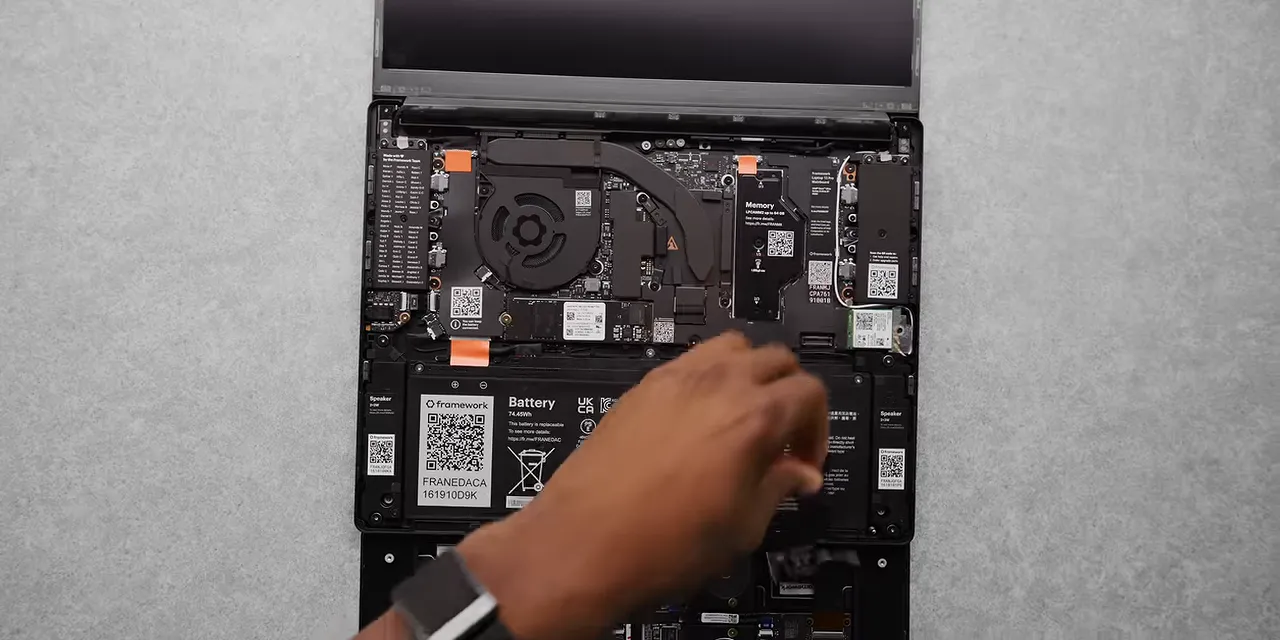
Comparing performance directly with Apple Silicon is less straightforward than comparing keyboard feel or chassis rigidity. The architectures are very different, and Apple’s integrated approach has its own advantages.
What I can say from using it is that the Framework has easily handled the productivity work I have thrown at it: word processing, email, Slack, Notion, and task managers. It is snappy. No problem.
The Core Ultra Series 3 lineup is efficient, and the integrated graphics are capable enough for some light gaming. This is still a productivity machine first, but it is not limited to documents and browser tabs.
If you reduce the comparison to benchmark numbers, the broad idea is similar to the rest of the laptop: performance in the neighborhood of 80% of a MacBook Pro, depending on what you are comparing, paired with vastly more modularity. That is not a universal performance ratio, but it captures the trade-off.
The larger battery is worth noting, too. Framework’s stated goal is MacBook Pro-level endurance, but battery capacity alone is not proof that it has reached that target.
The Weak Spots: Speakers and Webcam
Two components do not get nearly as close to the MacBook Pro experience.
First, the speakers. Do not let the Dolby Atmos branding set your expectations too high. These are barely half the speakers of the MacBook Pro, whose speakers remain ridiculously good.
Then there is the webcam. It is 1080p, but resolution is not the problem. The image is noisy, full of artifacts, and generally poor in the video calls and recordings I tried.
The MacBook Pro does not have some unbelievable webcam, either. But this one is a clear disappointment.
What I do appreciate is the pair of physical switches built into the bezel. They let you disconnect the webcam and microphone independently. That is a genuinely useful privacy feature, even if it does not fix the image quality.
Linux Feels Like a Natural Fit
I have been using Ubuntu on this machine. It has been a while since I used Linux as my daily operating system, and the experience has come a long way.
You can configure the Framework 13 Pro with Windows 11 instead. Personally, I probably would not.
For everyday use, the basic interface and capabilities are familiar enough. The bigger question is developer support: can you get the applications and tools you need?
There are plenty of options here:
- Browsers: Firefox, Chromium, Vivaldi, and Opera.
- Creative tools: GIMP for photo editing and Blender.
- Everyday apps: 1Password, Discord, and Todoist.
- Games: Steam and additional options in the App Center.
That does not mean every workflow will transfer perfectly. But if your required tools work in a Linux environment, this is a pretty good time to consider it.
There is also noticeably less of the Copilot, AI, and advertising clutter that has been making Windows more frustrating lately. For a productivity laptop, that matters.
The Ubuntu desktop experience has been pretty nice. Not a dramatic revelation. Just a pleasant operating system that lets me get things done.
Price and Value: The Longer You Keep It, the More Sense It Makes
So, has Framework built a modular laptop worth buying over a MacBook Pro?
The word “worth” is doing a lot of work there.
This is a more expensive machine than previous Framework laptops, and prices increased while I was reviewing it amid the memory shortage. The entry preorder price went from about $1,500 to $1,600. The higher-end option went from about $2,100 to $2,900.
That is a premium price to go with the premium build. And while it gets close to the MacBook Pro in several important areas, it does not match it everywhere. Some other Windows and Linux laptops may get closer on the initial hardware experience.
The day you buy the Framework is the day its value proposition is least convincing.
You have paid a lot for a machine that is not quite the best at everything. Its biggest advantage is something you may not need immediately.
But the longer you keep it, the more that advantage matters. The first time you upgrade a component or replace a damaged part, the equation starts to change. A spill that damages the keyboard deck, or a damaged port, could become a targeted parts replacement instead of a much larger repair or a whole new laptop, depending on what was affected.
A MacBook Pro can also last for years, with long software support. The difference appears when your requirements change. If your applications suddenly need more RAM, you cannot add it. If your needs evolve beyond the configuration you bought, the upgrade path is another computer.
Framework’s main selling point is that you have other options. The company is also committed to long-term software updates, but its hardware compatibility is the more interesting evidence of that commitment.
Backward Compatibility Makes the Promise More Credible
You can buy the new motherboard and install it in an older Framework 13, including one from about five years ago. That brings newer capabilities, such as faster Wi-Fi and better memory, to a machine you already own.
That is a much stronger statement than simply saying a laptop is repairable. Framework is giving existing owners a way to keep improving their computers without replacing everything around them.
And that is what makes this laptop special. It is not the automatic winner for someone who wants the most polished possible hardware on day one. The speakers and webcam are weak, the chassis is not quite MacBook-solid, and the price is high.
But if you are willing to commit to keeping and upgrading a laptop over time, Framework has built something genuinely compelling. The modular idea is no longer just something to root for. It is a real, premium product with a practical reason to exist.
I am glad it does.
Framework provided the laptop for review.


