Maybe we're all pros now. Or maybe Apple has decided that “pro” is less about a very specific kind of professional and more about anyone who wants the really good version.
The new Studio Display XDR is a great example. It's a 27-inch 5K mini LED monitor with up to 2,000 nits of HDR brightness, a 120 Hz refresh rate, Thunderbolt 5, and a $3,299 starting price. It's really good. It's also really expensive.
But after using it for a few days, the interesting part isn't just the panel. It's that this Studio Display replaces the Pro Display XDR. Studio replaces Pro. Keep that in mind, because it says quite a bit about where Apple seems to be heading.
Apple provided the display for review.
Quick Summary
- The Studio Display XDR delivers substantially better brightness, contrast, and motion than Apple's previous displays.
- Thunderbolt 5 connectivity and 140 W charging make it a compelling single-cable MacBook Pro companion.
- The $3,299 starting price includes the stand, but this remains an expensive monitor.
- Its mixed-use design prioritizes professional capability alongside everyday convenience rather than narrowly specialized workflows.
Two Studio Displays, Very Different Upgrades
Apple's two new monitors tell pretty different stories.
The regular Studio Display is barely updated. It has the same design, the same stand, the same chassis, and the same familiar 27-inch 5K IPS LCD panel. There's a new processor inside and Thunderbolt 5 connectivity on the back, but the price is still about $1,600.
It's good-looking. It's also a little weird to see that essentially decade-old panel technology still sitting at that price.
The Studio Display XDR is the meaningful upgrade. It keeps the 27-inch size and 5K resolution, along with the excellent stand, but finally adds the display technology that makes sense next to a modern MacBook Pro:
- A mini LED backlight with 2,000 local dimming zones.
- Up to 1,000 nits of full-screen SDR brightness.
- Up to 2,000 nits of peak HDR brightness.
- A maximum 120 Hz refresh rate with adaptive sync support.
That makes this much more than a regular Studio Display with a brighter backlight. It's a substantially higher-performing monitor, and it's taking over the spot previously occupied by Apple's Pro Display XDR.
The Panel Is the Main Event
There's not a whole lot of suspense here: this is an awesome display.
Compared with the Pro Display XDR, it improves the major image-quality characteristics I care about. Full-screen SDR brightness goes from 500 nits to 1,000 nits. Peak HDR brightness goes from 1,600 nits to 2,000 nits. And local dimming jumps from 576 zones to 2,000.
Those zones matter because the backlight can control smaller portions of the image independently. A bright object against a black background doesn't need to illuminate as much of the surrounding screen.
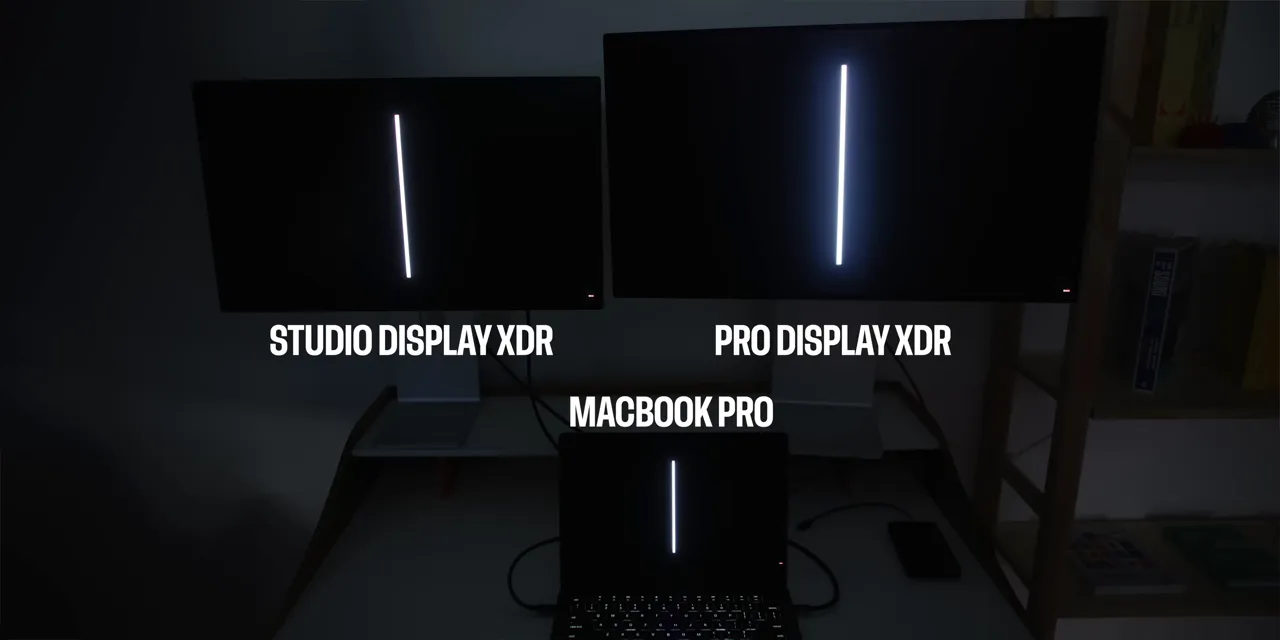
In a dark room, the difference is obvious. The Studio Display XDR has much less blooming around bright objects, and the contrast looks dramatically better. This isn't one of those upgrades where you need to convince yourself that you can see it.
For reference, Apple's Pro Display XDR specifications provide the baseline for the older display's brightness and backlight system.
Then there's 120 Hz. It improves the ordinary stuff you do all day: scrolling, moving windows, and navigating animations. You can even use it for gaming. That's not typically the job of a professional reference monitor, but it makes a lot of sense for a display that has to do more than one thing.
A Lower Price, Relatively Speaking
The Studio Display XDR also costs less than the monitor it replaces. That needs some context, because “less” is doing a lot of work here.
- Pro Display XDR: Started at $5,000, with another $1,000 for the stand and another $1,000 for nano-texture glass.
- Studio Display XDR: Starts at $3,299 with the stand included, and nano-texture adds $300.
So yes, this is a better-performing display for substantially less money. No, that doesn't suddenly make it inexpensive.
Nano-Texture Keeps Getting Better
The unit I've been using has nano-texture glass, and Apple's treatment seems to be improving with each generation.
The original nano-texture Pro Display XDR was effective at reducing reflections, but cleaning it always felt like a high-stakes activity. Touch the screen, leave a mark, immediately wonder whether you've made a permanent mistake. Not ideal.
Since then, nano-texture has appeared on the MacBook Pro and even the iPad Pro, which is, obviously, a touchscreen. My experience with the MacBook Pro version was already less intimidating, particularly when it came to cleaning.
This new desktop display still comes with a separate polishing cloth and a note instructing you to use only the included cloth. The cloth is different from the one supplied with the older Pro Display, too.
I'm less worried about the finish than I used to be, but that's not the same thing as establishing that any random microfiber cloth is approved. The supplied cleaning instructions are still the instructions to follow.
And yes, Apple updated the older polishing cloth's compatibility list to include the new Studio Display. A tremendous relief for everyone keeping track of polishing-cloth compatibility.
Finally, a Proper MacBook Pro Partner
My problem with the previous Studio Display wasn't that it looked bad. It was that it didn't feel like an especially good match for the MacBook Pro.
You had this bright, high-refresh-rate mini LED screen on your laptop, then a 60 Hz LCD on your desk. The external monitor was bigger, but in some important ways it felt like a step backward.
The Studio Display XDR fixes that mismatch. Now the laptop and external monitor share the same broad strengths: high brightness, mini LED contrast, and a high refresh rate.
Of course, there are plenty of other monitors you can connect to a Mac. The reason people keep choosing Apple's displays isn't just the silver metal, although that is clearly part of it. It's how neatly everything works together.
The One-Cable Setup Is Still the Selling Point
Plug one Thunderbolt 5 cable into your MacBook Pro, and the desk comes to life. The display connects, the accessories plugged into its rear ports become available, and the laptop charges at up to 140 W.
The extra Thunderbolt 5 port is sneakily one of the most useful upgrades. You can connect fast external storage without giving up that full-speed connection, or use it to connect another display.
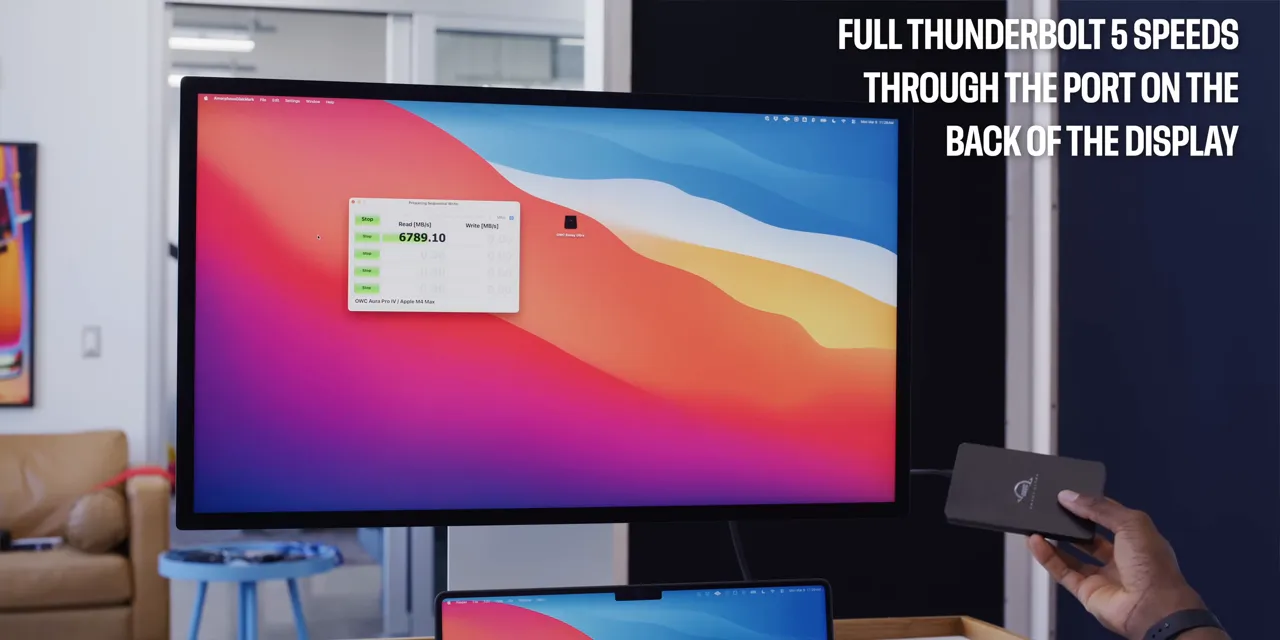
The supported configurations described here include daisy-chaining up to four regular Studio Displays or two Studio Display XDRs to the same MacBook Pro, all through that single connection to the laptop.
With two XDRs, that means matching high-refresh-rate, high-brightness mini LED screens across the setup. That is a much more coherent extension of the MacBook Pro than the old Studio Display was.
What “Studio Replaces Pro” Actually Means
The naming is more interesting than it initially looks.
Apple calls this a Studio Display, but its announcement still describes it as its best professional display. So the professional capability hasn't disappeared. It's just been packaged as the upgraded version of a more familiar product.
There's a Studio Display, and then there's the better Studio Display XDR. That's easier to explain, easier to understand, and easier to sell. Apple does love a clear price ladder.
My theory is that Apple is less interested in building specifically for the narrowest professional markets than it is in making high-end consumer products with professional-level capabilities.
Those specialized professional customers are a small, demanding group. They're also less likely to care about the ecosystem conveniences that make Apple products appealing to everyone else. A dedicated editing room doesn't necessarily need a built-in webcam, integrated speakers, or a particularly elegant docking experience.
An iPhone Pro or MacBook Pro, on the other hand, can appeal to a much broader audience while still being powerful enough to get serious work done. This display fits that same idea.
And That Makes the Mac Pro Look Vulnerable
The natural extension of that theory is that the Mac Pro might be in trouble.
At the time of this review, it hasn't been updated since the M2 Ultra version in 2023, while the Mac Studio has been getting more regular attention. I'd be willing to bet the Mac Pro doesn't get another update.
That's a prediction, not an announcement. But the pattern is hard to ignore: Studio is increasingly the name attached to Apple's most capable desktop products, while Pro remains all over its premium mainstream devices.
More Than Pro Enough for Mixed Use
For the work I do, this display is more than pro enough.
Some days that means editing video or working on photos. Other times it means a virtual meeting, a video call, music, entertainment, or just ordinary desktop work. This is a mixed-use product, and its extras make sense in that context.
The 1080p Center Stage webcam is perfectly average. Not amazing, not a reason to buy the monitor by itself, but useful when you need to jump into a call without adding another camera to your desk.
The speakers are surprisingly good for this thin chassis. Think roughly 16-inch MacBook Pro territory: impressive built-in audio, not a replacement for a proper set of dedicated speakers. If sound matters to your setup, you should probably still get those.
And the 120 Hz refresh rate benefits all those everyday interactions in between the serious work. This isn't trying to be a reference monitor that lives in a dark editing room and does exactly one job.
The Compromises Are Real, but the Alternatives Are Limited
There are things to complain about.
- The included Thunderbolt 5 cable is short: At roughly three feet, it doesn't leave much flexibility for desk layouts.
- The top gets a little warm: This is a large, bright display with an A19 Pro chip and 12 GB of RAM inside handling features such as the camera and audio.
- The power cable is still non-removable: The power supply is built in, which is nice, but the attached cable makes replacement more awkward than it should be.
- It's smaller than the Pro Display XDR: Existing owners give up some screen real estate, and the bezels are slightly thicker.
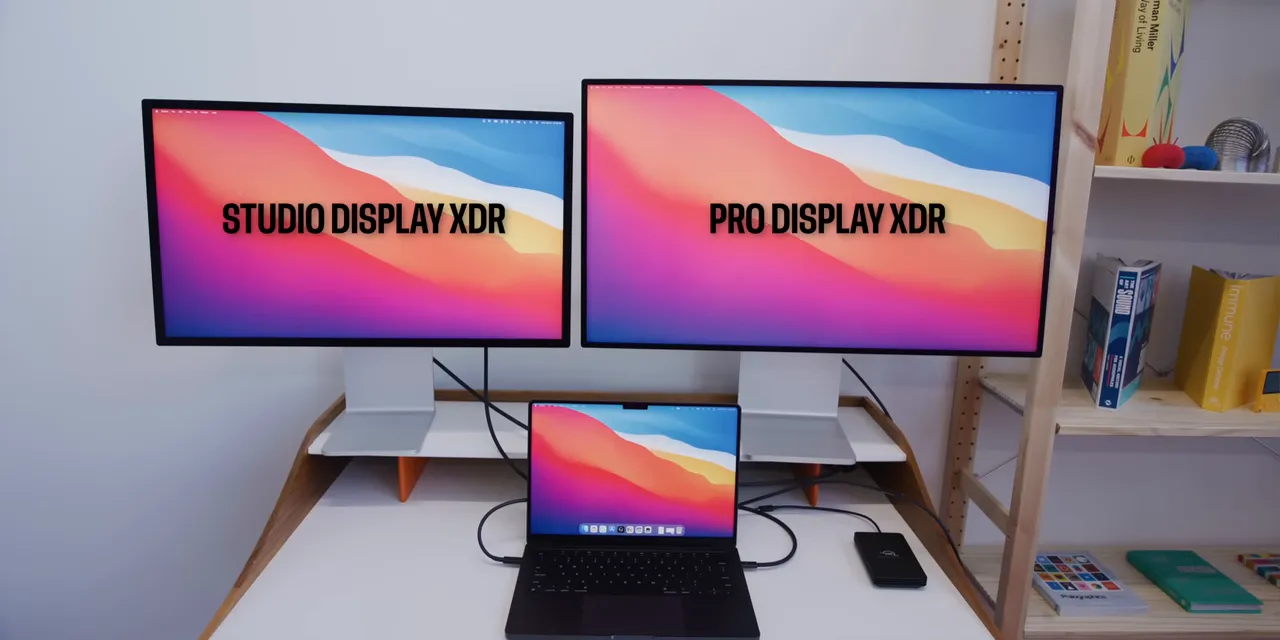
That last point is the one I notice most as someone who's used the larger Pro Displays for years. You get accustomed to having that much space. Still, 27 inches at 5K isn't exactly cramped, and the improvements elsewhere make switching pretty tempting.
The bigger problem for comparison shopping is finding an actual equivalent. A 27-inch 5K mini LED display with 2,000-nit peak HDR brightness and a high refresh rate is a very specific combination. I don't have another option matching that whole package to put next to it.
That doesn't erase the flaws or excuse the price. It does explain why a short cable and a warm top edge don't meaningfully change my conclusion.
The Verdict
If you already own a Pro Display XDR, the decision comes down to how much you value its larger workspace versus better brightness, contrast, motion, and connectivity. I'm used to those bigger displays, but the Studio Display XDR improves enough elsewhere that I probably should switch.
If you don't already own one and want the best display to complement a MacBook Pro, this is about as good as it gets, especially for that single-cable desk setup.
The Studio Display XDR is an excellent mixed-use monitor with professional-level capabilities. It's not affordable, and it isn't built exclusively around the needs of the most specialized professional environments. For a creator who also needs their desk to handle the rest of daily life, that's precisely why it works.
Now Apple just needs to give the Mac Studio a fresh Ultra chip to go with it. That would be appreciated.


