I usually think of drones as tools. Expensive tools, sure, but really useful when you have a specific aerial shot in mind. You take one out, work on getting that shot, and bring it home.
The Antigravity A1 is a little different. It can get aerial footage, but after spending time with it, the bigger surprise is how much fun it is to fly. Not necessarily to make anything. Just to fly.
The reason is pretty simple: this is essentially a 360 camera that happens to have propellers. Pair that with head-tracked FPV goggles and a joystick, and you get something that feels meaningfully different from the drones I’ve tried before.
Disclosure: Antigravity sponsored this hands-on experience. This isn’t a full review, and I’m not a drone expert, but I do have some feedback alongside the things I really like.
Quick Summary
- The A1 captures 360-degree footage, letting you choose camera framing after the flight.
- Head-tracked goggles let you look around independently of the drone’s flight direction.
- The joystick feels approachable because flying and final camera framing are separate tasks.
- Subtle stitching artifacts and goggle comfort are the main limitations I noticed.
A Flying 360 Camera Changes the Job
The A1 doesn’t have the normal camera gimbal you might expect. Instead, there’s a lens on top and another underneath. Together, they capture everything around the drone, rather than a single view pointed in one direction.
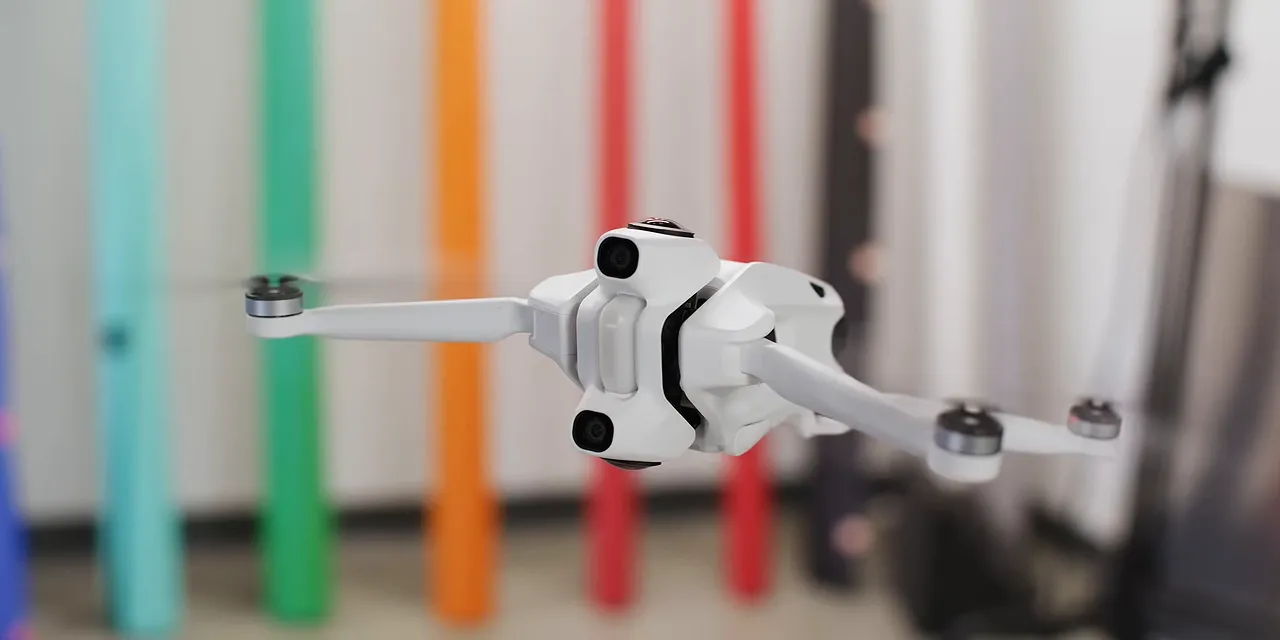
That’s the same basic appeal that has made 360 cameras so versatile for years. Get the camera into position, record the experience, and choose your framing afterward. You don’t have to aim it perfectly while everything is happening.
Once those cameras got good, people started finding increasingly creative ways to move them: swinging them on strings, throwing them, and putting them on huge selfie sticks. The A1 takes that idea to its next logical place. Now the camera can fly.
So instead of simultaneously thinking about flight, camera direction, and composition, you can concentrate on putting the drone somewhere interesting. As long as your subject is nearby, you can work out the framing when you get home.
You’re separating the flight path from the camera move. That’s the big deal here.
The Drone Disappears From the Footage
The A1 uses the same sensors and lenses as the Insta360 X5. And much like a 360 camera can hide its selfie stick, stitching combines the A1’s two views so that the drone body and propellers disappear from the finished footage.
The result is a floating-camera perspective without a drone sitting in the middle of the image. There is a stitching caveat, which I’ll get to, but the overall effect is impressive.
It records the full 360-degree image at 8K and 30 frames per second. The important distinction is that 8K covers the entire sphere. A conventional shot reframed from part of that sphere isn’t itself an 8K image. Still, there’s a useful amount of flexibility to choose where you want to point the final shot.
More Creative Options, Less Pressure to Nail the Shot
For a video creator, being able to choose a camera angle after landing is already a pretty big change. The A1 also has features that help with both flight and framing.
- Sky Genie: Select a subject in the goggles, and the drone can automatically orbit it.
- Deep Track: Track and frame a subject in the captured footage without manually building the move with keyframes.
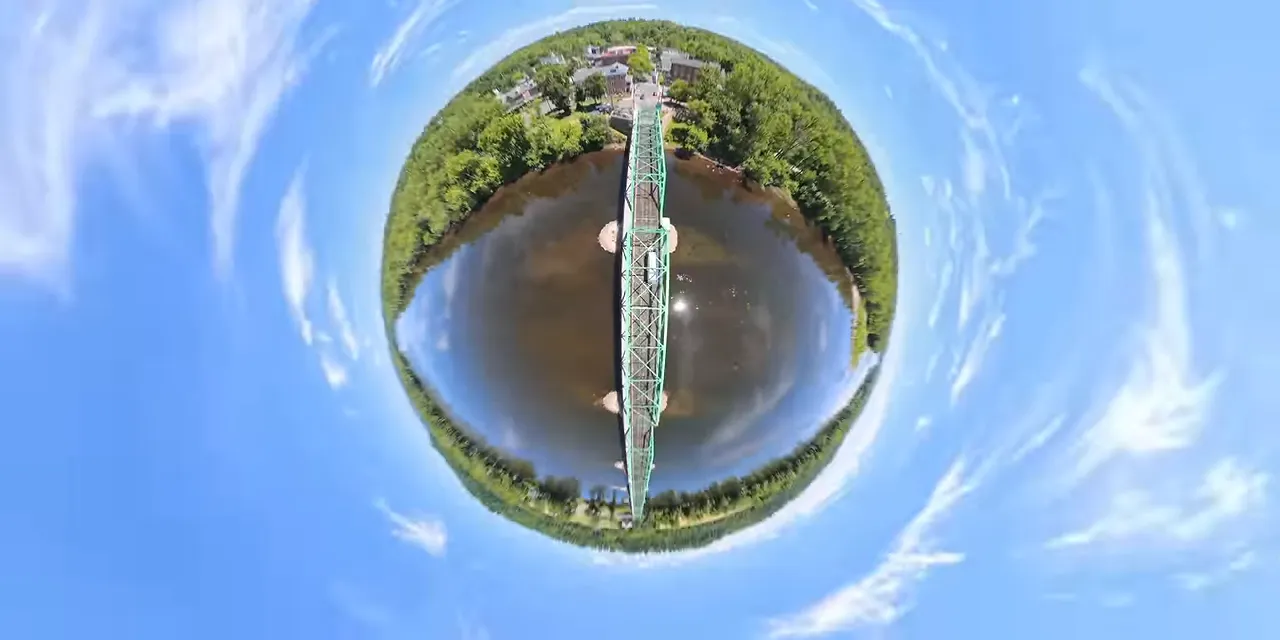
- 360 reframing effects: Turn the same recording into unusual perspectives, including floating-orb or tiny-planet-style shots.
Deep Track is my favorite, because drones and car shoots go very well together. You can fly in a straight line and try to match the car’s speed as closely as possible. Then Deep Track can pick up the car and handle the framing, instead of you manually keyframing the subject throughout the shot.
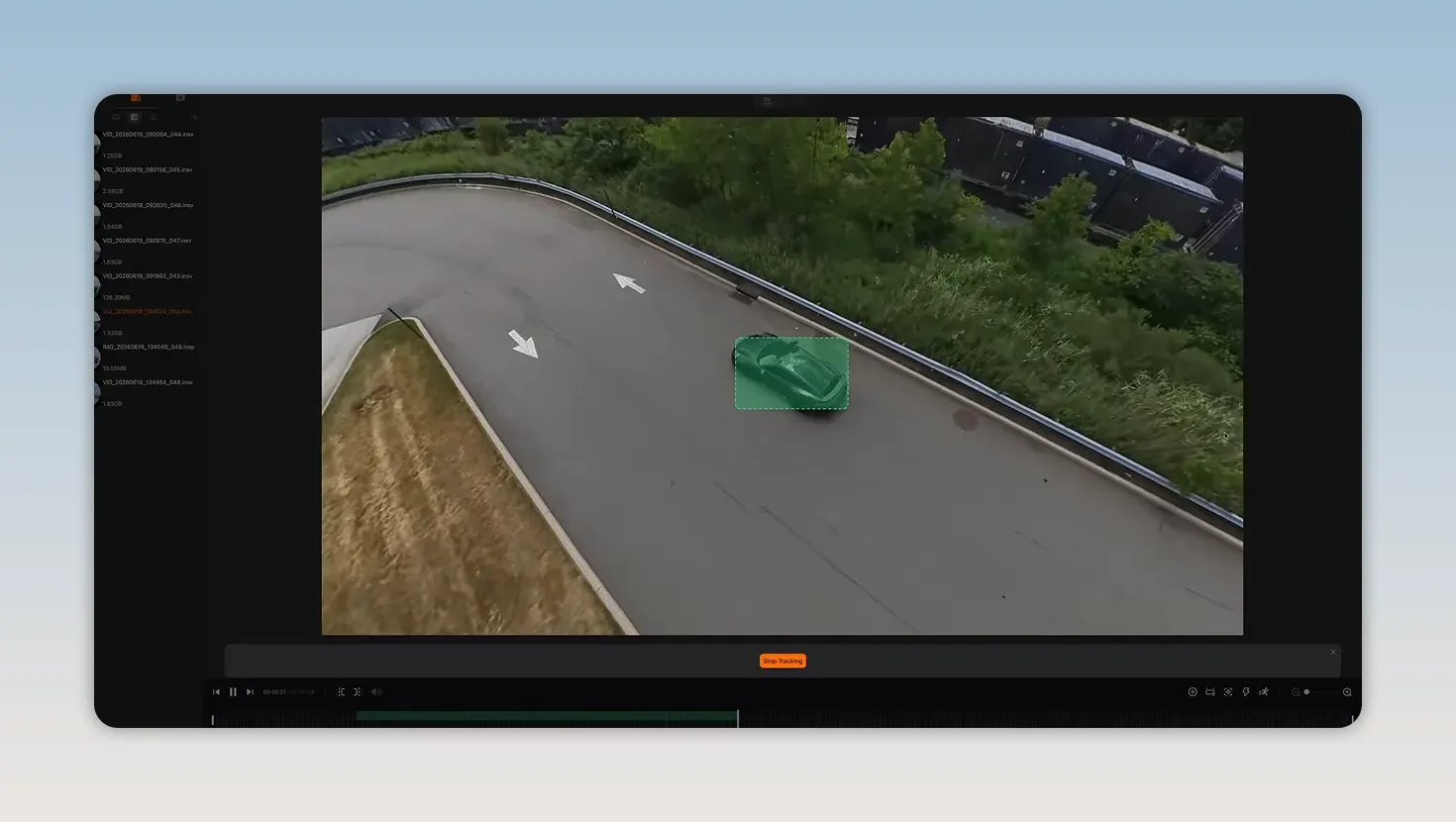
That doesn’t mean positioning no longer matters. You still need an interesting flight path and a useful relationship to your subject. But you don’t have to get every part of the finished camera move perfect in the air.
The more exaggerated 360 effects are fun, too. Am I going to use floating-orb shots constantly? Probably not. But being able to pull a completely different perspective out of the same recording is a cool option, especially for social media.
The Hardware Basics Still Matter
The A1 weighs 249 grams, which is a very familiar number if you’ve spent any time around small drones. That puts it below a common regulatory weight threshold, but it isn’t a universal permission slip. Requirements still depend on where and how you fly. In the United States, the FAA’s getting-started guidance is a useful place to check the rules for your operation.
There’s also a fairly substantial set of flight-assistance features:
- Obstacle avoidance and navigation assistance.
- Automatic landing gear.
- Payload detection.
- Automatic return to home.
I used return to home quite a few times. It turns out that when flying is this immersive, it’s easy to get a little overconfident about how far away you’ve gone.
The lenses are replaceable, which is nice to see on a device with exposed camera optics. If you damage one, replacing a lens is a more straightforward proposition than replacing an entire camera gimbal. Antigravity also offers its Care coverage for incidents such as flyaways and water damage, subject to the plan’s terms.
Battery Life Feels Different When Framing Can Wait
Battery life has usually been my weak spot with drones. You get airborne, start trying to line up the perfect shot, and suddenly you’re landing. Maybe the next battery will be the one.
The A1’s standard battery is rated for 24 minutes, which feels about par for the course. There’s also an extended battery rated for 39 minutes.
But the more interesting part is how the camera changes the pressure you feel during that time. Since you’re not trying to perfect the exact framing before landing, there’s less of that feeling that the battery is counting down on an unfinished shot. Battery anxiety doesn’t disappear, but it definitely feels reduced.
There’s also 20GB of internal storage, alongside an easily accessible SD card slot. Forget your card, and you can still record. I remain firmly in the camp that every camera should have some internal storage.
The Goggles Are What Make It Fun
All of those creator features are useful. But the original reason I got interested in the A1 was the flying experience itself.
A normal FPV drone generally gives you a forward-facing view as you fly. With the A1’s OmniLink transmission and goggles, you can keep flying in one direction while turning your head to look somewhere else.
Look sideways. Look down. Look around the landscape without turning the aircraft to match.
It feels a little like being a bird flying through a park, with the freedom to look around independently of where you’re going. Or a tiny jet. Either way, it’s incredibly immersive.
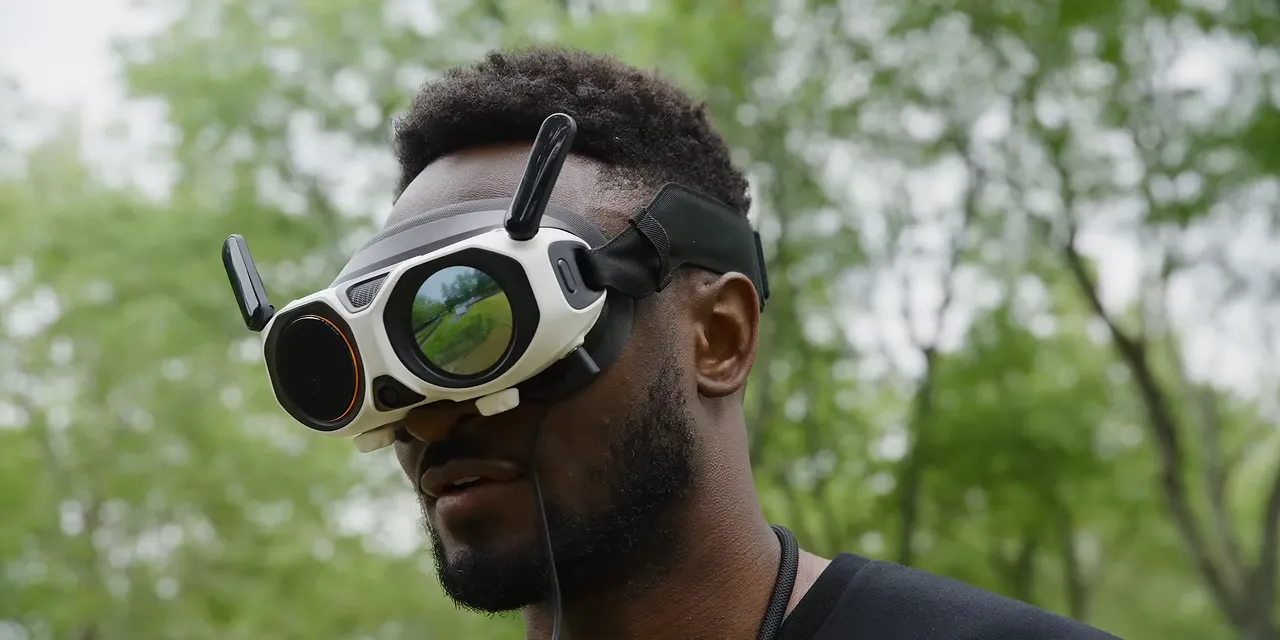
The goggles have a 90-degree field of view and 2560 by 2560 resolution per eye. Antigravity describes that field of view as the widest among flying FPV goggles. There’s one-tap defogging and a passthrough feature, too, so you can check your surroundings if someone comes up to you.
One particularly neat detail is the customizable exterior display. Someone standing nearby can get a sense of what you’re seeing, rather than being completely disconnected from the experience. It can also show status information during firmware updates.
Why the Joystick Actually Makes Sense
I was initially skeptical of the controller. There’s a reason the familiar two-stick layout is so common: the muscle memory is already there. I know how to use those controls to get a smooth sliding parallax shot.
But with the A1, you don’t need to execute that finished camera move while flying. You’re positioning a camera in space, and the joystick starts making a lot more sense in that context.
It feels closer to flying a plane toward the place you want to go, while your head remains free to look around.
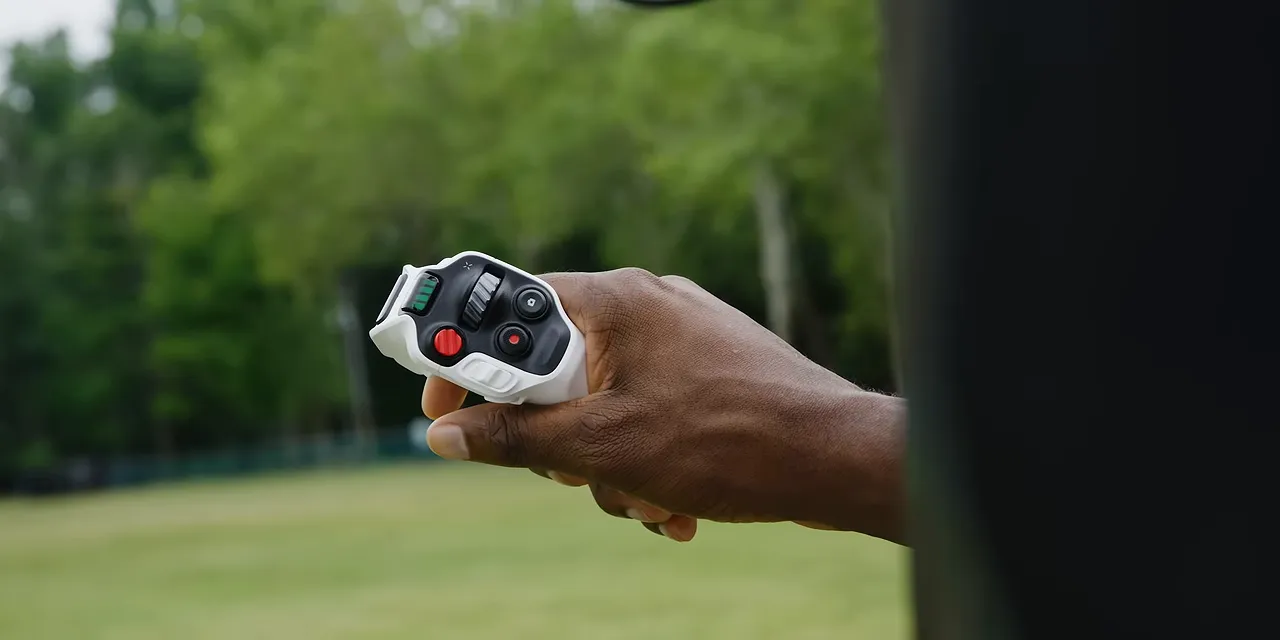
An icon in the goggles shows where the front of the drone is pointing. Press the trigger, and you fly in that direction. If you turn your head away from the flight path, a little picture-in-picture window appears so you can still see what’s ahead of the aircraft.
That last detail is important. Looking around shouldn’t mean losing all awareness of where the drone is going.
In practice, I found the controls surprisingly intuitive. I handed the A1 to Andrew at the studio for a day. His first shot, around 10 in the morning, was a fairly conventional flight in normal mode. By early afternoon, he was getting much more dynamic footage using sport mode and FPV controls, including wrist turns for tighter changes of direction.
That’s not a guarantee that everyone will master it in a few hours, but it shows how approachable it can be. I felt confident experimenting within about an hour, including on my first attempt at FPV mode.
SkyPath Makes the Experience Easier to Share
There’s another feature for someone who wants the experience without first learning the controls: SkyPath.
I can fly an interesting route and record the path. Then I can hand someone else the goggles, and the drone can fly that same route again in real time. They get to look around freely in 360 degrees without having to pilot it themselves.
That’s different from replaying a recording. The drone is actually out there flying the route again, and the person wearing the goggles is experiencing the live view.
One practical tip: have someone sit down the first time they try it. Looking down and suddenly getting the sensation of floating high above the ground can be pretty disorienting. Sitting is the sensible starting point.
The Things I’d Like to See Improved
I’ve had a really good time with the A1, but it isn’t perfect. A few things stood out.
The Stitching Can Leave a Small Mark
Hiding an entire drone and its propellers is impressive. But to a trained eye, there can be a very slight smudge along the horizon where the two lens images are stitched together.
Most of the time, I don’t really notice it. If you’re recording subjects right along that line, though, it can end up in the shot. It’s worth keeping in mind when deciding how clean you need the final image to be.
The Goggles Attract Attention
If you’re flying in a public place with a big pair of goggles and an illuminated exterior screen, be prepared to explain what you’re doing. They look unusual. People are going to be curious.
Antigravity told me it was also working on goggle-free flight options involving a ring remote and gesture controls. I haven’t tried those, so I can’t say how they work. But I appreciate the effort to find more ways to interact with this hardware.
A Top Strap Would Help With Comfort
The goggles are carrying displays and other hardware in front of your face. I’d like an additional strap over the top of the head to distribute that weight more evenly.
The existing fit works, but a top strap could make longer sessions more comfortable, especially if you want to keep flying through multiple batteries.
A Drone I’d Fly Without Needing a Shot
The most interesting thing about the Antigravity A1 isn’t one number on a spec sheet. It’s the combination of a flying 360 camera, independent head tracking, and controls that make sense once you stop thinking of the camera as something you have to aim constantly.
For creating footage, it gives you the freedom to choose your framing later. For flying, it gives you a reason to go outside even when you don’t have a particular shot planned.
That second part is what surprised me most. This is one of the more interesting hardware products I’ve used in a while, because it’s both a useful creative tool and something that’s genuinely fun on its own.
At the time of this sponsored feature, Antigravity promoted a limited-time Prime Day offer of up to 25% off the A1, representing savings of about $480, and up to 20% off accessories. It also offered a free flight battery and double-lens replacement kit to the first 25 qualifying purchases through my link. Those promotions are time-sensitive, so check the current offer and availability before buying.
|


