First generation devices are always the most fun to review. They answer one question and immediately create about twenty more. With the iPhone Duo, the big ones are pretty obvious: Should you buy a folding iPhone? What do you actually gain? And who is this $2,000 phone really for?
After about a week and a half of using it, my answer starts with a slightly strange observation. Most new products have a solid idea at their core and some rough edges that improve over time. The Duo almost flips that around.
It is incredibly polished around the edges, but a little rough in the middle. The animations, the hinge, and the inner display are excellent. The weight, app compatibility, and a few everyday interactions remind you very clearly that this is generation one.
A First Foldable, Even If It Is Not the First Foldable
Apple has this habit of introducing a product category as though the competition does not exist. Folding phones have been around since 2019. Samsung has spent years iterating on them. This is not some completely unexplored idea.
But for a lot of iPhone owners, the Duo is the first foldable they have seriously considered buying. That matters. Apple has to explain not just what this phone does, but why someone should change their habits and spend $2,000 on it.
The opening animation is a perfect example of that thinking. As you unfold the phone, the image appears to diffuse and reveal more display underneath. The effect responds directly to the hinge angle, so moving backward or forward changes it immediately.
It reminds me of lifting a lenticular sheet off an image. I cannot say that was definitely the inspiration, but the visual similarity is striking. More importantly, it teaches you what is happening: You are opening the phone to reveal an extended workspace.
That is the kind of polish Apple gets right here. It is not just smooth for the sake of being smooth. It makes an unfamiliar device easier to understand.
The Hardware: Beautiful, Solid, and Definitely Heavy
The Duo is a very pretty phone. The back glass curves smoothly into the raised camera plateau, where the two rear cameras sit. The titanium rails are shiny, premium feeling, and extremely good at collecting fingerprints.
The hinge is the more interesting part. Its resistance changes throughout the opening motion:
- At first, separating the magnets takes a deliberate pull.
- The phone then opens smoothly toward the middle.
- Resistance increases again so it can hold partially open positions.
- The final stretch snaps into the fully open position.
Closing it reverses that process, ending with a very satisfying magnetic clap. There is real mechanical thought here, and you feel it every time you use the phone.
It also has an IP68 dust and water resistance rating, which is impressive for a foldable. I have been treating it mostly like a regular phone: splashes, a bag, normal daily use. The beach is still a no for me. Sand and folding hardware are not a combination I am eager to test.
Premium materials do not automatically mean better ergonomics
Put the Duo beside a Samsung Z Fold 8 and the first generation part becomes obvious. Samsung’s phone is significantly thinner and more than 20% lighter. Its flatter sides also make it easier to pry open than the Duo’s slick, rounded titanium rails.
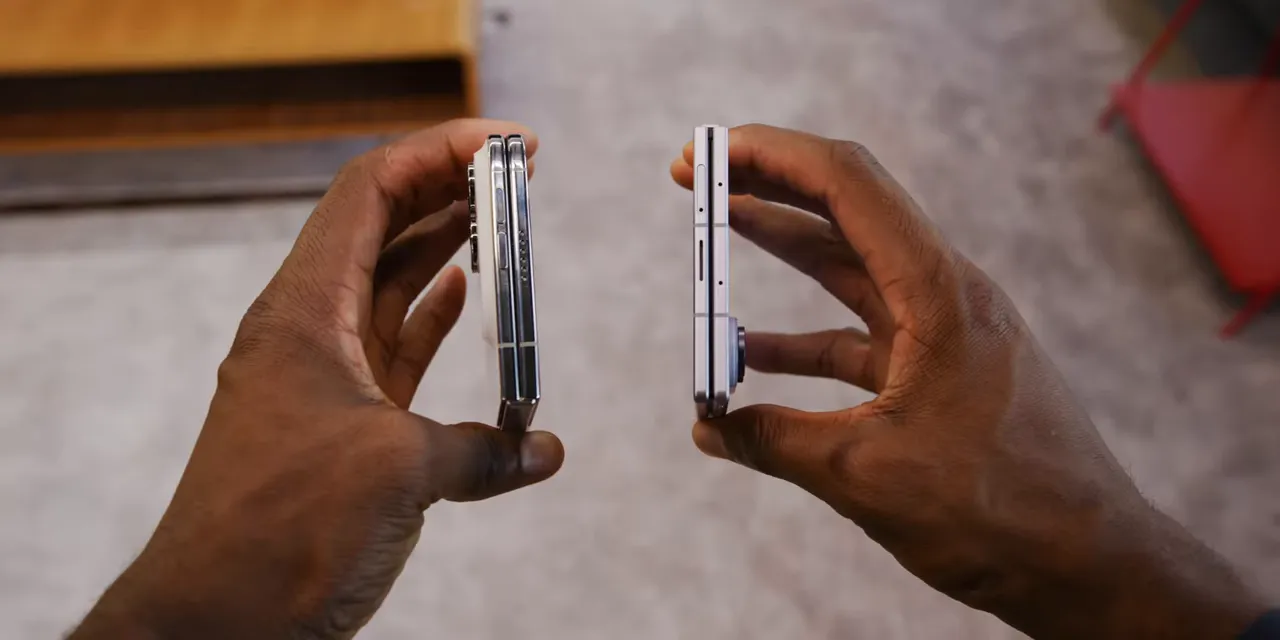
The Duo feels substantial, which initially seems appropriate for something this expensive. But after a week or two, I would absolutely take a version that weighed 20% less.
This is a recurring Apple design trade-off. Metal and glass can feel fantastic in your hand, but that does not mean additional weight improves the experience. A substantial MacBook Pro or desktop tower makes sense. A heavy Vision Pro on your face or metal AirPods Max on your head is a different story.
You are not wearing the Duo on your face, obviously. Still, the same principle applies: how premium something feels when you pick it up is not the same as how comfortable it is to use for hours. This reminds me of the original Pixel Fold. The idea is right. The hardware is just thicker and heavier than I hoped.
A very right-handed phone
The power button doubles as a fingerprint reader, and it falls naturally under your right thumb. Camera Control sits near the bottom-right corner, slightly out of the way until you rotate the phone to take a photo.
That leaves the volume buttons at the top. They are usable, but not particularly convenient in the closed orientation. Rotate the open phone vertically, more like an iPad mini, and their placement starts making more sense.
The software gestures add another reach. On iOS 27.1, which ships on the Duo, Control Center comes down from the top-right corner. Pulling down from the middle brings up Siri. Notifications require the top-left corner. Even with big hands, that last one involves some extra hand gymnastics.
The case situation has its own compromises
Apple’s $130 Folio case attaches magnetically to the back and slides outward to cover the front. It is a clever one-piece design with a useful kickstand, but the rails remain exposed.
The two-piece silicone case covers the front and back more conventionally, but leaves the hinge exposed instead.
Dbrand, a sponsor, offers a $60 Grip case with integrated hinge protection. Unlike folding cases that use separate mechanical pieces, this uses a single integrated protective section without moving parts. Of these options, it is the one I would lean toward if protection is the priority. The case and Prism screen protector are available through Dbrand’s Duo lineup, with availability also mentioned at Best Buy.
The Inner Display Is the Hardware Highlight
The inside screen does not feel like a first generation component at all. It is a 7.6-inch OLED with a 120Hz refresh rate and brightness that matches the outer display’s 3,000 nits.
But the specification I keep coming back to is the nano-texture finish. It hides an already subtle crease, cuts reflections extremely well, and feels really nice under your finger.
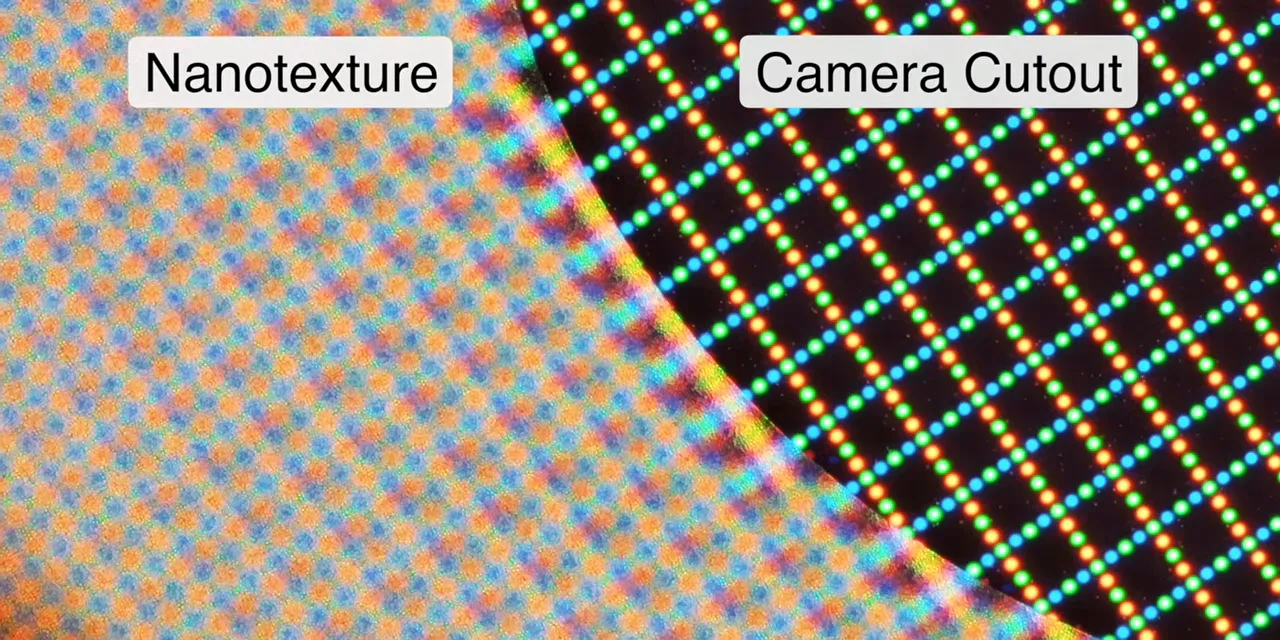
I put it under a microscope to get a closer look at the tiny surface structure. You can also see the area where the texture gives way around the under-display camera.
There is a trade-off. Diffusing light slightly softens text and video compared with a perfectly clear surface. I noticed it, but never found it bothersome. For reading, browsing, and video, the reduction in reflections is worth a lot.
I have found myself holding the Duo vertically and reading on it more often than I do with other foldables. That little pocket-tablet idea really works here.
The hidden selfie camera is much less impressive
The under-display camera is bad at taking photos. There is no especially delicate way to put that. FaceTime video looks a little better, but straight still images are poor.
Apple has clearly prioritized a large, mostly uninterrupted screen over the quality of a camera it expects people to use infrequently. I understand the decision. I also would not use that camera when another option is available.
Battery Life and Performance Are Pleasant Surprises
The Duo has roughly 4,900mAh of combined battery capacity, split between its two halves. In practice, battery life has been really good.
With something like 75% closed-screen use and 25% inner-screen use, this is comfortably an all-day phone. Even with plenty of high-brightness use, I have regularly finished the day with more than 30% remaining.
The 2nm A20 Pro chip deserves some credit. Performance feels right in line with the iPhone 17 Pro I came from, while efficiency is excellent. Spending more time on the larger display does use more battery, naturally, but the difference has not been as dramatic as you might expect.
There are still foldable compromises compared with conventional flagship phones, including battery and speaker trade-offs. But battery life has not been a practical problem in my testing.
The Cameras: Good Enough, Not Pro
The rear camera setup consists of a 48-megapixel main camera and an ultrawide. There is no dedicated telephoto.
I tried to establish exactly which main sensor Apple fitted into this thinner body. The available information points more toward the iPhone 17e camera than the iPhone Air, though I would not treat that identification as definitive.
Either way, the practical behavior is familiar. In good light, the Duo takes genuinely good photos. As conditions get darker, the smaller sensor needs higher ISO sooner, and noise becomes more visible than it does on the larger Pro cameras.
The ultrawide is useful to have, but do not expect spectacular sharpness from corner to corner. Zoom beyond about 4x is where the missing telephoto becomes especially obvious.
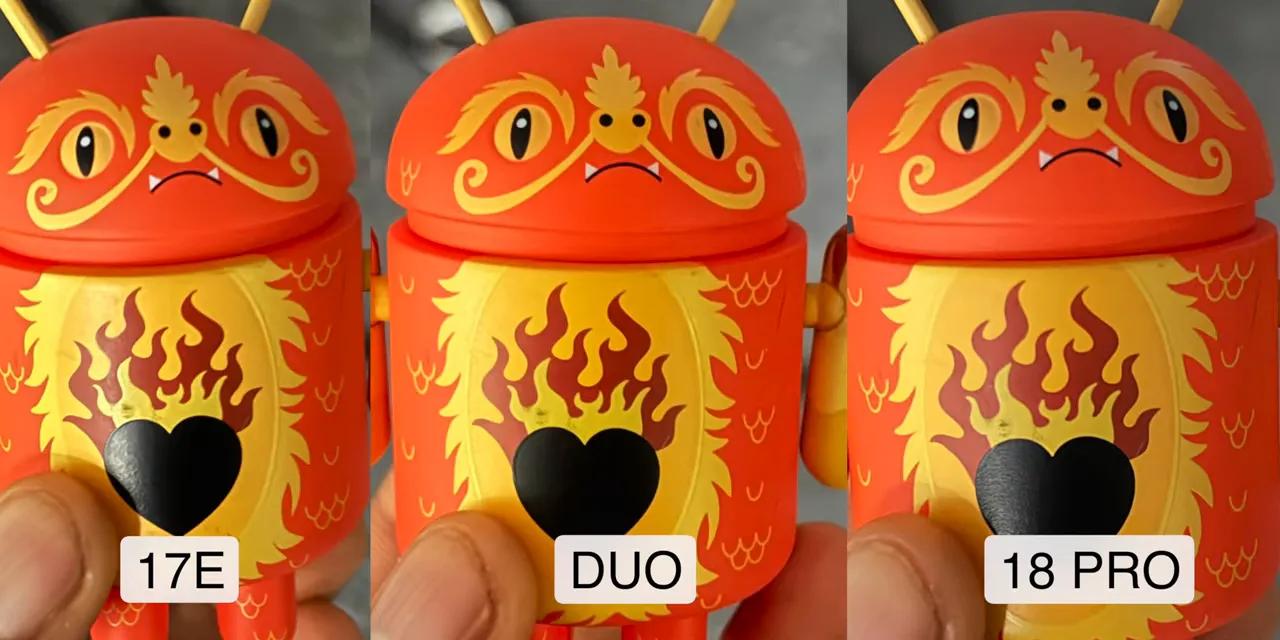
In weaker lighting, side-by-side comparisons put the Duo closer to the 17e than the 18 Pro for detail and noise. That is not the same thing as saying the camera is unusable. It is solid most of the time, and the results have been fairly predictable.
I shot my entire Tesla Roadster reaction piece on the Duo, and almost nobody commented on the camera quality. I could tell while editing that it was iPhone footage, but outdoor 4K at 30 frames per second was perfectly usable.
The important limitation is that a Pro chip does not bring Pro camera tools. There is no ProRes and no log recording here.
This is the productivity and entertainment iPhone with good-enough cameras, not the iPhone filmmaker’s dream device. That can feel strange when it is also the most expensive iPhone. But price is buying the folding form factor, not the best camera system.
The folding design adds some genuinely useful camera tricks
- Subject preview: Turn on the outer display so the person you are photographing can see the framing. I call this spouse mode. Ideally, everyone agrees on the picture before attempt number six.
- Kid Q: Colorful Snoopy animations on the outer screen encourage small children to look toward the camera.
- Main-camera selfies: Slide the camera control on the outer display to reveal the preview and shooting controls. The opposite display is disabled to prevent accidental touches.
That last feature is the answer to the weak inner selfie camera. Use the main rear camera when you want the best possible self-portrait.
The Biggest Launch Problem Is the Apps
Apple’s interface concept is clever. When the Duo is closed, most content sits on the left, while controls that would normally live at the top or bottom move into a strip on the right, closer to your thumb.
The home screen follows that rule. The app grid sits on the left, the dock moves to the right, and a compact indicator combines the time, battery, and cellular information. Apple’s own apps continue the same layout logic.
That is the blueprint. The problem is how many third-party apps do not follow it yet.
At launch, apps including Spotify, Google Maps, Waze, Discord, Twitter, and Google Calendar retain their conventional layouts. Their controls stay at the top and bottom, with unused black space down the right side.
Opening the phone often makes the problem more ridiculous. Some apps remain small iPhone-shaped windows in the middle of that huge display. Turning the phone vertically does not necessarily fix it. It brings back memories of early iPad apps that were basically phone apps with a magnification button.
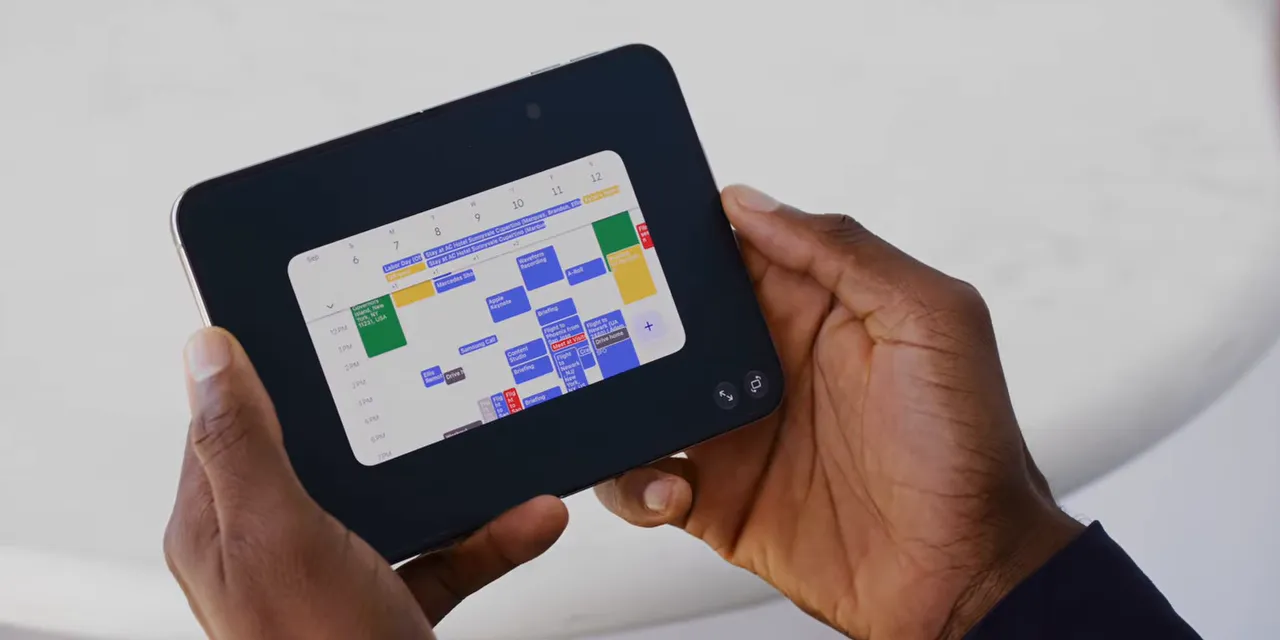
Other apps, including Spotify and Flighty, stretch across more of the screen without feeling truly designed for it. The result is a lot of switching between layouts that range from awkward to genuinely bad.
I expect this to improve as developers get devices and build Duo-specific interfaces. But that is an expectation, not something to buy on faith. These apps need proper Duo support, not simply an existing iPad version.
Some progress is already visible. Instagram received an update during my testing, and Carrot Weather has the right-side controls when closed plus a two-column layout when open. That is what this phone should feel like.
Not every app will get there. Arc Mobile is no longer being developed, which means I have to move on from it as my browser. Smaller apps, like the gym app I use every day, may never receive the necessary attention.
There are bugs, too
I have had a few freezes and odd behaviors, though nothing that required a catastrophic full-phone restart.
The opening and closing animation can become confused if you move very slowly, stop halfway, and start interacting with the display. The phone is juggling hinge angle, orientation, app placement, and whether it should enter StandBy. Under normal quick opening and closing, it is usually excellent. Deliberately interrupt that process and you can find the seams.
The Feature I Miss Most Is Face ID
The Duo does not have Face ID because there is not enough internal depth for the hardware. Instead, it uses a fingerprint reader in the power button, as many other foldables do.
The reader itself is fast. The behavior Apple built around it is what bothers me.
Touch the button with a registered finger and the phone pauses briefly on the lock screen. Keep holding, and it unlocks. The idea is to let you check notifications without immediately jumping past them.
Technically, that makes sense. On other fingerprint phones, I use an unregistered finger when I only want to see the lock screen, then the registered one when I want to unlock. Apple’s approach removes the need to learn that trick.
But it also adds a pause to every normal unlock, and I could not find a setting to disable it.
There is a workaround: Wake the phone, swipe up, then touch the fingerprint reader. It unlocks almost instantly. Which proves the sensor is quick, but also adds several steps to something that should be effortless.
I think Face ID will be the thing existing iPhone owners miss most. Not the zoom camera. Not even the thinner body. Face ID.
What the iPhone Duo Is Actually Great At
Two apps side by side
The obvious benefit of the large display is multitasking, and it becomes more useful once you remember it exists.
YouTube on one side and notes on the other is genuinely helpful. So is a video call beside whatever you need to reference. Copying a confirmation code from email directly into a login page is another small interaction that suddenly feels much easier.
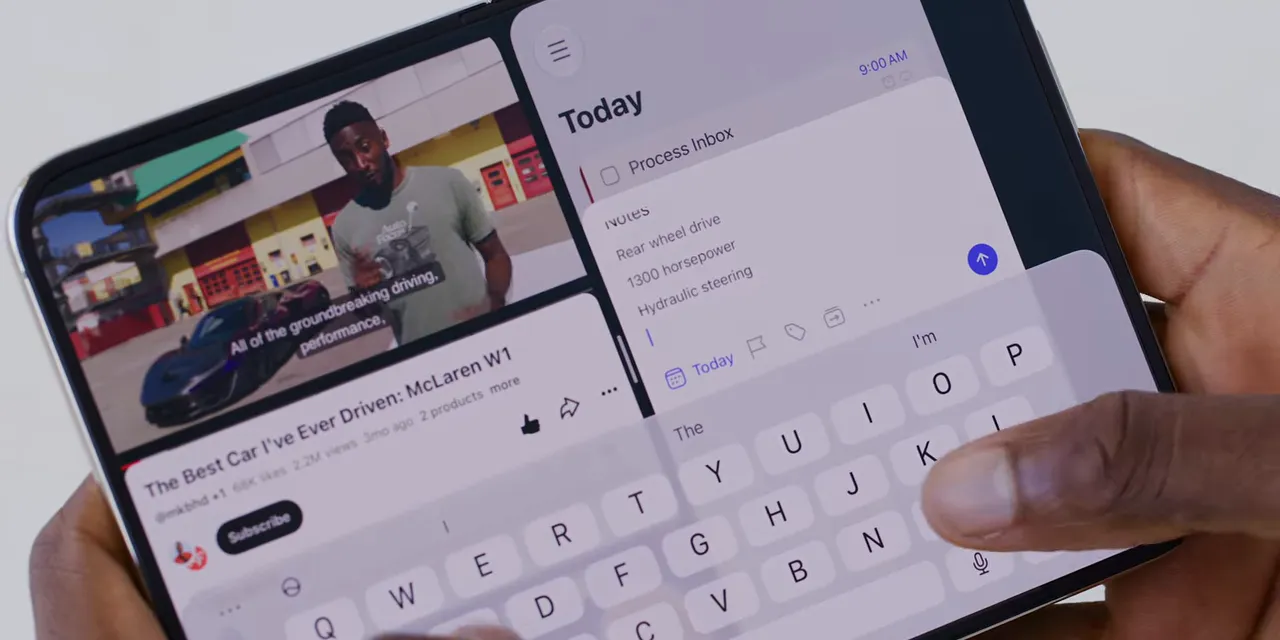
Tap the center divider to pair two apps. They visually join together like a book, and opening one brings back both. You can separate them through the same interaction.
Each half also behaves independently. Go home on one side while leaving the other alone, or swipe through recent apps in one pane without disturbing the other. It is intuitive.
There are limits: two apps, equal halves, side by side. No third window and no elaborate free-form arrangement. Still, that is substantially more flexibility than a regular iPhone.
And yes, I tried Instagram Reels and TikTok simultaneously. Technically possible. Audio jumps between the two, sometimes awkwardly. Please do not make that your productivity workflow.
Partially open use and StandBy
The hinge holds intermediate positions exceptionally well, and the software takes advantage of that.
Partially fold the phone while typing and the keyboard splits to keep your thumbs away from the middle. Supported apps can place content on one half and controls or typing space on the other.
Set it down in a tent shape and it automatically enters StandBy without needing to be plugged in. In portrait orientation, it can show two customizable panels. In landscape, it becomes one larger clock, weather display, calendar, or another selected screen.
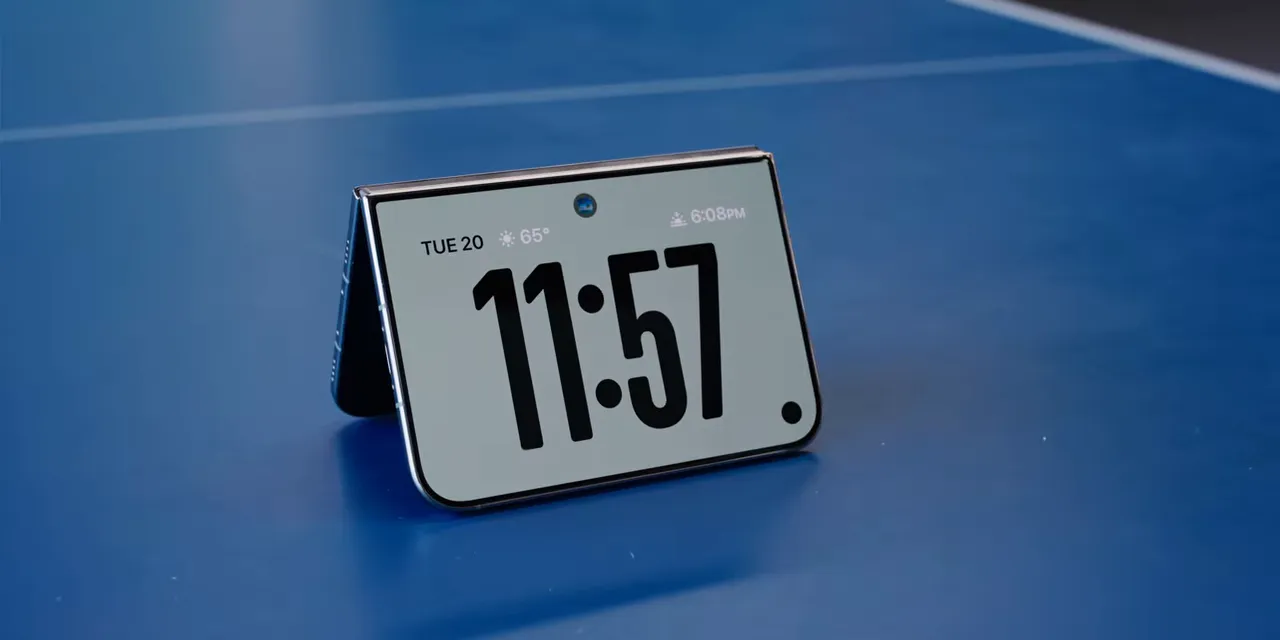
There is enough battery to leave it on a desk displaying information without making that a major concern. The underglow alarm-clock effect is also a nice touch.
Continuity that preserves what you are doing
For all the bugs I could provoke, normal continuity between the outer and inner screens is excellent.
You can be halfway through an email, with an attachment and a bunch of text, decide you need more room, and open the phone. Everything is right where you left it.
You can even unfold it mid-scroll while reading, and the motion continues onto the larger display. It is fast enough and consistent enough that opening the phone feels like expanding your current task rather than switching devices.
The little details add up
The side-mounted Dynamic Island has its own adapted animation. Close the inner camera app and the pixels shrink back over the hidden camera. The compact status indicator becomes easy to read once you learn it, including the cellular signal dots along the bottom.
Even the camera viewfinder has been considered. The sensor’s aspect ratio matches the outer display and the inner display rotated 90 degrees, so the image fills either screen without black bars.
These are small things individually. Together, they make the Duo feel understandable and fun rather than like a collection of folding-phone experiments.
Optional Accessories
Beyond a protective case, two accessories from sponsor Ridge are worth noting. Its five-in-one 10,000mAh power bank combines MagSafe, built-in cables, an Apple Watch charging pad, and hub functionality when plugged in. It can work with an existing phone as well as the Duo.
The tracker card is credit-card sized, supports Apple Find My and Google Find Hub, and offers up to ten months of battery life per charge with wireless recharging. Details are available through Ridge.
Should You Buy the iPhone Duo?
The simplest pitch is this: Have you ever wanted something like a 120Hz OLED iPad mini that fits in your pocket? The Duo gets surprisingly close to that idea.
But being the newest iPhone does not automatically make it the right iPhone.
- If your phone use is mostly texting, social media, and occasional browsing: Probably not. You are paying a lot for capabilities you may barely use.
- If you want the best iPhone cameras and professional video tools: No. A Pro model is the better fit.
- If you frequently drop and break phones: I would not make this your next experiment.
- If you love reading, entertainment, and two-app workflows, and the price is comfortable: This starts making much more sense.
After the learning curve, and after adjusting to life without Face ID, the Duo is a really fun phone. The wonderful inner screen, excellent hinge, and thoughtful animations go a long way.
They do not erase the weight, fix every app, or turn these cameras into Pro cameras. Apple has not engineered its way around every compromise of a foldable.
What it has done is deliver an admirable first attempt with flashes of greatness. The next generation needs to focus on the core experience: less bulk, better everyday interactions, and an app ecosystem that actually uses the display.
For most people, I would not call this the obvious upgrade. For the person who has been waiting for a pocketable little Apple tablet that also happens to be an iPhone, though? They made it. It is polished, it is rough, and it is a lot of fun.
Made with VideoToBlog using iPhone Duo Review: First Generation Fun!


